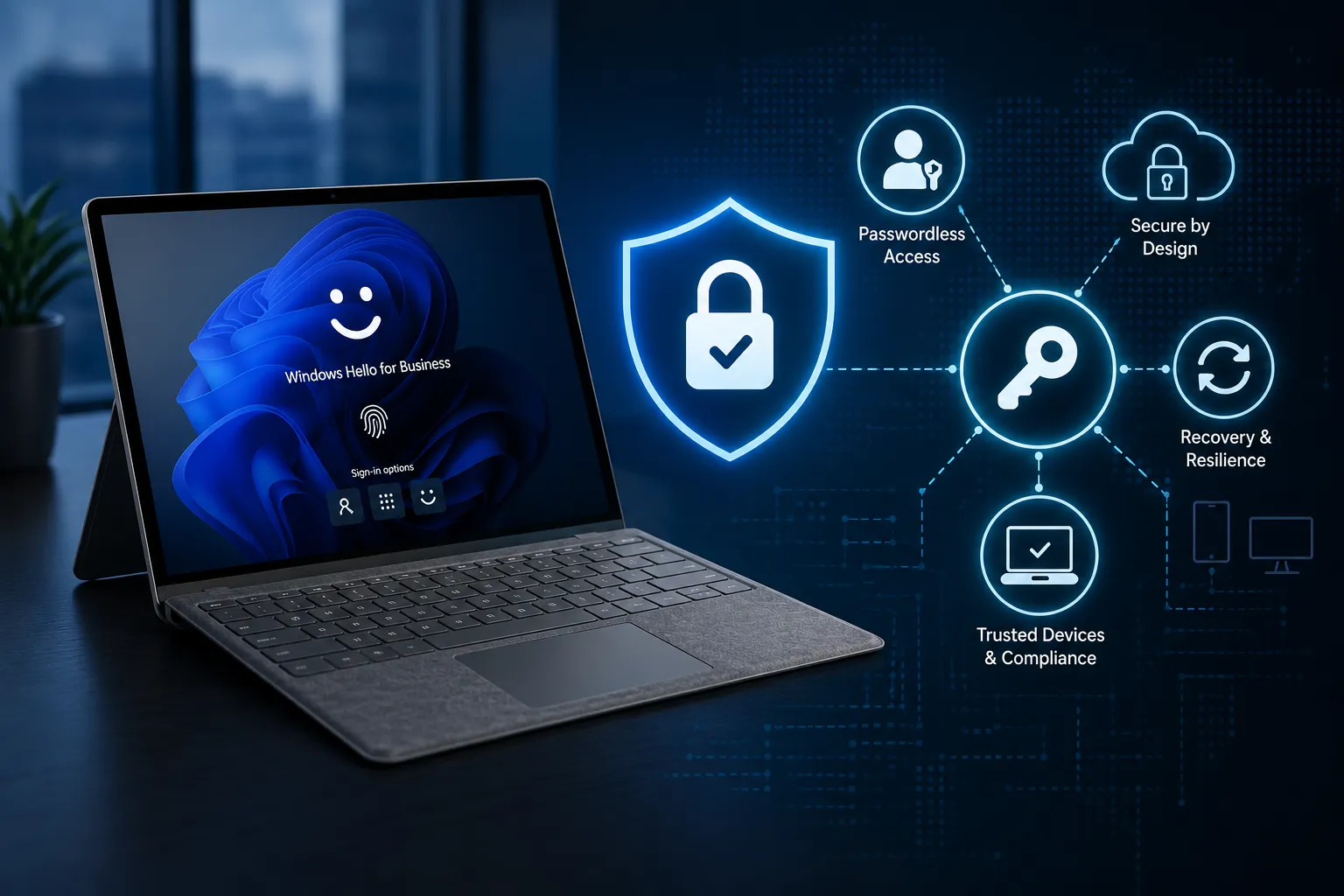
Why many organisations have already deployed phishing-resistant authentication without realising it
Introduction
When organisations start exploring phishing-resistant authentication, the conversation almost always jumps straight to passkeys.
FIDO2 security keys. Microsoft Authenticator. Synced passkeys. Authentication strength.
All important. All valid.
But often, completely the wrong starting point.
In recent customer engagements, I have seen the same pattern repeatedly. Organisations focus on deploying new authentication technologies before fully understanding the capabilities they already have in place. The result is a push towards passkeys, hardware security keys, and passwordless experiences, whilst overlooking one of the most important phishing-resistant authenticators already deployed across the workforce.
The challenge is rarely the absence of technology. It is the underutilisation of what is already there.
In many environments, the conversation moves quickly towards introducing new authentication methods without first assessing how existing capabilities can be leveraged to deliver phishing-resistant authentication. This often leads to unnecessary complexity, increased operational overhead, and missed opportunities to build on trusted, familiar experiences.
Before introducing something new, organisations should first understand what they have already deployed, and more importantly, how those capabilities can be combined to form the foundation of a modern authentication strategy.
The Misconception
When discussing phishing-resistant authentication, most organisations immediately focus on passkeys, FIDO2 security keys, and passwordless authentication technologies.
At the same time, Windows Hello for Business is often viewed as nothing more than a Windows sign-in experience.
Users authenticate with:
- A PIN
- Facial recognition
- Fingerprint authentication
and gain access to their device without needing to enter a password.
Whilst this perception is understandable, it limits Windows Hello for Business to a user experience improvement rather than recognising it as part of the organisation’s authentication strategy.
Rather than simply acting as a replacement for a password at Windows logon, Windows Hello for Business can provide the authentication foundation upon which broader phishing-resistant and passwordless authentication experiences are built.
The diagram below illustrates the difference between how Windows Hello for Business is commonly perceived and how it can be positioned within a modern authentication strategy.
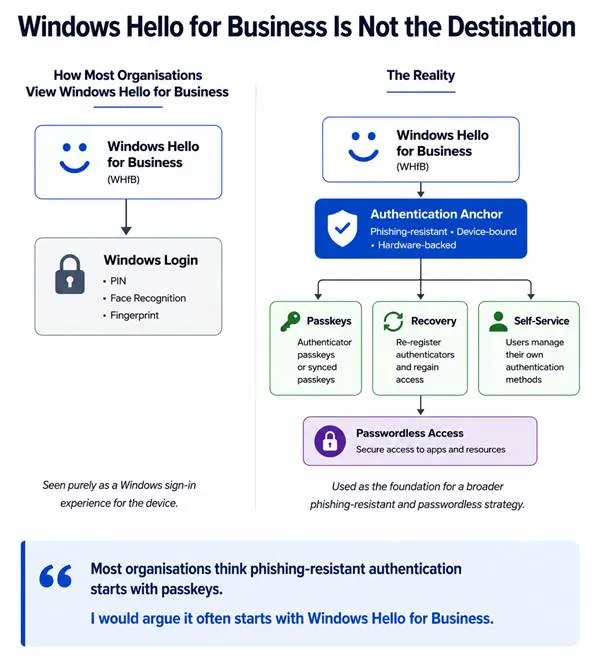
Windows Hello for Business (WHfB).
For many organisations, Windows Hello for Business is still viewed primarily as a Windows sign-in experience. Users authenticate using a PIN, facial recognition, or fingerprint and gain access to their device without needing to enter a password.
Whilst this perception is understandable, it does not reflect how WHfB operates from an identity and security perspective.
Windows Hello for Business is a phishing-resistant authenticator built on public key cryptography, device trust, and hardware-backed credential protection. Rather than transmitting shared secrets, authentication is performed using key pairs that are bound to both the user and the device.
This provides a significantly higher level of assurance than traditional password-based authentication, reducing exposure to common attack vectors such as phishing, replay, and credential theft.
When viewed through an identity and access management lens, WHfB is not simply a Windows feature. It is a strong authenticator that exists within the organisation’s broader authentication control plane, alongside other phishing-resistant methods.
The Hidden Opportunity
This is where many organisations misjudge their starting position.
Phishing-resistant authentication programmes are often approached as though significant new investment is required. The conversation quickly shifts towards passkeys, hardware security keys, and new authentication methods, with the assumption that the organisation is starting from a position of capability gap.
In reality, that is rarely the case.
Most organisations have already deployed a large proportion of the capabilities required to support phishing-resistant authentication. These commonly include:
- Microsoft Authenticator
- Conditional Access
- Device compliance and device trust controls
- Windows Hello for Business
- Identity governance capabilities
The challenge is not the absence of technology. It is the lack of alignment between the capabilities that already exist.
In many environments, these controls are deployed in isolation, each solving a specific problem, but not combined to deliver a cohesive authentication strategy. As a result, organisations invest in new authentication methods before fully understanding how their existing estate can be leveraged.
Key Takeaway
The challenge is not necessarily deploying new technology. The challenge is recognising and operationalising the capabilities that already exist.
For many organisations, the journey towards phishing-resistant authentication does not begin with introducing something new. It begins with assessing, aligning, and fully utilising the capabilities that are already in place.
The Real Value of Windows Hello for Business
Once Windows Hello for Business is established as a phishing-resistant authenticator on a trusted device, its value extends far beyond Windows sign-in.
At this point, the organisation already has a strong, device-bound authentication method that users are familiar with and use regularly. This creates an opportunity to reuse that existing trust across a wider set of authentication scenarios.
Rather than introducing new user journeys or relying on additional authenticators, WHfB can be leveraged to support:
- Registration of new authentication methods
- Passkey enrolment
- Authenticator replacement
- Access recovery scenarios
- Self-service authentication workflows
This shifts the role of WHfB from a single-purpose sign-in method to a reusable authentication control that can support multiple stages of the user lifecycle.
In practical terms, this means organisations can begin to build phishing-resistant authentication experiences using capabilities that are already deployed, trusted, and understood by their users.
This approach reduces friction, limits the need for additional tooling, and provides a more consistent and supportable authentication experience.
Passkeys Are Easy. Supporting Them Is Not.
One of the most common mistakes I see is organisations focusing almost entirely on the deployment of passkeys.
The assumption is often surprisingly simple
Deploy passkeys and the problem is solved.
Unfortunately, reality is considerably more complicated.
From a technical perspective, enabling passkeys is often one of the easiest parts of the programme. The difficult part is everything that happens afterwards.
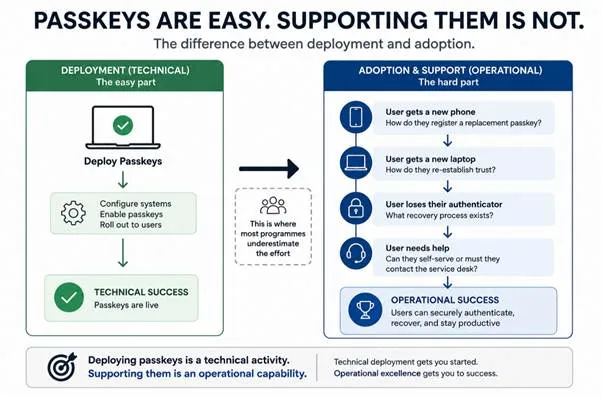
The technical enablement is rarely the challenge. The complexity begins the moment users start interacting with the system in the real world.
- What happens when a user gets a new phone?
- How do they register a replacement passkey?
- What happens when a user receives a new laptop?
- How do they re-establish trust and continue working?
- What happens when a user loses their authenticator?
- What recovery process exists?
- Can users resolve common issues themselves, or does every problem result in a service desk call?
These are not technology questions. They are operational questions.
In practice, these scenarios determine whether a phishing-resistant authentication programme succeeds or fails.
Organisations that focus solely on authentication methods often underestimate the importance of the operating model that supports them. The number of authenticators deployed is far less important than how effectively they can be managed, supported, and recovered.
The organisations that succeed are not those with the most authentication methods. They are the ones with the most mature authentication operating model.
Authentication Is a Lifecycle, Not a Login Event
Historically, authentication has often been viewed as a sign-in activity.
A user enters their credentials, completes MFA, and gains access to the resources they require.
Modern authentication architectures require a much broader perspective.
Authentication now encompasses the entire user lifecycle, including:
- Onboarding
- Registration
- Passkey enrolment
- Device replacement
- Authenticator replacement
- Recovery
- Self-service management
The authentication experience therefore extends far beyond the moment a user signs in.
Organisations that focus exclusively on authentication technology often underestimate the importance of authentication lifecycle management.
In my experience, lifecycle management becomes the true measure of authentication maturity.
Before introducing new authentication methods, organisations must define how those methods will be registered, replaced, recovered, and managed across the user lifecycle. These operational considerations often prove more important than the choice of authenticator itself.
Final Thoughts
Passkeys represent an important evolution in authentication, and there is little doubt that they will become increasingly common across enterprise environments over the coming years.
However, successful phishing-resistant authentication programmes are not defined by the number of passkeys deployed.
They are defined by how effectively authentication is governed, supported, and managed throughout the user lifecycle.
Windows Hello for Business remains one of the most underutilised capabilities within the Microsoft identity stack.
or many organisations, the journey towards phishing-resistant authentication does not start with deploying something new.
It starts with fully understanding, and fully utilising, what is already in place.
Windows Hello for Business is often viewed as the destination, in reality, it may be the foundation.
Passkeys are easy. Supporting them is not.
Comments
No comments yet — be the first to leave one below.
Published — it will appear for everyone in a couple of minutes once the site updates.