Windows LAPS: More Than Password Rotation
Local administrator passwords have been a problem for as long as we have had local administrator accounts.
Give every device the same password and compromise one machine, and you potentially have a credential that can be reused across the estate.
Give every device a different password and somebody has to create, store, rotate and recover them.
Disable local administration completely and eventually you will discover the device that really does need recovering when none of your normal management tooling is available.
LAPS has been Microsoft’s answer to a big part of that problem for years.
But I think it is worth looking at it again.
Not because LAPS is new.
It isn’t.
And not because everybody suddenly needs to rip out their existing implementation and start again.
They don’t.
It is worth revisiting because Windows LAPS today can be part of a much broader local administrator management design than simply rotating a password.
That is what this series is going to explore.
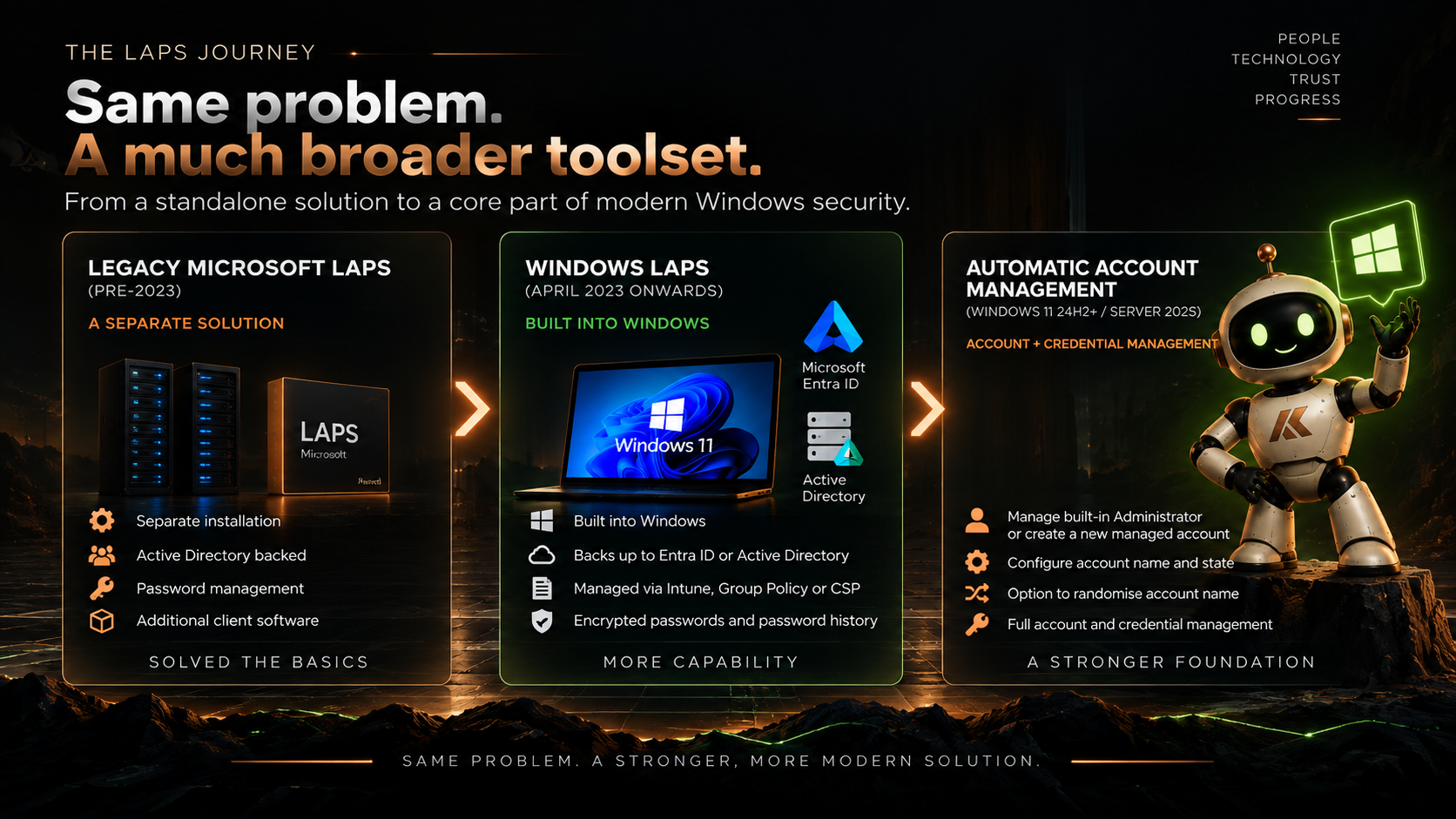
First, which LAPS are we talking about?
If you have been working with Windows for a while, the name “LAPS” can mean slightly different things depending on when you deployed it.
The original Microsoft Local Administrator Password Solution, which we now generally refer to as legacy Microsoft LAPS, was a separate product that organisations installed to manage local administrator passwords through Active Directory.
Then, in April 2023, Microsoft introduced Windows LAPS into Windows itself.
Same fundamental problem.
Very different implementation.
Windows LAPS is built into supported versions of Windows rather than requiring the old separately installed LAPS client. It can back credentials up to Windows Server Active Directory and, for supported device join scenarios, Microsoft Entra ID.
It also brought capabilities that legacy LAPS didn’t have, including things such as password encryption in Active Directory, password history and integration with Entra ID.
So when I refer to LAPS throughout this series, unless I specifically say otherwise, I mean Windows LAPS.
LAPS is not Intune
This distinction is important.
I regularly hear people refer to “Intune LAPS”, and I understand why. There is a Windows LAPS policy sitting right there in:
Intune → Endpoint security → Account protection
But Intune isn’t providing a different version of LAPS.
Windows LAPS is the technology running on the Windows device.
Intune is one of the ways we can configure it.
For example, we can manage Windows LAPS using:
- Microsoft Intune through the Windows LAPS CSP
- Group Policy
- Other mechanisms capable of configuring the Windows LAPS CSP
- Legacy Microsoft LAPS policy during certain migration scenarios
That distinction becomes particularly important in hybrid environments.
A Windows 11 device might be joined to Active Directory, hybrid joined to Entra ID, enrolled in Intune and still processing Group Policy.
So which management plane should own LAPS?
Intune or Group Policy?
The answer shouldn’t simply be “Intune because it is newer”.
We’ll come back to that later in the series.
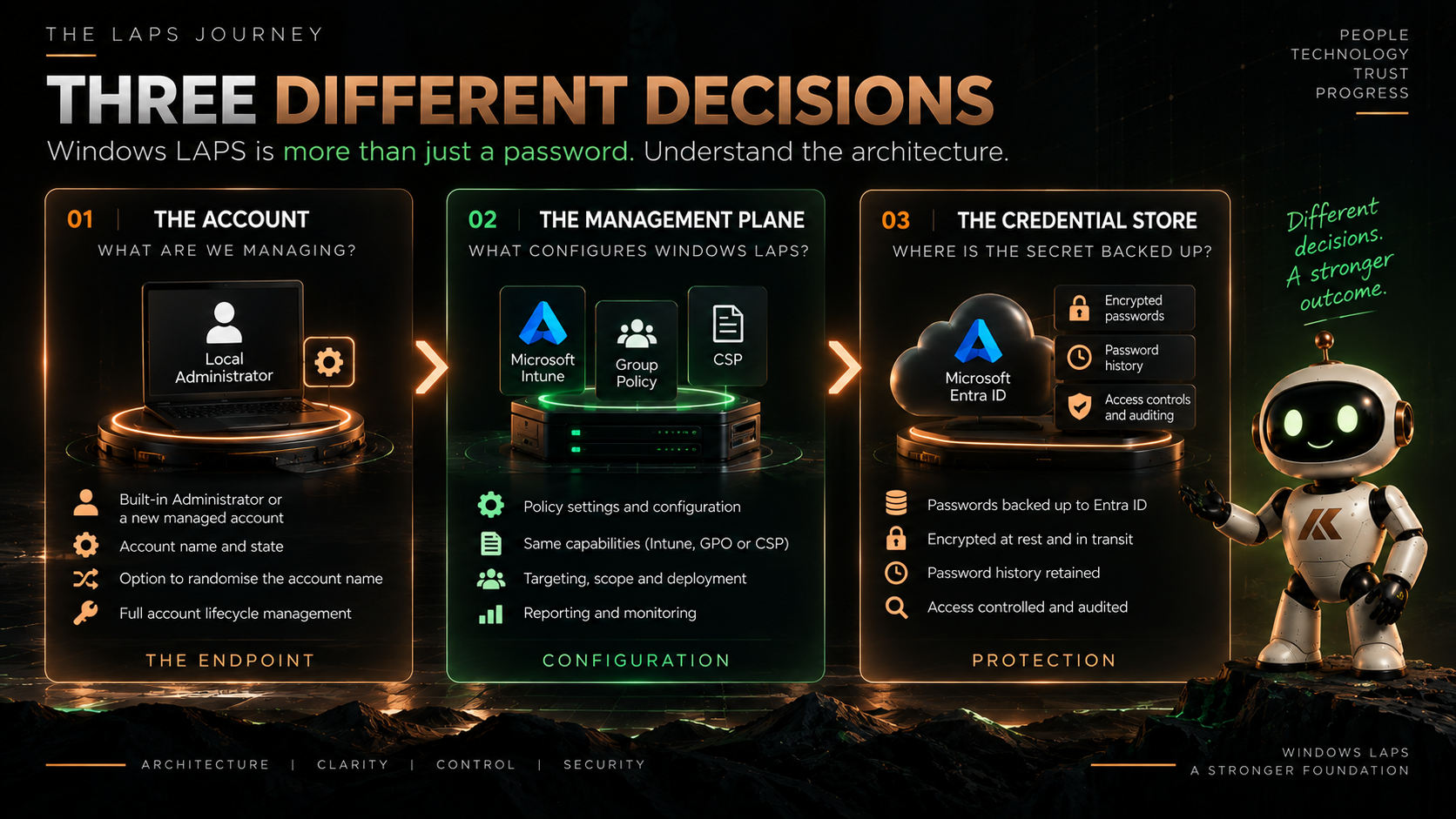
Where does the password go?
There is another decision that sometimes gets mixed up with how LAPS is configured:
Where should the credential be backed up?
Windows LAPS can use either:
Microsoft Entra ID
or
Windows Server Active Directory
depending on the join state of the device.
An Entra joined device can back its LAPS password up to Entra ID.
An Active Directory joined device can back it up to Active Directory.
A hybrid joined device gives us a choice between the two.
But it isn’t simply a case of backing the password up everywhere just in case.
Windows LAPS doesn’t back the same password up to both Entra ID and Active Directory simultaneously.
That means the location of the credential is another architectural decision.
Where is the device managed?
Who needs to retrieve the credential?
What administrative roles should have access?
What happens during a recovery scenario?
What dependencies are we comfortable having when everything else has gone wrong?
Those questions matter more than which radio button we select in a policy.
The bit that made me look at LAPS again
The capability that really prompted me to revisit this was Automatic Account Management.
Traditionally, the relationship between LAPS and the local administrator account was fairly straightforward.
You created and configured the account.
LAPS managed the password.
That is still supported, and Microsoft calls this manual account management mode.
But on Windows 11 24H2 and later, Windows LAPS can also use Automatic Account Management.
Now LAPS can take responsibility for more of the account itself.
It can:
- manage the built-in Administrator account
- create a new custom managed account
- configure the account name
- enable or disable the account
- randomise the account name
That changes the conversation.
Instead of asking:
How do we rotate the password of our local administrator account?
we can start asking:
What local administrator account should exist in the first place?
And I think that is a much more useful question.
Creating another administrator isn’t automatically an improvement
This is where I think LAPS architecture needs a little more thought.
Imagine we configure Windows LAPS to automatically create a new managed local administrator.
Great.
It gets a strong password.
The password rotates.
The credential is securely backed up.
We know how to recover it.
Job done?
Not necessarily.
What happened to the local administrator account that was already there?
What about an account created by an old build process?
Or a provisioning script?
Or an application?
Or something added manually three years ago that everybody has forgotten about?
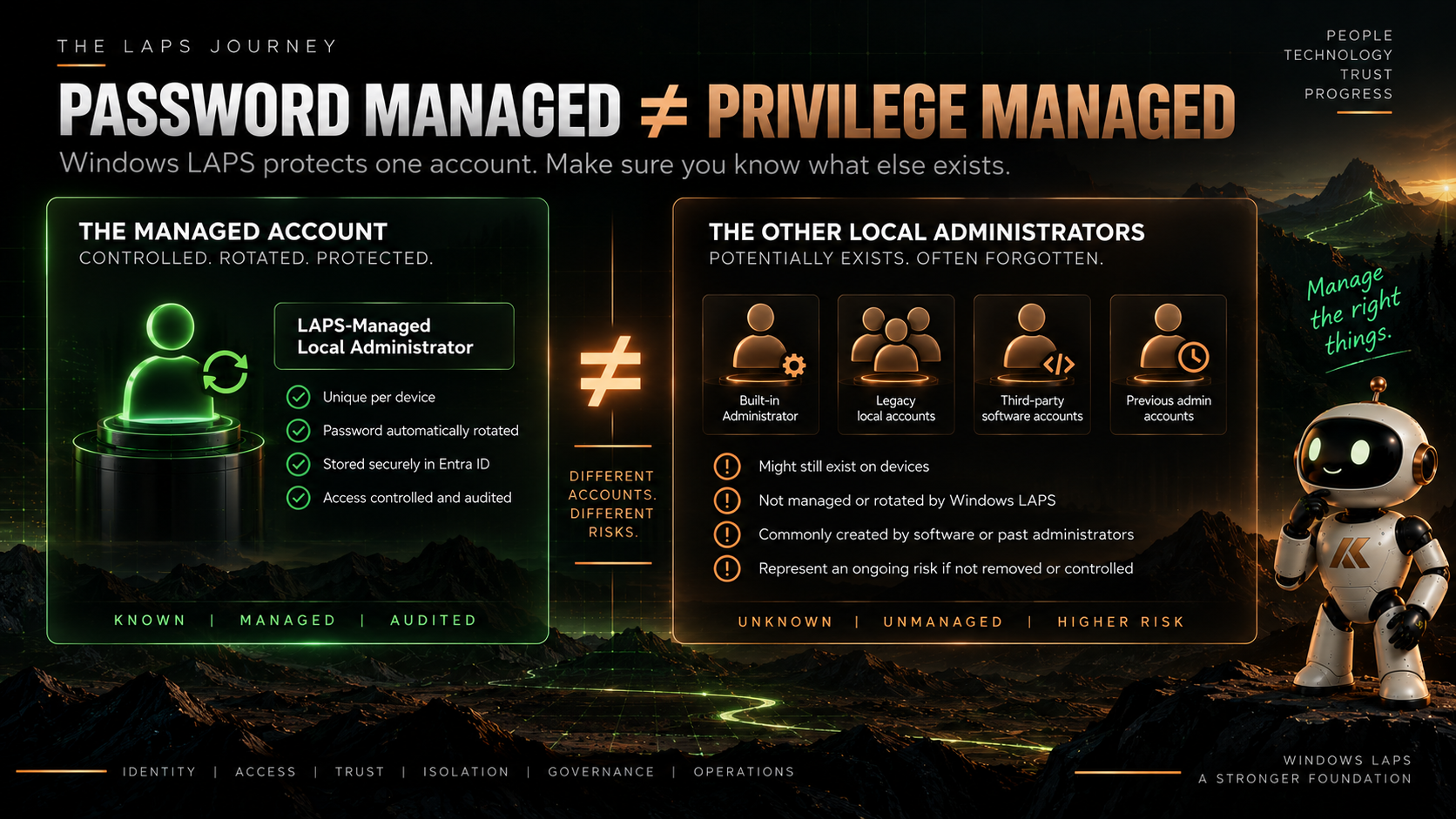
LAPS managing one account doesn’t automatically mean that local administrative privilege on the device is under control.
That distinction is going to be one of the recurring themes throughout this series.
Managing a local administrator password is not the same thing as managing local administrative privilege.
LAPS is an important control.
It isn’t the entire control model.
The built-in Administrator question
Then there is another decision.
Should we manage the built-in Administrator account?
Or should we create a dedicated account for LAPS?
There are arguments and operational considerations around both approaches.
One useful property of the built-in Administrator is that Windows knows exactly which account it is regardless of its name because it can identify it using its well-known RID.
A custom account gives us a different model, and Automatic Account Management removes some of the historic administrative overhead because LAPS itself can now create and maintain that account on supported versions of Windows.
We can even randomise its name.
But I don’t want to reduce this to:
Random account name = more secure.
A difficult-to-guess username isn’t the security boundary.
The interesting questions are what the account can do, how its credential is protected, who can retrieve it, how its use is audited and what other administrators exist alongside it.
We’ll dig into that properly when we look at Windows 11.
Intune versus Group Policy isn’t just old versus new
There is another discussion I want to tackle separately because I think it deserves more nuance than it usually gets.
For a modern Entra joined Windows 11 estate managed through Intune, using Intune to manage Windows LAPS is a fairly natural design.
Microsoft itself recommends Intune for Entra joined devices and for hybrid joined devices that are enrolled in Intune.
But Group Policy hasn’t suddenly become inherently bad.
For Active Directory joined systems, particularly Windows Server, Group Policy remains a perfectly legitimate and Microsoft-supported way of managing Windows LAPS.
The problem comes when ownership isn’t clear.
If a hybrid Windows 11 device can receive configuration from both Intune and Group Policy, we need to understand which system owns the setting and what happens when they disagree.
Windows LAPS CSP policy takes precedence over LAPS configuration delivered through Group Policy.
Useful behaviour.
But I don’t think this is a good architecture:
Don’t worry, if both management systems configure it, one of them wins.
Policy precedence is a conflict-resolution mechanism. It shouldn’t be your management strategy.
We’ll look at Intune versus Group Policy properly later in the series.
Windows Server deserves a different conversation
I also don’t want to write an article about Windows 11 and then add:
“Oh, and do the same thing on your servers.”
Windows Server has different operational requirements.
Different management patterns.
Different recovery scenarios.
Active Directory itself may be part of the design.
Domain controllers introduce Directory Services Repair Mode.
And while Automatic Account Management is available with Windows Server 2025, older supported Windows Server versions can still use Windows LAPS without that capability.
Same technology.
Different architecture.
So Windows Server gets its own article.
And deployment isn’t the finish line
Finally, I want to look at what happens after we configure everything.
Who can retrieve a LAPS password?
How is that access delegated?
How do we know when somebody retrieves one?
What happens after the credential has been used?
Should it immediately rotate?
What happens to active sessions?
How do we identify devices where LAPS isn’t working?
And perhaps most importantly:
How do we know that the account managed by LAPS is actually the only local administrative access path we intended to leave behind?
Because a green policy status in Intune doesn’t necessarily answer that question.
Where we’re going
Over the next few posts, I’m going to break the problem down rather than trying to cover every possible LAPS scenario in one enormous article.
Part 1 — Windows LAPS on Windows 11: Designing Local Admin Properly
We’ll look at Windows 11, Automatic Account Management, the built-in Administrator versus a custom account, account creation, randomised names, Autopilot and what a clean local administrator design might actually look like.
Part 2 — Windows LAPS: Intune or Group Policy for Windows 11?
We’ll look at the management plane.
Entra joined.
Hybrid joined.
AD joined.
Intune.
Group Policy.
Policy precedence.
And, more importantly, how to avoid accidentally having two management systems believing they own the same security control.
Part 3 — Windows LAPS on Windows Server: Same Technology, Different Design
We’ll move to the server estate and look at Active Directory-backed LAPS, Group Policy, Windows Server 2025 Automatic Account Management, older supported Server versions, recovery and the additional considerations around domain controllers and DSRM.
Part 4 — Operating Windows LAPS: Deployment Isn’t the Finish Line
Finally, we’ll bring it together operationally.
Credential retrieval.
RBAC and delegation.
Auditing.
Password rotation after use.
Monitoring.
Unmanaged local administrators.
Recovery.
And proving that the design we intended is actually the design running across the estate.
More than password rotation
Windows LAPS solves a very specific and very important security problem.
We should absolutely avoid having reusable local administrator passwords scattered across an estate.
But once we have solved that problem, there is a bigger one sitting behind it.
Why does this local administrator exist?
Who can use it?
Who can retrieve its credential?
What can it access?
What other local administrators exist?
And what happens when somebody actually uses it?
That is the direction I want to take with this series.
Because ultimately:
LAPS manages a credential. A good LAPS architecture manages local administrative access.
And those aren’t quite the same thing.
Microsoft Learn references
Documentation checked on 22 September 2026. Microsoft’s documentation below describes the Windows LAPS capabilities, supported platforms, policy mechanisms and account-management functionality discussed in this article. The architectural recommendations and design opinions are my own.
Comments
No comments yet — be the first to leave one below.