
What I Learned Deploying Global Secure Access for Real
On 20 July, I published the first article in this series.
At the time, the question was fairly simple:
Is Microsoft Global Secure Access really just another way of replacing the VPN?
Ten articles later, I think I can answer that fairly confidently.
No.
It can replace a traditional VPN.
Entra Internet Access can also replace significant parts of a traditional Secure Web Gateway.
But after spending the last couple of months designing, deploying, testing, troubleshooting and occasionally swearing at Global Secure Access, I think looking at it purely as a replacement for either of those things misses the interesting bit.
The bigger change is what happens when identity, device trust, network access and policy start becoming part of the same access decision.
That is where Global Secure Access gets interesting.
It is also where the architecture gets more complicated than the diagrams suggest.
And that is really what this final article is about.
Not another deployment guide.
Not another tour through the portal.
Just the things I have learned from actually working with it.
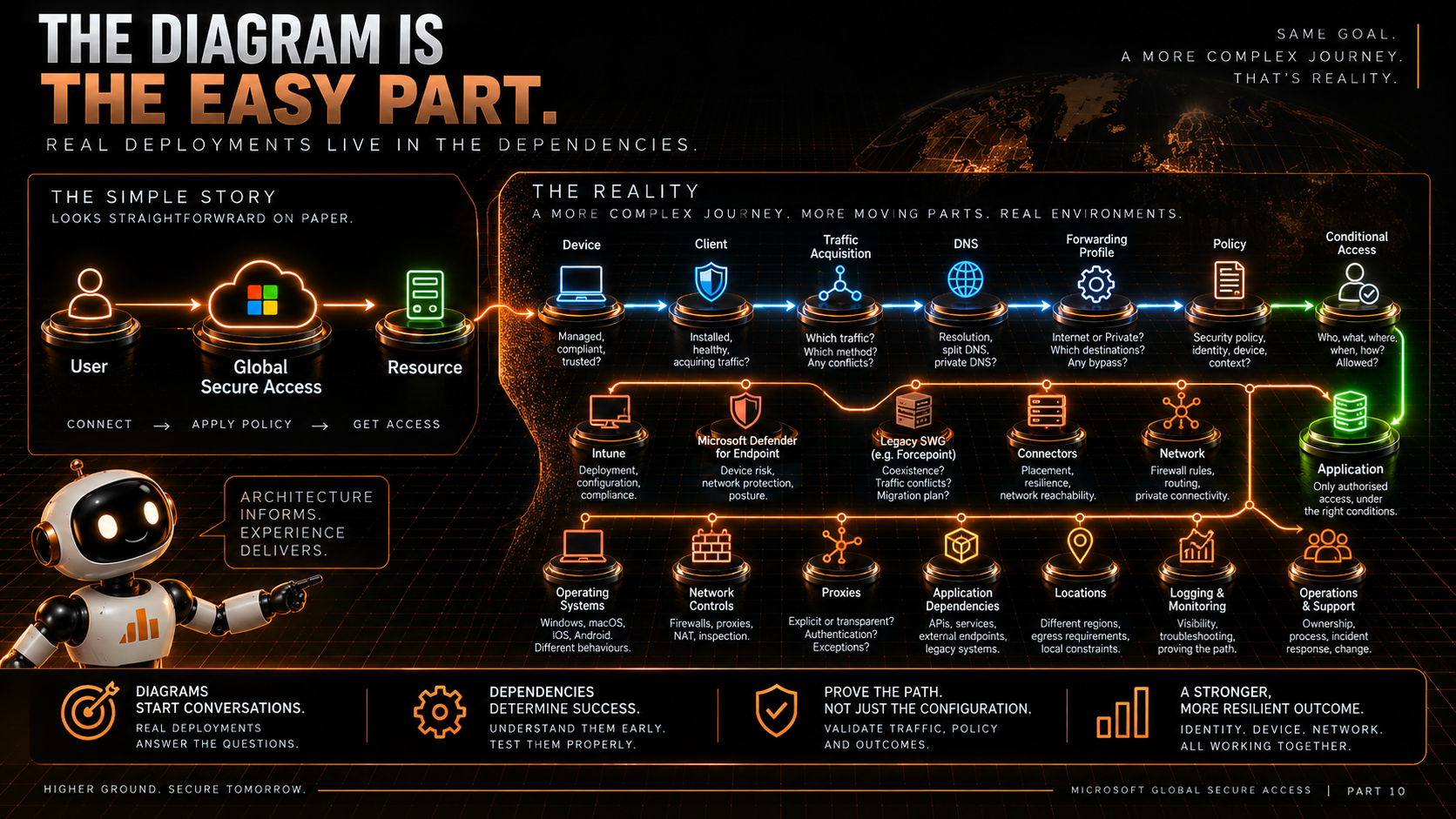
The diagram is the easy part
At a high level, Global Secure Access looks beautifully simple.
User → Global Secure Access → Resource
The user connects.
Global Secure Access applies policy.
The user gets to the thing they are allowed to access.
Job done.
Except the real architecture looks rather more like:
User → Device → Client → Traffic Acquisition → DNS → Forwarding Profile → Policy → Conditional Access → Microsoft Edge → Connector → Network → Application
And somewhere around that you might also have:
- Microsoft Defender for Endpoint
- Intune
- an existing Secure Web Gateway
- local firewalls
- network controls
- proxies
- application dependencies
- different operating systems
- different locations
- different DNS behaviour
- and users doing things you hadn’t thought of
The portal configuration is often the easy part.
Working out what actually happened to the traffic is where the interesting work starts.
The architecture diagram tells you where you want the traffic to go. It doesn’t prove that it went there.
Installed does not mean protected
This is probably one of the biggest lessons from the entire project.
Installing the Global Secure Access client is easy.
Getting it onto a managed device through Intune is easy.
Seeing the icon appear and the client report that it is connected is reassuring.
But none of those things necessarily prove that the traffic you care about is being protected in the way you think it is.
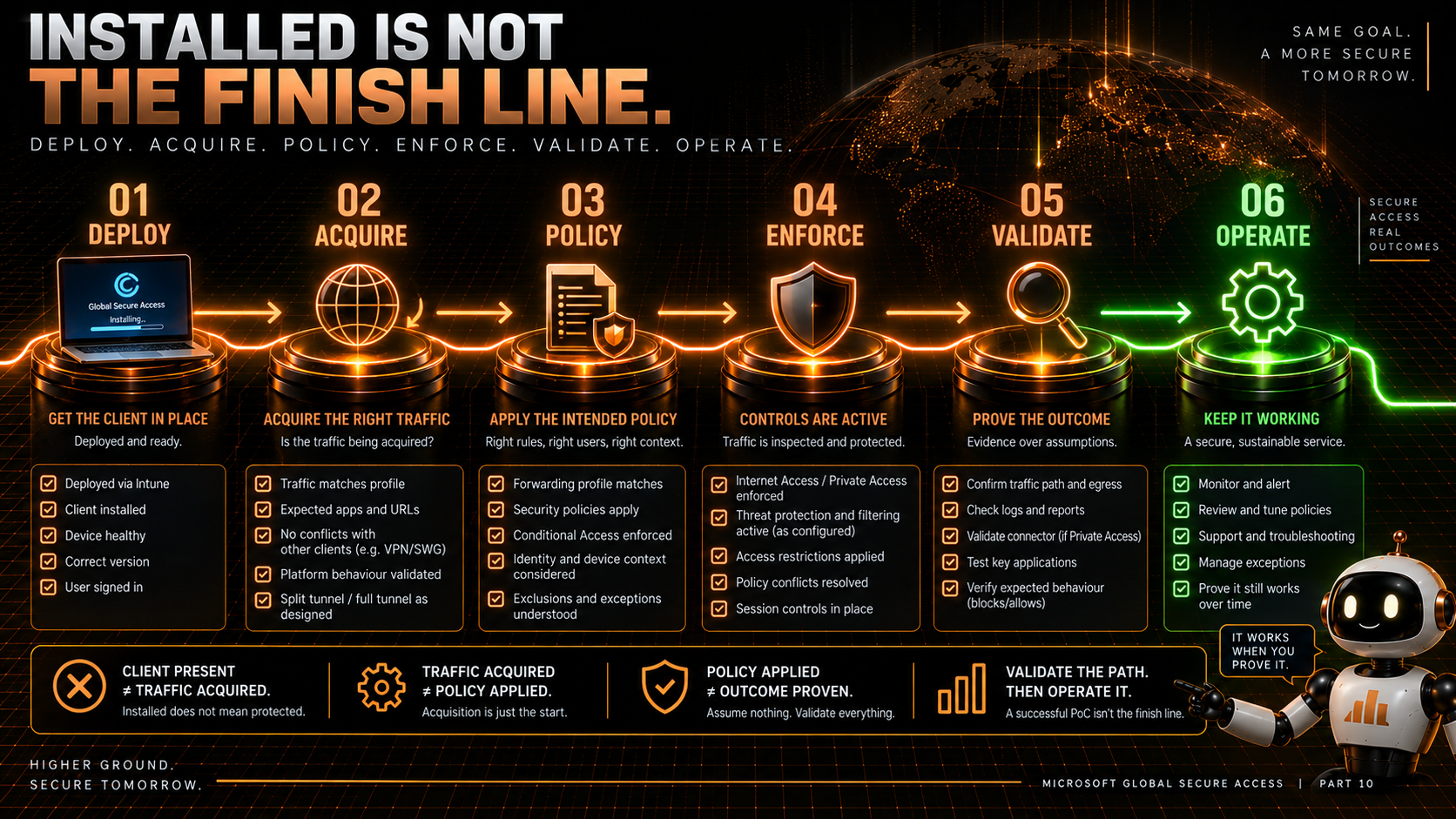
There is a much more important sequence:
Deploy → Acquire → Apply Policy → Enforce → Validate → Operate
Each stage matters.
Deploy
Is the client actually installed and healthy?
Acquire
Is the traffic you expect Global Secure Access to handle actually being acquired?
Apply Policy
Is it matching the forwarding profile and security policy you intended?
Enforce
Are those controls actually affecting the session?
Validate
Can you prove the resulting path and policy decision?
Operate
Can you still prove all of that six months later when something changes?
That last one matters.
A successful proof of concept isn’t the same thing as a successful operational service.
Microsoft itself recommends defining success criteria, piloting with a small group and systematically testing the applications in scope before expanding a Global Secure Access deployment.
That is good advice.
I would go slightly further.
Don’t make “the client is installed” one of your success criteria.
Make “we can prove the expected traffic is acquired, controlled and taking the expected path” one of them.
Coexistence needs to be proven
This became particularly important during the Secure Web Gateway migration.
Microsoft designed the Global Secure Access client differently from many traditional VPN/SSE clients and documents scenarios where GSA can operate alongside existing non-Microsoft SSE solutions.
That does not mean every combination will behave perfectly.
In the environment I was working with, Forcepoint and Global Secure Access did not coexist reliably when both were trying to acquire the traffic we were interested in.
They effectively fought over who had the right to it.
That is an observation from this particular environment, not a statement that Forcepoint and Global Secure Access can never coexist.
There is an important distinction there.
The lesson I took from it was:
Supported coexistence does not remove the need to test coexistence.
You need to understand how the existing product acquires traffic.
You need to understand how Global Secure Access acquires traffic.
Then you need to test what happens when both are present on the same endpoint.
Not just whether both clients say they are healthy.
Test the traffic.
That discovery changed the migration design.
Rather than trying to run two competing controls indefinitely, we introduced a transitional security baseline using Microsoft Defender for Endpoint, Network Protection and Web Content Filtering while devices moved between the two architectures.
The migration then became state-based:
Legacy SWG → Remove → Verify → Reboot → Deploy GSA → Validate → Complete
That was far more predictable than hoping two endpoint traffic acquisition technologies would politely negotiate with each other.
Migrate the requirement, not the legacy configuration
This was another lesson that became increasingly important as the project progressed.
It is very tempting during a migration to look at the old platform and think:
We need to move all of this into the new one.
Years of URL exceptions.
Allow lists.
Blocked categories.
Networks.
Applications.
Bypasses.
Special cases that nobody quite remembers creating.
The easiest migration plan is to reproduce them.
It is also an excellent way of spending a lot of money replacing an old architecture with a shiny new version of the same old architecture.
The principle I ended up using was:
Migrate the requirement, not the legacy configuration.
An existing rule is evidence that somebody needed something at some point.
It is not automatically evidence that they still need it.
The migration becomes an opportunity to ask:
What are we actually trying to achieve?
That changes the process from:
Export → Convert → Import
to:
Discover → Understand → Rationalise → Build Baseline → Add Proven Exceptions
It takes more thought.
But you end up with a much cleaner security model.
Quick Access is useful. It shouldn’t automatically be the destination
The same thinking applies to Entra Private Access.
Quick Access is incredibly useful.
If you are replacing a VPN, being able to publish a broader set of private resources quickly can make the initial transition dramatically easier.
It also gives you something else that I think is particularly useful: visibility.
Once traffic is flowing, Application Discovery can help you understand what users are actually accessing.
That gives you evidence to start carving broad access into individual applications.
And that is where Private Access becomes more interesting than simply being Microsoft’s VPN replacement.
Instead of:
User → Corporate Network
you can start moving towards:
User + Device + Context → Authorised Application
That is a very different security model.
The danger is stopping halfway.
If you publish enormous network ranges through Quick Access, migrate everyone from the VPN and then leave it like that forever, you may have changed the technology without really changing the access model.
The VPN disappeared.
The network-level trust largely didn’t.
Quick Access can be the bridge.
It doesn’t always have to be the destination.
DNS will make you question everything
I knew DNS would matter.
I probably underestimated how often it would be involved when diagnosing what appeared to be something else.
Private Access in particular forces you to separate several things that are very easy to mentally bundle together:
- name resolution
- traffic acquisition
- policy
- routing
- connector selection
- backend reachability
A DNS response does not prove the application path.
A successful TCP connection does not necessarily prove the policy path.
And a connector being online does not prove the backend application is reachable from it.
When troubleshooting, I found it much more useful to stop asking:
“Why doesn’t GSA work?”
and instead ask:
“Which part of the path have I actually proved?”
Can the name be resolved?
Was the traffic acquired?
Which forwarding profile matched?
Which policy applied?
Which connector handled it?
Can that connector reach the destination?
What does the application itself do next?
Breaking the problem down like that makes troubleshooting much less mysterious.
Connector design matters earlier than you think
It is very easy to treat the Private Network Connector as something you install near the resource and then forget about.
I wouldn’t design it that way.
Connector placement affects:
- availability
- locality
- failure domains
- network reachability
- maintenance
- resilience
- and potentially the user experience
If Private Access becomes the route into important business applications, the connector fabric becomes part of the application’s availability architecture.
That means thinking about connector groups, multiple connectors and where those connectors live before you move critical workloads behind them.
A connector isn’t just plumbing.
It is part of the service.
What surprised me
A few things surprised me during this project.
The first was how quickly Global Secure Access stopped feeling like a networking product.
The networking obviously matters enormously, but the interesting conversations increasingly became identity conversations.
Who is the user?
What device are they using?
Is that device compliant?
What application are they trying to reach?
Should that identity be able to reach it?
Under what conditions?
That is a very different conversation from:
Are you connected to the corporate network?
The second surprise was how useful fixed egress could be.
It sounds like a fairly mundane networking capability until you start looking at SaaS platforms, third-party services and security controls that still depend on known source addresses.
The third was how much the endpoint matters.
Windows, macOS and mobile aren’t interchangeable implementations of exactly the same thing.
The capabilities and limitations differ.
If you have a mixed estate, testing one Windows laptop and declaring the architecture validated isn’t enough.
And finally, I was surprised by how much value there was in simply being able to see the traffic.
Discovery changes architecture conversations.
Instead of designing purely from assumptions about what users should be accessing, you can start comparing that with what they actually use.
Geography still matters
This one caught us.
The customer I was working with has users in China.
In our deployment, Global Secure Access Internet traffic for those users was egressing through Singapore rather than mainland China.
That caused an interesting problem.
Some China-based websites and services did not behave as expected because, from their perspective, the user wasn’t arriving from China.
They were arriving from Singapore.
That distinction mattered.
Microsoft supports Global Secure Access for users physically located in China where the tenant itself is outside China, but there are specific considerations around connectivity and the operation of SASE services in the region.
I also want to be careful with the observation here.
Singapore was the egress path we observed in this deployment.
I’m not suggesting that every Global Secure Access user in China will always egress through Singapore or that this is a guaranteed Microsoft routing behaviour.
But it exposed an architectural dependency I think is easy to overlook.
Cloud-delivered doesn’t mean location-independent.
Where your traffic emerges can matter.
Some services use source geography for:
- localisation
- access restrictions
- fraud controls
- licensing
- regulatory controls
- content availability
- or simply different regional behaviour
So egress location can become an application dependency.
And that leads to one of the more useful lessons I took from the entire deployment:
Don’t just prove that traffic is going through GSA. Prove that it should be.
Sometimes the correct design might be to acquire the traffic.
Sometimes the correct design might be to bypass it.
The important thing is that the decision is deliberate.
What was harder than expected
Traffic acquisition.
Not necessarily configuring it, but proving it.
Coexistence.
Not because coexistence is inherently impossible, but because endpoint networking becomes much more interesting when multiple products want to influence the same traffic.
Platform differences.
A design that works beautifully on Windows still needs to be tested on macOS and mobile if those platforms are in scope.
Troubleshooting.
Particularly learning to separate DNS, acquisition, routing, policy and backend connectivity instead of treating them as one problem.
And perhaps most importantly:
knowing when the migration is actually finished.
Moving the client isn’t the same thing as moving the control.
Moving the control isn’t the same thing as validating the outcome.
Global Secure Access isn’t the whole security architecture
One thing I definitely wouldn’t do is treat Global Secure Access as the thing that replaces everything around it.
It doesn’t.
Intune still matters.
Defender for Endpoint still matters.
Conditional Access matters enormously.
Firewalls still matter.
Workload security still matters.
Application authentication and authorisation still matter.
Identity governance still matters.
The interesting part is how those controls can increasingly contribute to the same access decision.
That is why I think the overlap between some of these technologies isn’t necessarily duplication.
The endpoint tells us something about device trust.
Entra tells us something about identity.
Conditional Access evaluates context.
Global Secure Access controls the path.
The application still controls what the user can actually do when they arrive.
Those controls should complement each other.
Operations needs an owner
There is another question that is easy to leave until far too late:
Who owns this thing?
Is Global Secure Access networking?
Identity?
Endpoint?
Security?
All four?
Architecturally, it crosses all of them.
Operationally, somebody still needs to be responsible when a user says:
“I can’t get to the application.”
That support path needs to know how to determine whether the problem is:
- the endpoint
- traffic acquisition
- DNS
- Conditional Access
- Internet Access policy
- Private Access policy
- the connector
- the network
- or the application
Logging and diagnostics aren’t just useful during deployment.
They are part of the operating model.
The same applies to failure.
What happens when a connector fails?
What happens when a forwarding profile causes an unexpected problem?
What happens when Global Secure Access itself isn’t available?
What happens if the control you need to recover Global Secure Access is itself protected by Global Secure Access?
Recovery needs to be designed before you need it.
What I would do differently
If I were starting this deployment again, I would spend even more time at the beginning understanding traffic.
Not products.
Traffic.
What are users accessing?
Where is it?
How do they get there today?
What controls are currently involved?
Which of those controls represent genuine business or security requirements?
Which are historical baggage?
I would define validation before deployment.
For each scenario I would want to know:
What evidence will prove this is working?
Not just “the website loads”.
What path should it take?
Which profile should acquire it?
Which policy should apply?
What should the logs show?
Where should it egress?
What should happen when the user or device doesn’t meet the requirements?
I would also design the operational model earlier.
Who monitors it?
Who supports it?
Who owns policy?
Who owns connectors?
Who decides whether a destination should be bypassed?
Who approves an exception?
Those questions become much easier to answer before you have thousands of users depending on the service.
And then there was privileged access
Part 9 of this series was deliberately different.
Most of this series has been based on things I have deployed, tested or encountered while working with Global Secure Access.
Part 9 wasn’t.
It asked a different question:
Could the same identity-aware application access model be applied to privileged administration?
Dedicated privileged identity.
Trusted PAW or vPAW.
Phishing-resistant authentication.
Conditional Access.
PIM.
Private Access.
Explicit privileged resource.
Potentially even time-bound connectivity alongside time-bound privilege.
I think there is something interesting there.
But I haven’t proven the complete architecture yet.
That distinction matters.
It is an architecture I want to test, not a reference architecture I’m claiming to have validated.
And in some ways that feels like an appropriate place for this series to end.
Because after ten articles, I have fewer simplistic answers about Global Secure Access than I did at the beginning.
But I have much better questions.
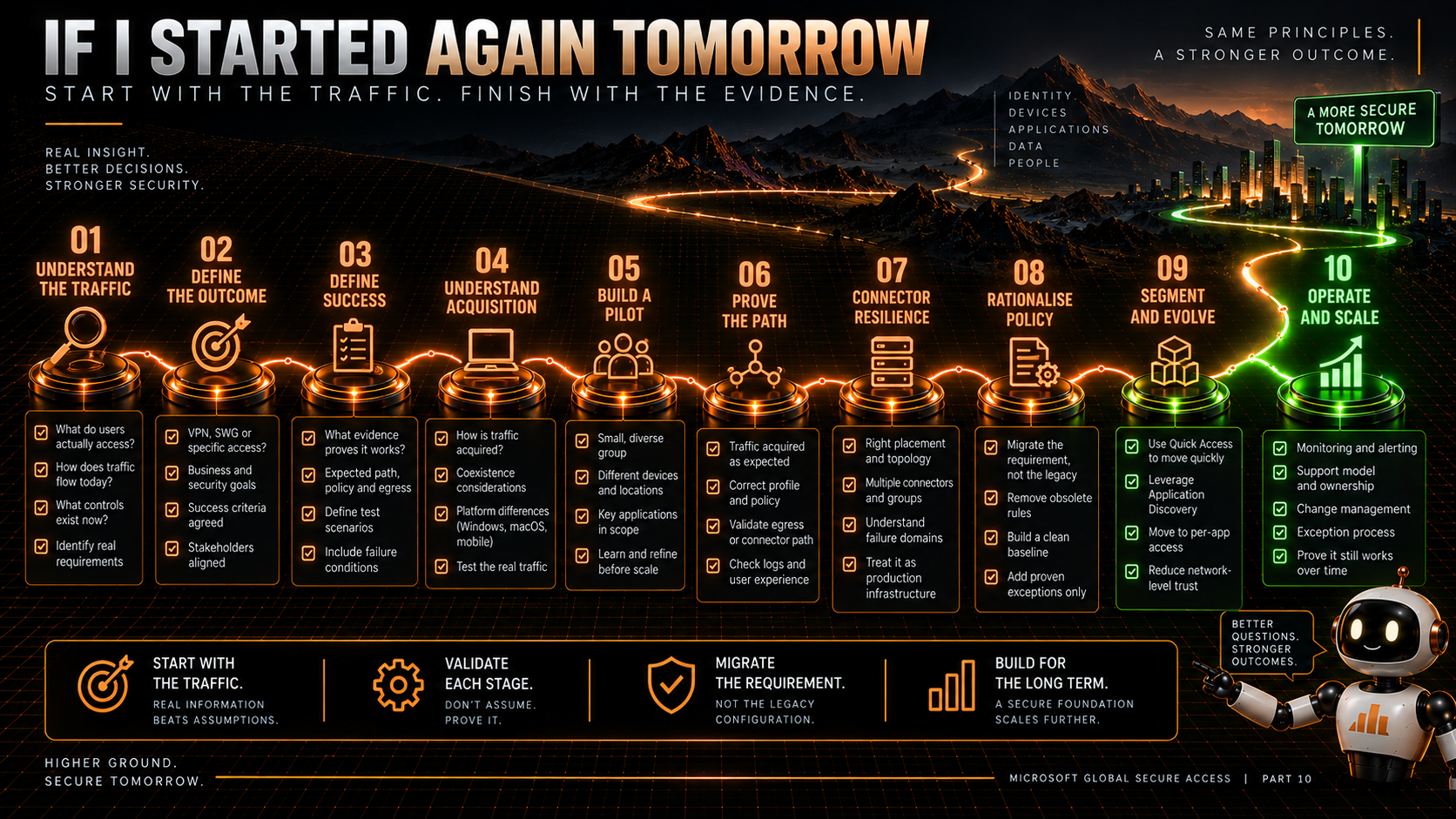
If I started again tomorrow
If somebody asked me tomorrow how I would approach their first Global Secure Access deployment, this is roughly where I would start.
1. Understand the traffic
Before configuring anything, understand what users actually access and how that traffic flows today.
2. Define what you are replacing
VPN?
Secure Web Gateway?
Specific access paths?
Don’t start with “deploy GSA”.
Start with the outcome.
3. Define success before deployment
Decide what evidence will prove each scenario works.
4. Understand traffic acquisition
Especially if another VPN, proxy or SSE product already exists.
5. Build a small representative pilot
Different users.
Different devices.
Different locations.
Different applications.
6. Prove the path
Don’t stop when the client says connected.
Prove acquisition, policy, routing and the resulting egress or private application path.
7. Design connector resilience
Treat the connector fabric as production infrastructure.
8. Rationalise policy
Don’t automatically recreate years of legacy rules.
Migrate the requirement, not the legacy configuration.
9. Use broad access to learn, then segment
Quick Access can help you move quickly.
Application Discovery can help you understand what should come next.
10. Build operations before scale
Logging.
Support.
Ownership.
Exceptions.
Recovery.
Then expand.
More than just a VPN replacement
Back on 20 July, I called the first article in this series:
More Than Just a VPN Replacement
At the time, that was largely an architectural argument.
Ten posts later, I think it has become a practical one.
Yes, Global Secure Access can replace a VPN.
Yes, Entra Internet Access can take over capabilities traditionally provided by a Secure Web Gateway.
But those are implementation outcomes.
They aren’t the most interesting part.
The interesting part is what happens when network access stops being a largely separate decision from identity and device trust.
When access to a private application can be based on who you are, what device you’re using and the context of the request rather than simply whether you managed to connect to the right network.
When internet security policy can use identity context rather than treating an IP address as a reasonable approximation of a person.
When the network path itself starts participating in Zero Trust.
That is where I think Global Secure Access gets genuinely interesting.
It isn’t perfect.
There are platform differences.
There are limitations.
There are migration challenges.
There are architectural decisions Microsoft can’t make for you.
And there are plenty of things I still want to test.
But that is probably the biggest thing I’ve taken from writing this series.
Global Secure Access isn’t interesting because Microsoft built another tunnel.
It is interesting because the tunnel is becoming less important than the decision about who should be allowed to reach what, from where, using which device, under which conditions.
That’s a much bigger architectural change.
I’ve learned a lot since that first post on 20 July.
Hopefully some of what I’ve broken, tested and figured out along the way saves somebody else a little time.
As for what comes next?
I still have that privileged access architecture from Part 9 sitting there waiting for a lab.
So perhaps this isn’t really the end.
The series might be finished. The testing definitely isn’t.
Microsoft Learn references
Documentation checked on 22 September 2026. Microsoft’s documentation below describes the Global Secure Access capabilities, supported scenarios, deployment guidance and current limitations discussed in this article. The deployment observations, migration patterns, Forcepoint coexistence experience, China/Singapore egress observation and architectural recommendations are based on my own experience and judgement and should not be interpreted as Microsoft guidance or universal product behaviour.
- What is Global Secure Access?
- Introduction to Microsoft Global Secure Access Deployment Guide
- Global Secure Access client overview
- Global Secure Access traffic forwarding
- Known limitations for Global Secure Access
- Global Secure Access support for users in China
- Manage the Internet Access traffic forwarding profile
- Enable the Private Access traffic forwarding profile
- Configure Quick Access
- Application Discovery for Global Secure Access
- Configure per-app access using Global Secure Access applications
- Private Access per-application segmentation
Comments
No comments yet — be the first to leave one below.