
The GSA client is deployed. Traffic is flowing. Entra Internet Access is enforcing the policies you tested during migration.
Then someone asks the obvious question:
Can we turn the other web protection off now?
It is a reasonable question. We have moved the secure web gateway function, rationalised the policies and introduced another place where traffic can be blocked. Nobody wants to maintain the same exception in three portals indefinitely.
But “the other web protection” hides several different jobs.
Defender detecting suspicious activity on a device is different from EIA blocking an inappropriate website category. Device compliance is different from permission to access an application. Reaching a private server is different from being authorised to use everything on it.
In the previous article, we used MDE, Network Protection, Web Content Filtering and SmartScreen as a transitional security baseline while moving away from the incumbent SWG. That baseline reduced exposure during the change. It did not reproduce every capability of either gateway.
Now we need to decide what its permanent role should be.
My starting point is simple: keep a control because it has a defined security job, and retire it when that job has been demonstrably transferred or is no longer required.
The ownership model below is my architectural recommendation, not a Microsoft-prescribed reference architecture. Product behaviour is grounded in the Microsoft Learn documentation checked on 16 September 2026; deployment choices still need validating against your licences, platforms and configuration.
Start with the responsibilities
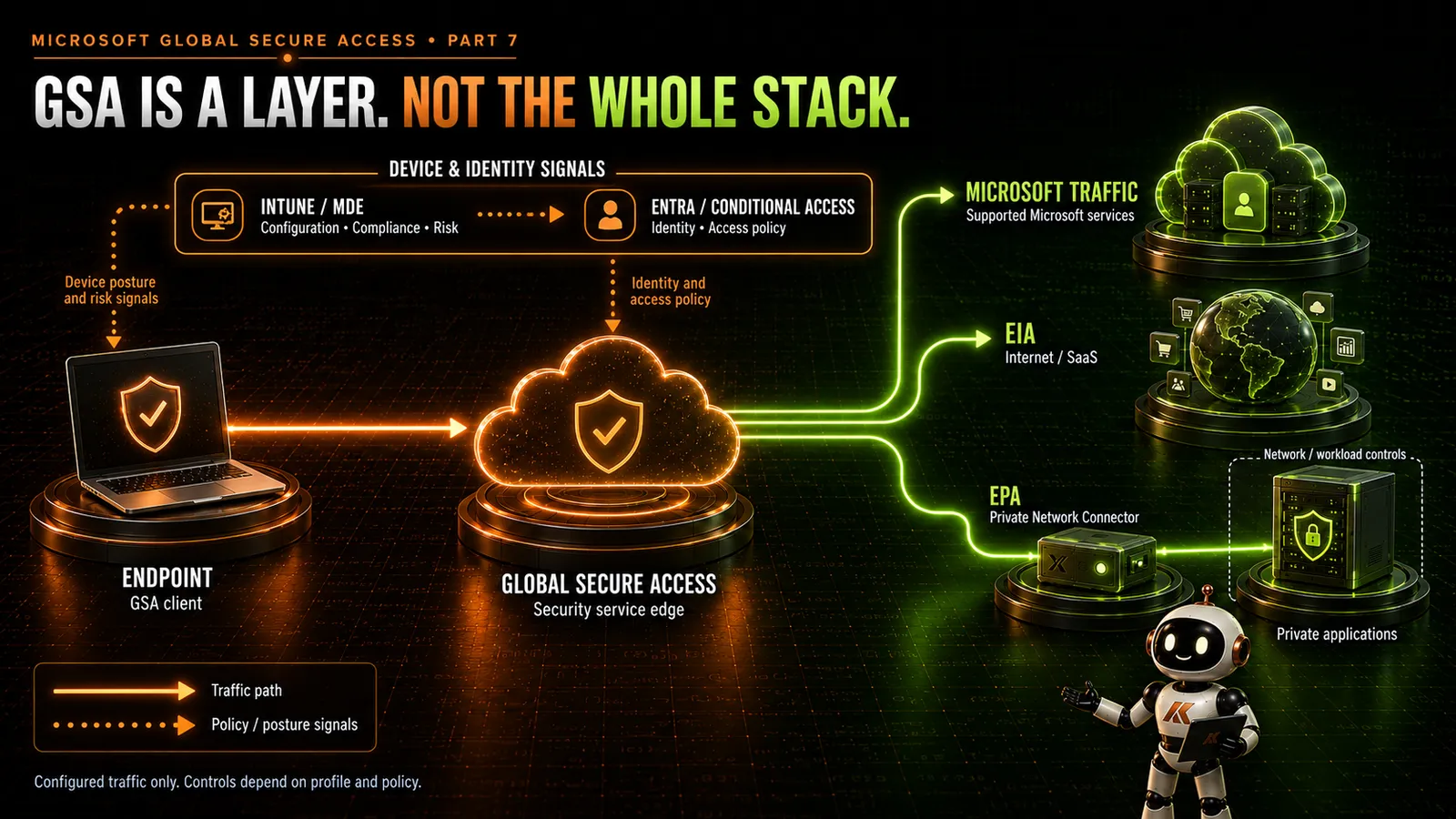
Global Secure Access brings together Microsoft Entra Internet Access and Microsoft Entra Private Access. It gives us a way to acquire traffic and apply access and security controls through Microsoft’s security service edge. It does not take ownership of every security decision around that traffic. Microsoft Learn: GSA overview
I would describe the surrounding architecture like this:
- Intune manages device configuration and assesses compliance against the requirements we define.
- Defender for Endpoint provides endpoint security visibility, detection and response, alongside the relevant endpoint prevention controls.
- Entra ID and Conditional Access govern identity and access requirements using the signals available to the policy.
- GSA, EIA and EPA handle the configured traffic paths, internet security policies and access to published private resources.
- Network and workload controls protect the infrastructure and applications behind those access paths.
These are responsibilities, not a sequence of appliances. Intune does not proxy a browser request, and Conditional Access is not another firewall hop.
Intune still owns the device baseline
Installing GSA does not tell us whether a device meets our security requirements.
Intune configuration policies establish settings; compliance policies evaluate defined conditions. Conditional Access can then require the device to be marked compliant before granting access to the resources in scope. Those are connected mechanisms with different responsibilities. Microsoft Learn: device compliance
Defender device risk can also feed that assessment through the Intune integration. For example, a configured risk threshold can make a device noncompliant, which a corresponding Conditional Access policy uses to restrict access. That integration must actually be configured. Microsoft Learn: Defender and Conditional Access
I would keep separate checks for device compliance and GSA operational health. A compliant device does not, by that label alone, prove that the expected forwarding profile is active or that the intended request was inspected.
That distinction matters when someone presents a green compliance dashboard as evidence that the migration is complete.
Defender still has an endpoint to protect
EIA can make decisions about traffic passing through its enforcement path. Endpoint detection and response gives analysts visibility into suspicious activity and the ability to investigate and respond to threats on devices. Moving the gateway does not transfer that responsibility. Microsoft Learn: endpoint detection and response
Consider a download that is permitted by internet policy. The fact that the connection was allowed does not settle what the downloaded software subsequently does.
The endpoint team still needs to understand execution, suspicious behaviour and the response required if the device is compromised. I would retain the endpoint prevention and EDR capabilities appropriate to the organisation’s endpoint security design.
Network Protection, WCF and SmartScreen are related
We also need to stop treating these as three entirely independent web gateways.
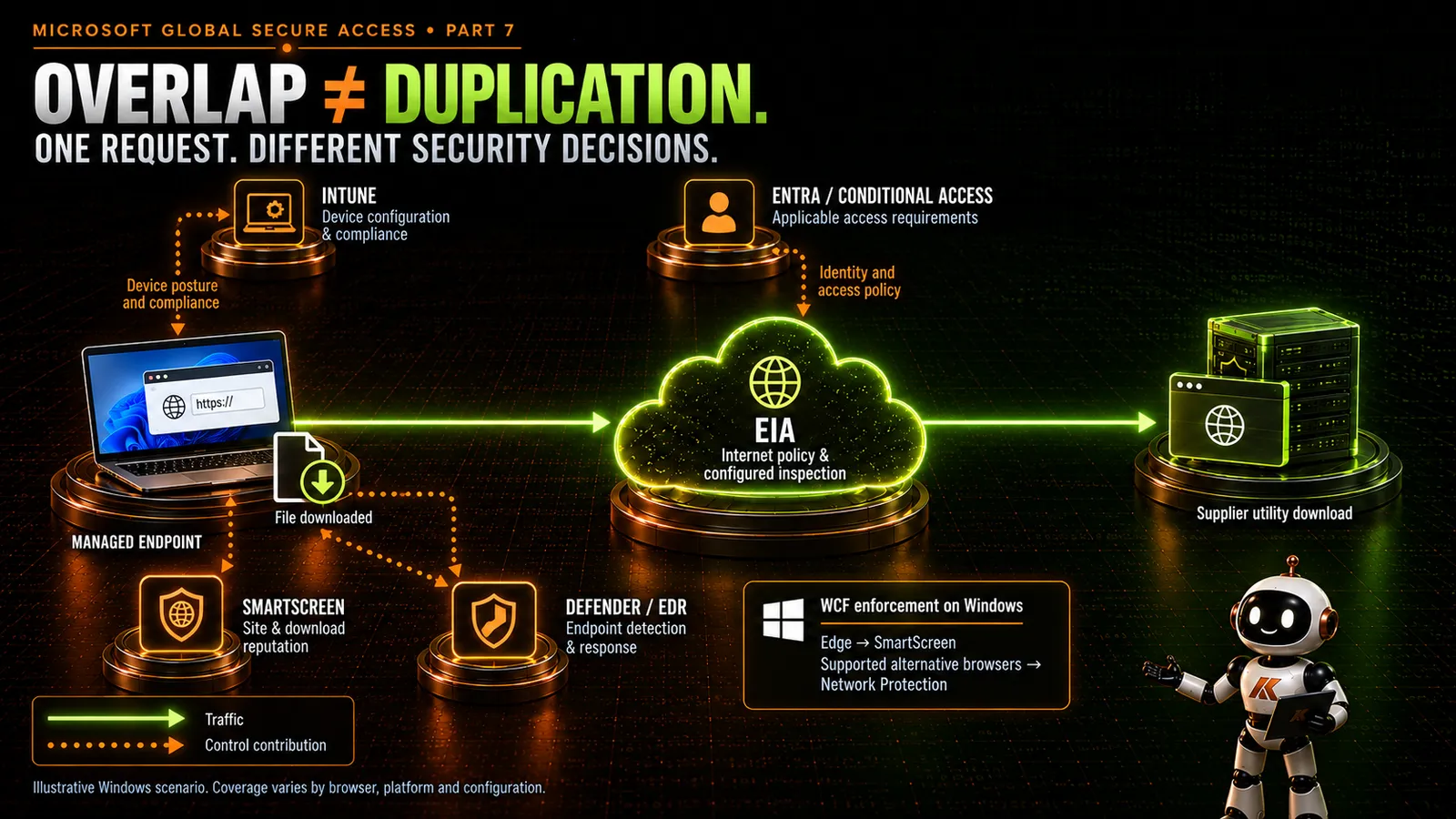
Defender Web Content Filtering regulates website categories. On Windows, its browser enforcement uses SmartScreen in Edge and Network Protection in supported alternative browsers. WCF is a policy capability that relies on those enforcement mechanisms. Microsoft Learn: Defender WCF
Network Protection extends protection against malicious destinations to supported browser and non-browser processes. Its coverage table explicitly distinguishes those uses: WCF is not supported for non-browser processes. Windows Edge uses SmartScreen rather than Network Protection for these web protection scenarios. Microsoft Learn: Network Protection
SmartScreen also provides website and download reputation protection in Edge. A business decision to allow a category in EIA does not remove the value of checking a suspicious download. Microsoft Learn: Edge SmartScreen
My default would be to retain the relevant endpoint threat protections, then review WCF’s category policy separately.
Check the actual platform requirements. Network Protection enforcement depends on its operating mode and Defender prerequisites; Microsoft also documents QUIC and Encrypted Client Hello restrictions for FQDN blocking in non-Microsoft browsers. A successful Windows Edge test is insufficient evidence for Chrome, macOS or mobile coverage. Microsoft Learn: Network Protection requirements and limitations
What should happen to the transitional WCF baseline?
During migration, WCF had a clear purpose: provide an agreed minimum level of category control while the primary internet enforcement platform changed.
Once EIA is operational, I would make an explicit choice for each device population.
Retain a smaller permanent baseline where an endpoint category restriction has a continuing requirement and its coverage is proven. Keep its scope narrow enough that the team can explain why it exists.
Retire overlapping WCF category blocks where EIA has taken ownership of the requirement and the relevant traffic paths are validated. This is a WCF policy decision, not an instruction to disable Network Protection or SmartScreen.
Retain a separate policy for a defined population where its access design differs, rather than forcing every device into the same arrangement.
What I would avoid is leaving the entire transitional policy in place because nobody scheduled the review.
Nor would I describe retained WCF as “EIA failover”. Endpoint web controls have their own dependencies and coverage limits. They do not automatically reproduce EIA inspection, policy or availability behaviour if the GSA path fails.
Test that failure scenario deliberately. Establish whether the affected traffic stops, takes another route or remains subject to a reduced set of controls. Record the result for the actual client and configuration, rather than inferring it from a diagram.
Overlap can be useful
Imagine a user opening an approved supplier website and downloading a utility.
The device baseline establishes whether their laptop meets the configured requirements. Conditional Access applies the relevant access conditions. EIA evaluates the acquired internet traffic against the applicable security policy. Browser reputation protection can raise a separate concern about the site or download. Endpoint security then has a job if the utility behaves maliciously.
Those decisions contribute different evidence. Some may also share intelligence or enforcement dependencies, so we should not count every product name as an independent barrier.
Accidental duplication looks different.
A team receives approval to use a website. EIA allows it, but an old WCF category block still prevents access. Someone adds a Defender exception without checking the original reason. The next person repeats the process in a firewall.
We now have several policy stores and no reliable explanation of the intended outcome.
An allow in one product does not override a block in another. Each enforcement point applies its own configuration. Microsoft documents precedence within Defender web protection, but that is not a universal precedence order across the security stack. Microsoft Learn: Defender web protection
The useful question is whether the second control addresses a distinct risk, population or tested failure scenario. If we cannot explain that, its continued presence deserves review.
EIA owns internet policy, within its coverage
For a migrated population, I would make EIA the primary owner of routine internet acceptable-use policy and associated exceptions.
EIA groups filtering policies into security profiles, which can be delivered through Conditional Access. That connects identity-aware policy selection with traffic enforcement at the service edge. It does not mean every public website becomes an Entra-integrated application or presents an MFA prompt. Microsoft Learn: Internet Access
Policy ownership also needs a traffic boundary. The Internet Access profile has acquisition and bypass rules; a policy cannot inspect a request that never reaches its enforcement path. Microsoft Learn: Internet Access traffic profile
Microsoft traffic needs its own treatment
The Microsoft traffic profile covers defined Microsoft service destinations. Microsoft explicitly states that traffic available for acquisition there cannot instead be acquired by the Internet Access profile. Setting a Microsoft rule to bypass does not make that traffic fall through into EIA. Microsoft Learn: Microsoft traffic profile
That is why “internet protection enabled” needs more explanation than a single switch. Review the Microsoft and Internet profiles together, and validate the controls intended for each path. Microsoft documents source IP restoration, compliant network checks and universal tenant restrictions in its Microsoft traffic deployment material; these require their respective configuration. Microsoft Learn: enable the Microsoft traffic profile
Also keep compliant network and compliant device separate in the design. They address different conditions. Neither label is shorthand for “everything is trusted”.
Give TLS inspection an owner
TLS inspection deserves a specific decision because it changes the encrypted connection itself.
EIA supports decrypting HTTPS traffic at the service edge, evaluating applicable controls and re-encrypting the traffic towards the destination. Inspection must be configured, and the client must trust the relevant certificate chain. Enabling the Internet Access profile alone is not proof that TLS inspection is taking place. Microsoft Learn: TLS inspection
My recommendation is to nominate one primary TLS inspection owner for each traffic path. If EIA owns inspection for managed-user internet traffic, review any legacy SWG or firewall decryption still applied to that same path.
This is an operating recommendation, not a claim that every multi-inspection design is unsupported. Keeping another inspection stage should have a specific purpose and tested compatibility.
Agree who owns certificate distribution and renewal, bypass approval, application testing and investigation of handshake failures. A pinned application or protocol limitation can require different handling. Microsoft’s current documentation, for example, lists HTTP/2 negotiation as unsupported for TLS inspection and identifies certificate pinning as a mobile application concern. Microsoft Learn: TLS limitations
Separate a TLS inspection bypass, which leaves encrypted content uninspected, from a traffic acquisition bypass, which changes whether traffic enters that GSA path. They are different exceptions with different consequences. Microsoft Learn: TLS inspection FAQ
EPA changes access to private resources
EPA can take over private application access requirements previously delivered through a VPN. Its per-application model lets you define application segments, assign users and apply Conditional Access to the enterprise application. Microsoft recommends moving towards per-application segmentation for finer access control. Microsoft Learn: per-app segmentation
My design preference is to publish the destinations and ports the application needs, with appropriate connector placement, rather than recreate broad network reachability for convenience.
That access path still ends at an application with its own authentication, permissions and infrastructure dependencies. Granting reachability does not grant a user every role inside the application.
Likewise, user access through EPA does not settle how servers communicate with databases, how workloads reach the internet, or how other ingress paths are protected. Firewalls, host controls, segmentation and application controls still need requirements and owners. Azure Firewall, for example, explicitly addresses both east-west and north-south workload traffic. Microsoft Learn: Azure Firewall
I would review those controls against the new access design. Some rules may become redundant. Others become more important because they constrain what the connector-side infrastructure can reach.
Know which control owns the decision
This is the table I would take into an architecture review. “Owner” means the recommended primary responsibility for the stated decision, not an exclusive capability or an automatic product integration. Coverage, licensing, policy scope and enforcement mode still apply. Intune can distribute a Defender setting while Defender remains the enforcement mechanism.
| Decision or requirement | Recommended primary control owner | Qualification and supporting controls |
|---|---|---|
| Device configuration and compliance assessment | Intune | Define the baseline and compliance rules; configured Defender risk integration can contribute a signal. |
| Endpoint threat prevention, investigation and response | Defender endpoint controls / MDE | Retain the appropriate endpoint capabilities; EIA traffic enforcement does not replace EDR. |
| Site/download reputation and endpoint web threats | SmartScreen / Network Protection, according to platform | Related mechanisms with specific prerequisites; do not assume identical browser coverage. |
| Routine internet category policy for migrated users | EIA | Applies to acquired traffic and applicable policy. Retained Defender WCF needs a named residual purpose. |
| Identity, authentication and access conditions | Entra ID / Conditional Access | Uses configured signals and supported controls for targeted resources and GSA policies; application permissions remain separate. |
| Traffic acquisition and forwarding | GSA profiles and connection configuration | Validate assignments, routes and bypasses; acquisition alone does not prove inspection. |
| Supported Microsoft traffic path | GSA Microsoft traffic profile | Configure the intended Microsoft-specific controls; this traffic does not fall through to EIA. |
| User reachability to published private resources | EPA with Entra assignment / Conditional Access | Scope application segments; retain application authorisation and connector-side network controls. |
| TLS decryption on managed-user internet paths | EIA, where selected | One agreed primary inspection owner per path; track trust, compatibility and bypasses. |
| Workload communication, segmentation and other ingress/egress | Traditional network and workload controls | Includes appropriate firewalls, host and application controls for paths outside or behind user access enforcement. |
Make the blocked-request workflow usable
A good architecture should help the service desk answer “why is this blocked?” without trying random exclusions.
I would give them a short sequence:
- Capture the user, device, browser or process, destination, timestamp and visible error.
- Establish whether the failure concerns identity, endpoint protection, traffic acquisition, service-edge policy or the destination.
- Find the relevant decision evidence and policy owner before changing anything.
- Test the agreed correction against both the original failure and a request that should remain blocked.
A request blocked locally may never produce a corresponding EIA transaction. A connection reaching the destination can still fail application authorisation. Missing evidence in one portal is a reason to follow the path, not proof that another product is broken.
Keep one exception record that identifies the business requirement, affected controls, approver and review date. Several technical changes may implement it, but the justification should remain coherent.
Before retiring the old control, test normal access, denied access, approved exceptions and degraded connectivity across representative platforms. Include requests that take bypass paths. Then remove obsolete policies and migration assignments so the permanent design matches the documented one.
What I would keep, and what I would retire
I would keep the device baseline, endpoint threat protection, identity controls and the network or workload controls that still have a defined job.
I would make EIA the primary internet policy owner for the migrated scope, design EPA around the private access requirements, and give Microsoft traffic its own explicit treatment.
Then I would remove redundant category policy, duplicate inspection and legacy access rules where testing proves their requirements have moved.
That is the point of the review after migration: to arrive at a security stack that people can explain and operate. Every remaining control should have a reason to exist, a known boundary and someone responsible for its decisions.
Next in the series, we will look more closely at designing Entra Private Access: application segments, connectors, resilience and the difference between publishing an application and recreating a VPN.
Microsoft Learn references
Documentation checked on 16 September 2026. The ownership recommendations and transitional-baseline design in this article are architectural judgements; the references below describe Microsoft’s capabilities, prerequisites and configuration guidance.
- What is Global Secure Access?
- Device compliance policies in Intune
- Defender for Endpoint and Conditional Access
- Endpoint detection and response capabilities
- Defender web protection overview
- Defender Web Content Filtering
- Network Protection coverage, requirements and limitations
- Microsoft Edge and Defender SmartScreen
- Microsoft Entra Internet Access
- Manage the Internet Access traffic profile
- Microsoft traffic profile overview
- Enable the Microsoft traffic profile
- TLS inspection and known limitations
- TLS inspection FAQ
- Private Access per-application segmentation
- Azure Firewall overview
Comments
No comments yet — be the first to leave one below.
Published — it will appear for everyone in a couple of minutes once the site updates.