
Remote access requirements often begin with a simple sentence:
I need to access the same internal resources when I am away from the office.
For decades, the standard answer has been a virtual private network. The user authenticates to a VPN gateway, a tunnel is established and the device is given routes into the corporate network. Internal DNS becomes available, applications behave as though the user is in the office and the network perimeter is extended to wherever the device happens to be.
That model works, but it also creates an architectural problem. The VPN normally connects a user to a network, even when the user only needs one application.
Microsoft Entra Private Access changes that boundary. Instead of placing the device on the corporate network, it acquires traffic for defined destinations and carries it through Microsoft’s Security Service Edge to a private network connector located near the resource. Access to that route can then be assigned to specific users and groups and protected using Conditional Access.
This is why Microsoft Entra Private Access should not be treated as a cloud-hosted VPN concentrator. It is an opportunity to replace broad network connectivity with identity-driven and application-aware access.
That does not mean every VPN can be switched off tomorrow. A successful migration depends on understanding what the existing VPN really provides, designing resilient connectors, resolving internal names correctly and moving applications in controlled phases.
What are we actually replacing?
A VPN is rarely responsible for only one thing. Depending on the organisation, it may provide:
- User authentication
- Device authentication
- Internal IP addressing
- Routes to private networks
- Access to internal DNS servers
- Name-resolution suffixes
- Full-tunnel or split-tunnel internet routing
- Connectivity for management agents
- Administrative access
- Third-party connectivity
- Access to file shares, databases and legacy applications
- A recovery path when other remote-access services fail
Replacing the VPN therefore begins with discovery rather than deployment.
If the current configuration contains routes for 10.0.0.0/8, that does not prove every remote user needs access to every private address. It usually means broad network connectivity was the easiest way to make unknown application dependencies work.
The migration question should not be:
How do we reproduce every VPN route in Microsoft Entra Private Access?
It should be:
Which identities need access to which applications, using which protocols and under what conditions?
That is the architectural shift.
The traditional VPN model
In a traditional remote-access design, the endpoint establishes a tunnel to a VPN gateway. The gateway authenticates the connection and provides network reachability. After that, access is usually controlled by a combination of routes, network security groups, firewall rules, VLANs and permissions on the destination service.
This can result in several weaknesses:
- Users receive routes to more networks than they require.
- Segmentation depends on network controls that may not understand the user’s identity.
- Access policies are often tied to IP addresses or VPN address pools.
- Different user populations require increasingly complex gateway policies.
- Third-party access can become difficult to separate from employee access.
- A compromised endpoint may be able to discover or probe resources beyond the intended application.
- Infrastructure teams must operate internet-facing VPN gateways and their supporting authentication services.
These are not arguments that every VPN is insecure. A well-designed VPN can use strong authentication, device certificates, granular routes and tightly controlled firewall policy.
The deeper issue is that the security boundary remains primarily network-centric.
The Microsoft Entra Private Access model
Microsoft Entra Private Access is Microsoft’s Zero Trust Network Access capability within Global Secure Access. It provides access to private applications and resources through the Global Secure Access client and Microsoft Entra private network connectors.
The client does not simply create an unrestricted tunnel into the corporate network. It acquires traffic that matches the Private Access traffic forwarding configuration.
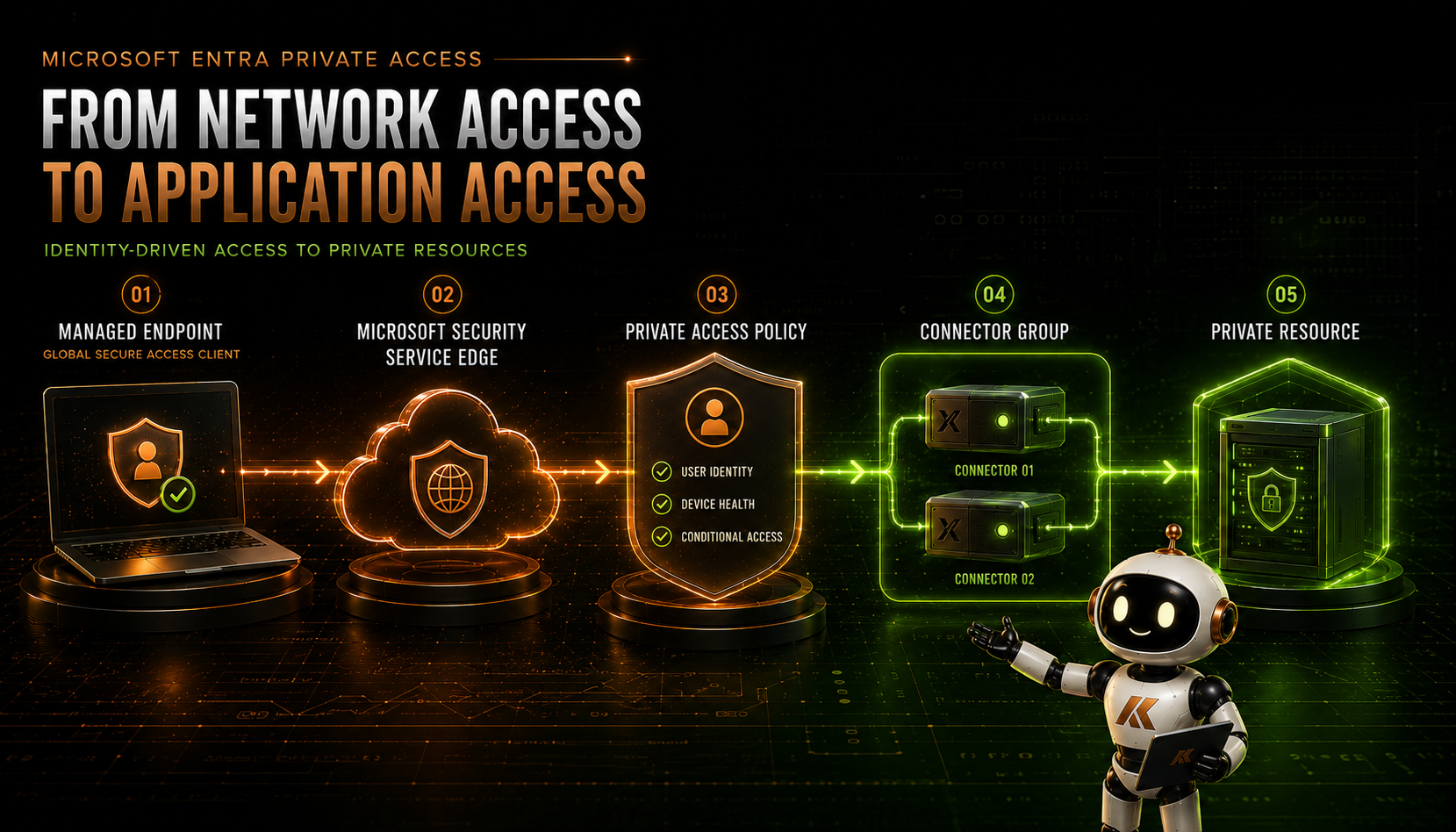
The traffic path contains five main stages:
- A managed endpoint runs the Global Secure Access client.
- The client identifies traffic that matches the Private Access configuration.
- The traffic is sent to Microsoft’s Security Service Edge.
- Microsoft Entra evaluates the user’s access to the relevant Quick Access or Private Access application.
- The service sends the connection through an available connector to the private resource.
The private network connector establishes outbound connections to Microsoft. The design does not require an inbound VPN listener or a public IP address on the connector server.
Traffic that does not match an enabled Global Secure Access traffic profile continues to use its normal network path. That selective acquisition is one of the reasons Private Access can be introduced alongside an existing VPN.
Microsoft provides its current architectural overview in Learn about Microsoft Entra Private Access.
The components involved
A Private Access deployment contains several distinct components. Understanding their responsibilities makes design and troubleshooting much easier.
Global Secure Access client
The Global Secure Access client runs on the endpoint and acquires traffic based on the traffic forwarding profiles and application segments delivered to that user.
On Windows, the client uses a lightweight filter driver rather than presenting itself as a conventional VPN connection. Microsoft specifically notes that this allows it to coexist with many VPN and Security Service Edge clients, although coexistence still needs to be tested with the organisation’s actual endpoint, proxy and security configuration.
The client is currently available for Windows, macOS, iOS and Android. The mobile platforms have different deployment methods and limitations, which I will cover separately in this series.
Microsoft documents the client architecture in Global Secure Access client overview.
Private Access traffic forwarding profile
The Private Access traffic forwarding profile tells the client that Private Access traffic should be acquired and sent to Global Secure Access.
Users need the appropriate licensing and must be included in the traffic profile assignment. They must also be assigned to the Quick Access or Private Access enterprise application that contains the destination they are trying to reach.
Enabling the traffic profile alone does not publish every private resource. The destinations are defined through Quick Access and individual Global Secure Access applications.
Quick Access
Quick Access is an enterprise application that acts as a container for a broad set of private destinations. Application segments can be created using:
- Fully qualified domain names
- Individual IP addresses
- IP ranges
- Ports
- TCP or UDP
Quick Access is useful when migrating a set of existing VPN routes, supporting multiple related services or discovering which resources a pilot group actually uses.
The name can be misleading. Quick Access is not a special tunnel that bypasses identity controls. Users and groups are assigned to the Quick Access enterprise application, and Conditional Access can be applied to it.
Microsoft’s configuration process is documented in Configure Quick Access for Global Secure Access.
Global Secure Access applications
An individual Global Secure Access application provides a more granular boundary. It contains one or more specific application segments, is assigned to a connector group and can have its own users, groups and Conditional Access policies.
For example, an organisation might publish:
- An internal finance web application on TCP 443
- A management server on TCP 3389
- A database administration endpoint on TCP 1433
- An SSH management service on TCP 22
- A legacy line-of-business application using a defined TCP or UDP port
This allows access to be assigned at the application level rather than through a broad collection of network routes.
Microsoft refers to this as per-app access and documents the process in Configure per-app access using Global Secure Access applications.
Private network connectors
Private network connectors are lightweight agents installed on supported Windows Server systems. They establish outbound connectivity to Microsoft’s service and provide access to the private resources reachable from their network.
The connector needs:
- Outbound access to the required Microsoft service endpoints
- Network connectivity to the published applications
- Working DNS resolution for the application names
- A supported Windows Server and .NET configuration
- Appropriate monitoring, patching and lifecycle management
The connector does not need a public IP address or an inbound firewall rule. Connections are initiated outbound from the connector network.
Microsoft documents the connector requirements in Configure connectors for Microsoft Entra Private Access.
Why Private Access resembles a VPN
From the user’s perspective, Private Access can feel very similar to a VPN:
- Internal applications remain available away from the office.
- Existing desktop and web applications can continue to use their normal names.
- Users do not need to browse through a separate application portal.
- Common TCP and UDP applications can be carried through the service.
- The client can run quietly in the background without requiring the user to select a VPN profile.
That similarity is useful during migration, but the underlying architecture is different.
| Area | Traditional remote-access VPN | Microsoft Entra Private Access |
|---|---|---|
| Access boundary | Network, subnet or route | Defined application or resource |
| Traffic acquisition | Full-tunnel or split-tunnel routes | Configured FQDN, IP, port and protocol |
| Primary authorisation | VPN policy followed by network controls | Entra assignment and application-targeted Conditional Access |
| Private connectivity | Inbound VPN gateway | Outbound private network connectors |
| Client addressing | Commonly assigns an internal VPN address | Does not place the endpoint directly on the private network |
| DNS | Often pushes internal DNS servers and suffixes | Private DNS uses the Global Secure Access service and connector-side resolution |
| Segmentation | Routes, VLANs, ACLs and firewalls | Quick Access and individual Global Secure Access applications |
| Availability | Redundant VPN gateways or concentrators | Multiple connectors in a connector group |
| User experience | Connect to a network | Access assigned resources through the Global Secure Access client |
| Policy context | Frequently connection and network based | Identity, device and application aware |
The important difference is that Private Access can make the application—not the network—the object being protected.
Quick Access as a migration bridge
Quick Access is likely to be the starting point for many organisations because it can reproduce a useful subset of existing VPN connectivity without requiring every application to be understood on day one.
For example, a pilot configuration might contain:
intranet.contoso.comon TCP 443files.contoso.comon TCP 44510.20.30.50on TCP 3389- A restricted management subnet on defined administrative ports
- An internal DNS suffix resolved through Microsoft Entra Private DNS
That lets the infrastructure team prove the service, the endpoint deployment, DNS, connectors and application behaviour.
However, placing all RFC1918 address space into Quick Access would simply reproduce the broad VPN access model through a different transport.
A better strategy is:
- Use Quick Access to establish an initial migration boundary.
- Collect application usage through diagnostics and Application Discovery.
- Identify the destinations that users actually require.
- Create individual Global Secure Access applications for suitable workloads.
- Assign each application to the correct user or administrative group.
- Remove the migrated destinations from the broader Quick Access definition.
Microsoft’s per-app access segmentation tutorial describes this transition from discovered Quick Access traffic to more precise application publishing.
This is also why Quick Access and published applications should not be treated as competing features. Quick Access can help begin the migration; per-app access can help complete the move towards least privilege.
I will examine that design decision in more detail later in this series.
DNS is part of the access architecture
VPN migrations frequently fail because the route is tested before name resolution.
An application may depend on:
- An internal DNS suffix
- Split-brain DNS
- Short hostnames
- Service records
- A separate authentication hostname
- Dynamically returned application addresses
- Multiple API and content hostnames
Microsoft Entra Private DNS allows internal DNS suffixes to be added to the Quick Access configuration. Queries matching those suffixes are sent to the Global Secure Access DNS proxy. If the result is not already cached, the query is forwarded through the configured connector group and resolved using the DNS configuration of the connector server.
At a high level:
- The endpoint requests an internal FQDN.
- The Global Secure Access client directs the matching query to Microsoft’s DNS proxy.
- The service forwards the query to the connector group.
- The connector uses its locally configured DNS resolver.
- The response returns through the service.
- The client uses a synthetic address to steer the resulting application traffic through Private Access.
Microsoft documents this process in Understand Microsoft Entra Private DNS.
The connector’s DNS configuration is therefore part of the production design. If two connectors in the same group resolve a hostname differently, user behaviour may become inconsistent. If a connector can reach Microsoft but cannot resolve the application, its portal status can still appear healthy while the application fails.
Encrypted DNS requires attention
At the time of writing, FQDN-based traffic acquisition is not compatible with secure DNS mechanisms such as DNS over HTTPS, DNS over TLS or DNSSEC in the Global Secure Access client. Microsoft advises disabling secure DNS where it prevents the client from acquiring the configured destinations.
This must be assessed across:
- Operating-system DNS configuration
- Browser-managed secure DNS
- Endpoint security software
- Existing DNS filtering services
- Proxy and Secure Web Gateway clients
Do not discover this after migrating a critical application. Include DNS behaviour in the pilot test plan and review the current Global Secure Access known limitations before deployment.
Connector placement and resilience
Connector placement should follow the applications, not necessarily the users.
If an application is hosted in Azure, place an appropriate connector group in or near the virtual network containing that application. If another application remains in a datacentre, use connectors with direct and resilient access to that datacentre resource.
Avoid sending application traffic across unnecessary site-to-site links simply because the first connector was installed in the organisation’s head office.
For production workloads, use at least two connectors in each active connector group. Connectors in the same group operate as a unit for load balancing and high availability.
Connector groups can be organised by:
- Geographic location
- Datacentre or cloud region
- Security zone
- Production and non-production
- Application sensitivity
- Business entity
- Active and disaster-recovery sites
Microsoft provides further design scenarios in Microsoft Entra private network connector groups.
A green connector is not an end-to-end health check
An active connector status confirms that the connector can communicate with Microsoft’s service. It does not prove that the connector can:
- Resolve the application’s hostname
- Reach the destination port
- Complete the application’s authentication flow
- Access every dependency used by the application
- Provide acceptable performance to the user
Operational monitoring should therefore test both connector health and representative application journeys.
Protect the connector infrastructure
Connectors provide a path to private resources and should be treated as sensitive infrastructure.
- Use dedicated supported Windows Server systems for production deployments.
- Restrict interactive administration.
- Apply security updates and monitor connector versions.
- Limit outbound access to the required service and application destinations.
- Do not expose inbound management ports to the internet.
- Exclude the required Global Secure Access communication from TLS interception where Microsoft specifies.
- Monitor connector capacity and application latency.
High availability protects against a connector failure. It does not automatically protect against a site, DNS, firewall or application failure, so the wider dependency chain still needs to be designed.
Applying identity and device controls
Quick Access and individual Global Secure Access applications are represented as enterprise applications in Microsoft Entra ID. Users and groups can be assigned to them, and Conditional Access policies can target those applications.
A baseline policy could require:
- Multifactor authentication or an appropriate authentication strength
- A compliant device
- A Microsoft Entra hybrid joined device where required
- An acceptable sign-in risk
- Approved client platforms
Privileged applications may require a phishing-resistant authentication strength and a dedicated administrative device.
There is an important distinction: Conditional Access is applied to the Quick Access or Global Secure Access application, not to every packet in the Private Access tunnel as a single universal target. Microsoft calls this out in its current limitations.
The users must also be correctly assigned to both the traffic forwarding profile and the relevant application. Missing either assignment can result in traffic not being acquired or access being denied.
Start new Conditional Access policies in report-only mode, validate the sign-in behaviour and maintain appropriate emergency access exclusions. Microsoft’s configuration guidance is available in Apply Conditional Access policies to Private Access apps.
Conditional Access protects the route to the application. It does not replace the application’s own authentication and authorisation. The destination must still enforce appropriate user permissions.
Application-centric access
Private Access makes it possible to define access using the destination, port and protocol rather than giving the user an unrestricted network route.
This is particularly valuable for:
- Remote Desktop to defined management servers
- SSH to controlled Linux hosts
- Internal web applications
- File services
- Database administration
- Legacy client/server applications
- Privileged access to management platforms
- Contractor access to a limited service
Network firewalls remain relevant. Private Access should be used with, not instead of, segmentation and destination-side controls.
The difference is that a firewall no longer needs to infer the user solely from a VPN address pool. The route itself can be assigned through Microsoft Entra ID before the connection reaches the private network.
What happens when the user is in the office?
An organisation may not want traffic to leave the local network, pass through Global Secure Access and return through a connector when the endpoint is already beside the application.
Microsoft Entra Private Access includes Intelligent Local Access. It allows the Global Secure Access client to identify that it is connected to a configured private network and use local connectivity for selected applications.
The client performs DNS-based probes to determine whether the device is on the corporate network. When the configured conditions are met, local bypass can be enabled for the selected applications.
This can reduce unnecessary hairpinning and preserve the expected on-network experience. It also introduces another decision point that must be tested carefully across offices, wireless networks, guest networks and split DNS configurations.
Microsoft documents the feature in Configure Intelligent Local Access.
Deploying the client
The Global Secure Access client should be treated as a managed security component rather than optional user-installed software.
For Windows devices, it can be packaged and deployed through Microsoft Intune. A controlled deployment should include:
- A dedicated pilot group
- Current supported client versions
- Detection and remediation reporting
- User and device assignment validation
- Testing with existing VPN and proxy clients
- Advanced Diagnostics access for the support team
- A defined upgrade process
- A decision on whether users may disable the client
Users should understand that there may no longer be a VPN button to press. When the client is healthy and the user is assigned, matching application traffic is acquired automatically.
That is normally a better experience, but it changes the support conversation. Instead of asking whether the VPN is connected, the service desk needs to determine whether:
- The Global Secure Access client is healthy
- The Private Access channel is connected
- The user received the correct forwarding profile
- The application appears in the client configuration
- DNS resolved through the expected path
- Conditional Access succeeded
- A connector could reach the destination
A phased VPN migration strategy
Do not begin by removing the VPN client.
Private Access can coexist with existing remote-access technology while applications are discovered, tested and migrated. The safest approach is a deliberate sequence.
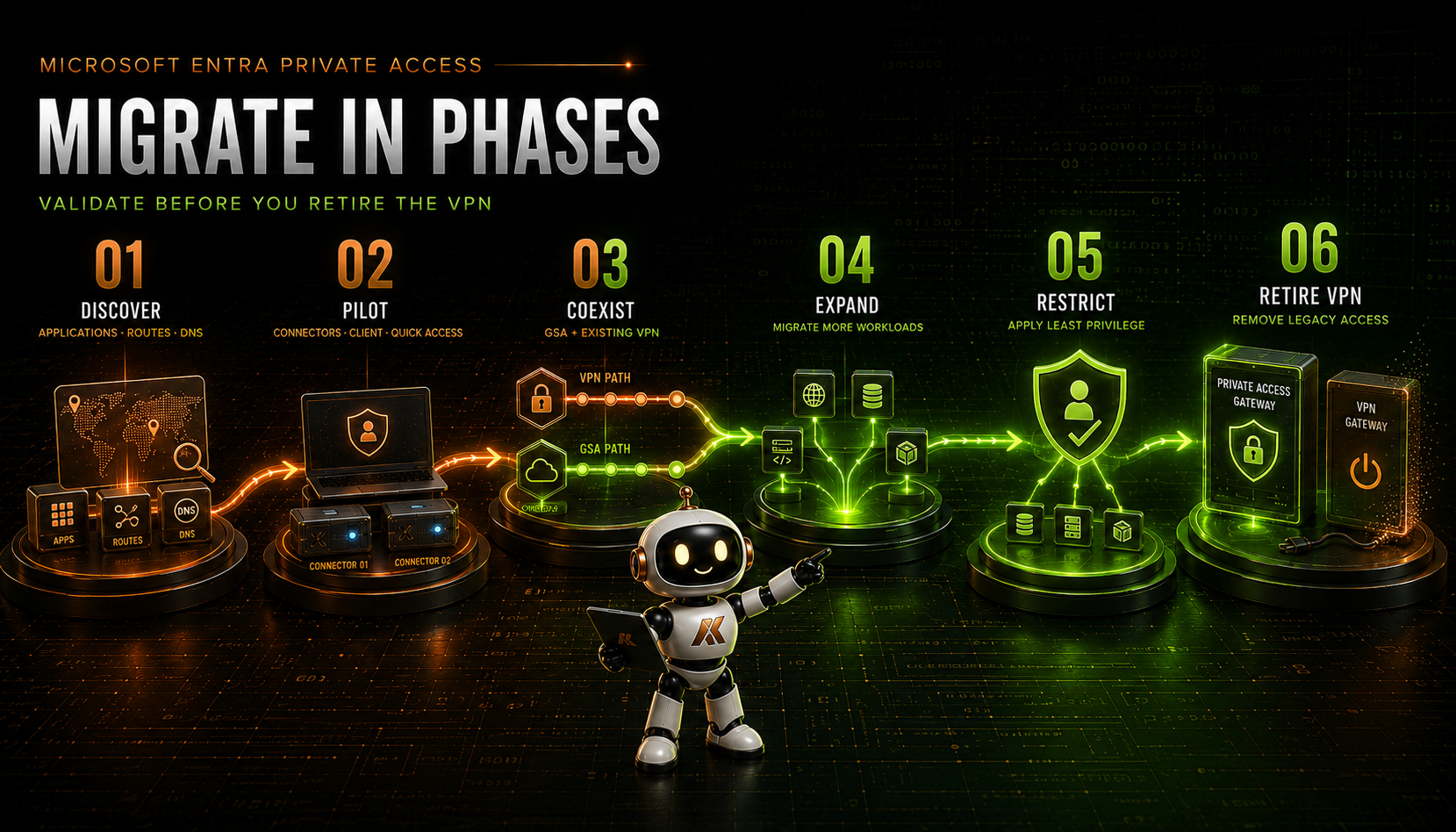
Phase 1: Discover
Start with evidence rather than the VPN configuration alone.
Document:
- Users and groups with VPN access
- Published routes and address pools
- Internal DNS servers and suffixes
- Applications, owners and business criticality
- Destination FQDNs, IP addresses, ports and protocols
- Authentication and single sign-on dependencies
- Device-management traffic
- Administrative use cases
- Third-party and contractor access
- Applications that use short names or dynamic endpoints
- Recovery and emergency-access dependencies
VPN concentrator logs, firewall logs, DNS logs and endpoint telemetry can help reveal what users actually access. Speak to application owners as well; a network flow does not explain whether the connection is still required.
Phase 2: Pilot
Build the minimum production-shaped foundation:
- A dedicated connector group
- Two connectors for resilience
- The Private Access traffic forwarding profile
- A tightly scoped Quick Access configuration
- A pilot Global Secure Access client deployment
- Application-targeted Conditional Access in report-only mode
- Logging and support procedures
Choose applications with known destinations, clear ownership and low operational risk. Test from multiple networks and device types, including the office if Intelligent Local Access will be used.
Phase 3: Coexist
Run Private Access and the existing VPN together while the service is validated.
Pay particular attention to:
- Overlapping routes
- FQDN and IP acquisition precedence
- DNS and secure DNS
- Proxy auto-configuration files
- Endpoint security clients
- Local subnet conflicts
- Applications that open secondary connections
- Performance differences between the two paths
Decide which service should acquire each destination. Do not leave the result to accidental route precedence.
During coexistence, users should retain a tested route back to the existing VPN if a migrated application fails. That fallback should be temporary and monitored rather than becoming the permanent default.
Phase 4: Expand
Add more applications only after the foundation is stable.
Use Application Discovery and support data to identify frequently used Quick Access destinations. Group applications by location and connector dependency, then migrate them in manageable waves.
Each wave should include:
- Technical validation
- Application-owner acceptance
- Conditional Access testing
- Connector failover testing
- User communication
- Support-team readiness
- A rollback decision
Phase 5: Restrict
This is where the project delivers its real Zero Trust value.
Move suitable destinations from broad Quick Access definitions into individual Global Secure Access applications. Assign them only to the users and groups that need them and apply controls appropriate to the application.
Review and remove:
- Unused routes
- Entire subnets published for one host
- Broad user assignments
- Legacy VPN entitlements
- Temporary pilot exceptions
- Overlapping application segments
The objective is not merely to carry the same traffic through a new service. It is to reduce the amount of access granted.
Phase 6: Retire the VPN
Retire the legacy VPN only when:
- Required applications have been migrated or intentionally excluded
- DNS behaviour is understood
- Connector resilience has been proven
- Conditional Access policies are enforced
- The service desk can diagnose common failures
- Application owners have accepted the new path
- Unsupported use cases have an approved alternative
- Emergency and recovery access has been documented and tested
Remove access in stages. Begin with user entitlement and unused routes before decommissioning gateways, certificates, firewall rules and authentication integrations.
Retiring the VPN should be the result of a successful migration—not the event used to force one.
What Private Access does not automatically replace
Microsoft Entra Private Access can replace many remote-access scenarios, but it is not a universal substitute for every form of network connectivity.
As of August 2026, important considerations include:
The client is required
Private Access traffic is currently acquired through the Global Secure Access client. Global Secure Access remote networks can carry Microsoft and Internet traffic profiles, but they cannot currently acquire the Private Access profile.
Devices that cannot run the client require another design.
Local-subnet overlap can affect IP-based acquisition
Private Access tunnelling to an IP destination works only when the destination range is outside the endpoint’s local subnet. Home networks that overlap corporate address space can therefore cause problems for IP-based definitions.
Using appropriate FQDN-based application definitions can reduce dependence on ambiguous addresses, but DNS and application behaviour still need to be tested.
Secure DNS can prevent FQDN acquisition
DNS over HTTPS, DNS over TLS and DNSSEC are not currently supported by the client for this acquisition model. If the client cannot observe the expected DNS resolution, the application traffic may bypass the Private Access path.
Multi-session systems require review
The Global Secure Access client does not currently support concurrent user sessions on the same machine. Multi-session Remote Desktop and virtual desktop platforms therefore require careful assessment.
Network discovery is not application publishing
Applications that rely on broadcast, multicast, peer discovery, unpredictable dynamic ports or unrestricted lateral network access may not translate neatly into an application-segment model.
Site-to-site connectivity is a different requirement
Private Access is primarily designed to provide users and managed endpoints with access to private resources. It should not be assumed to replace every site-to-site tunnel, server-to-server dependency or infrastructure-routing requirement.
Recovery paths still matter
Cloud-delivered access depends on internet connectivity, Microsoft services, the endpoint client, identity services, connectors, DNS and the destination application. Highly privileged or business-critical environments still need a documented recovery strategy.
Review Microsoft’s known limitations against the organisation’s requirements before committing to complete VPN retirement. The product evolves quickly, so this review should be repeated throughout the migration.
Testing the complete access path
Successful testing must go beyond confirming that an application’s landing page opens.
Use the Global Secure Access client’s Advanced Diagnostics to verify:
- The Private Access channel is connected.
- The expected forwarding profile is present.
- The destination FQDN or IP appears in the configuration.
- The traffic action is Tunnel.
- The traffic uses the Private Access channel.
- The resolved destination and port are correct.
Then validate the wider journey:
- Test the application from outside the corporate network.
- Test with an assigned and an unassigned user.
- Test a compliant and a non-compliant device where applicable.
- Confirm that Conditional Access produces the expected result.
- Stop one connector and confirm that new connections continue through the second connector.
- Test authentication, redirects, APIs, downloads and secondary application functions.
- Test access from the corporate network when Intelligent Local Access is enabled.
- Confirm that removing an assignment removes access.
- Confirm that the old VPN route is no longer used for migrated applications.
The Microsoft troubleshooting process is available in Troubleshoot application access.
Security and operational recommendations
Do not recreate the entire network
Publishing every private address range may make the first pilot successful, but it preserves the same broad-access problem. Start with the minimum useful boundary and reduce it over time.
Use groups for assignment
Assign users to Quick Access and Private Access applications through governed Microsoft Entra groups. Avoid building an environment of unexplained direct assignments.
Apply Conditional Access at the application boundary
Match the strength of the policy to the resource. A routine intranet and a domain-controller management interface should not have identical access requirements.
Design connector groups deliberately
Use pairs of connectors and place them near the resources they serve. Separate connector groups where geography, security zones, ownership or recovery requirements differ.
Keep application segments precise
Avoid overlapping segments and do not publish an entire subnet when one FQDN and port would meet the requirement.
Monitor the user journey
Connector availability is only one part of the service. Monitor name resolution, destination reachability, authentication and application performance.
Maintain coexistence for a defined period
Running both services indefinitely increases cost and complexity. Give each migration wave an entry criterion, acceptance criteria and a target date for removing the corresponding VPN dependency.
Keep the platform current
Test and deploy supported client and connector versions. Review known limitations and release changes regularly because capabilities continue to evolve.
When is Private Access a good fit?
Microsoft Entra Private Access is a strong fit when:
- Managed users need remote access to defined private resources.
- The organisation wants to reduce broad network-level access.
- Microsoft Entra ID is the primary identity control plane.
- Conditional Access and device compliance should protect private-resource access.
- Applications can be represented by predictable FQDNs, IP addresses, ports and protocols.
- Outbound connectors can be deployed close to the resources.
- The Global Secure Access client can be deployed and managed on the endpoints.
Retaining another connectivity method may still be appropriate when:
- Devices cannot run the required client.
- The requirement is site-to-site rather than user-to-application.
- An application depends on broad discovery or unsupported traffic patterns.
- Multi-session hosts are required.
- Infrastructure recovery must operate independently of the normal cloud access path.
- A legacy dependency has not yet been understood well enough to migrate safely.
That is not a failure of the architecture. A Zero Trust migration should make exceptions explicit and constrained rather than forcing every workload through the same pattern.
Final thoughts
Replacing a VPN should not mean rebuilding every existing route in another portal.
The real opportunity is to move from a model in which a user connects to the network to one in which a verified identity and device are granted access to a defined application under controlled conditions.
Microsoft Entra Private Access provides the components needed to make that change: selective traffic acquisition, Quick Access, per-app publishing, Conditional Access, Private DNS and outbound private network connectors.
Quick Access can provide the bridge from existing VPN routes. Application Discovery can show what users really need. Individual Global Secure Access applications can then create the more granular access boundaries that the traditional network tunnel could not provide easily.
The migration should still be deliberate. Discover the dependencies, pilot the service, coexist with the VPN, expand in controlled waves, restrict access and only then retire the legacy platform.
The measure of success is not that the old VPN gateway has been turned off. It is that users can reach the applications they need without being granted access to the network they do not.
What’s next?
Replacing traditional VPN access on managed computers is only part of the story. Users also need secure access from smartphones and tablets, but the Global Secure Access experience on mobile platforms is significantly different from the Windows client.
In the next article, Global Secure Access on iOS, iPadOS and Android, I will explore Microsoft Defender integration, Intune deployment, mobile onboarding, platform limitations, user experience considerations and the common mistakes organisations encounter when introducing Global Secure Access to mobile devices.
Further reading
- Learn about Microsoft Entra Private Access
- Global Secure Access client overview
- Configure Quick Access for Global Secure Access
- Configure per-app access using Global Secure Access applications
- Understand Microsoft Entra Private DNS
- Microsoft Entra private network connector groups
- Apply Conditional Access policies to Private Access apps
- Configure Intelligent Local Access
- Known limitations for Global Secure Access
Comments
No comments yet — be the first to leave one below.