Global Secure Access on Mobile Devices
So far in this series I’ve looked at Global Secure Access from a fairly traditional endpoint perspective.
Windows.
macOS.
Replacing VPN access.
Providing a fixed egress IP for applications that still insist on source IP allow-listing.
But there is another endpoint sitting in most organisations that we shouldn’t ignore.
The mobile device.
Phones and tablets have become proper business devices.
We access email from them. Teams. SharePoint. Line-of-business applications. Admin portals. Internal web applications.
In my case, I regularly use my iPad as an actual working device rather than just a bigger screen for checking email.
And that raises an interesting question.
If we are moving towards an identity-aware access model with Global Secure Access, why should that stop when the endpoint happens to be running iOS or Android?
It doesn’t have to.
Microsoft Global Secure Access supports iOS, iPadOS and Android, allowing the same broader access architecture to start extending beyond the traditional desktop.
And that opens up some interesting possibilities.
The Mobile Access Problem
The traditional corporate security model was heavily influenced by location.
A device in the office was connected to the corporate network.
That network had firewalls, proxies, web filtering and access to internal applications.
Take the device outside the office and things became more complicated.
VPNs extended the corporate network to remote endpoints, while mobile devices often ended up with a completely different access model.
But think about how a managed mobile device is actually used today.
It could be connected through:
- corporate Wi-Fi;
- home broadband;
- hotel Wi-Fi;
- airport Wi-Fi;
- public Wi-Fi;
- 4G; or
- 5G.
The network changes constantly.
The identity and device don’t.
That’s why Global Secure Access becomes interesting.
Rather than making the network the primary security boundary, we can start making access decisions around the user, device and resource being accessed.
That’s a much better fit for mobile.
Global Secure Access Isn’t Just a Windows Client
This is something that I think can easily get missed when people first look at Global Secure Access.
It isn’t simply a Windows client for replacing a VPN.
Microsoft currently provides Global Secure Access clients for:
- Windows;
- macOS;
- iOS and iPadOS; and
- Android.
On mobile platforms, Global Secure Access is integrated with Microsoft Defender for Endpoint.
That gives us the ability to acquire supported traffic from the mobile device and send it through the appropriate Global Secure Access traffic profile.
Those profiles can include:
Microsoft traffic
Internet traffic
Private Access traffic
Which means we’re no longer just talking about accessing an internal application from a phone.
We’re potentially talking about extending the broader Global Secure Access architecture to mobile endpoints as well.
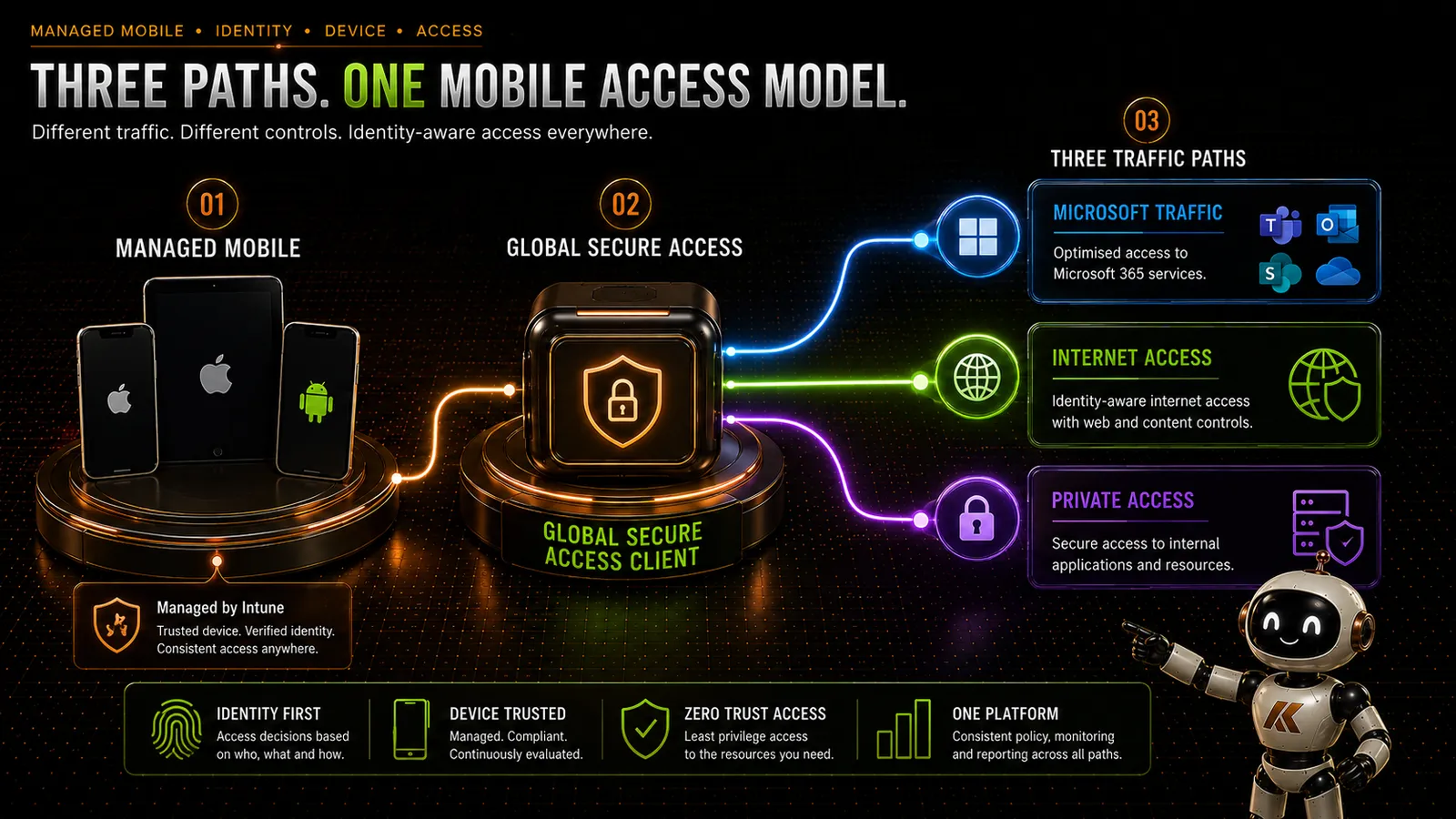
Three Traffic Paths
One of the things I like about Global Secure Access is that we don’t need to treat every destination in exactly the same way.
A managed mobile device can potentially have different traffic paths depending on what the user is accessing.
Conceptually:
Microsoft 365
Mobile Device → Global Secure Access → Microsoft Traffic Profile → Microsoft 365
Internet
Mobile Device → Global Secure Access → Entra Internet Access → Internet
Private Applications
Mobile Device → Global Secure Access → Entra Private Access → Private Network Connector → Application
That distinction matters.
We’re not simply building a tunnel and throwing everything through it.
We can apply the appropriate access model to the appropriate traffic.
Entra Internet Access on Mobile
This is probably the part that interests me most from an organisational security perspective.
A corporate mobile device doesn’t suddenly stop being a corporate endpoint because somebody disconnects from the office Wi-Fi.
If the organisation has decided that certain categories of internet content should be restricted, ideally that policy should follow the user and device.
Not the building.
With Microsoft Entra Internet Access, internet traffic acquired from the mobile device can be evaluated against the organisation’s Global Secure Access internet controls.
That gives us the opportunity to apply a more consistent internet security model regardless of whether the device is using corporate Wi-Fi, home broadband or a mobile network.
This starts to change the conversation around mobile web security.
Instead of:
“What network is this device connected to?”
we can start asking:
“Who is using this device, what are they trying to access, and what policy should apply?”
That is much closer to the Zero Trust model we’ve been talking about for years.
This Could Be Particularly Interesting for Managed Devices
Global Secure Access also supports scenarios involving registered but unmanaged devices.
That’s useful, and there are definitely scenarios where organisations may want to explore that.
But I’m particularly interested in organisation-managed mobile devices.
If the device is already managed through Microsoft Intune, we have much more context available to us.
We can manage the configuration.
We can establish compliance requirements.
We know considerably more about the state of the endpoint.
And we can combine that device management position with identity-aware access controls.
For a corporate iPhone, iPad or Android device, that starts to create a much more coherent model.
Intune manages the device.
Microsoft Defender provides endpoint security capabilities.
Microsoft Entra provides identity and access control.
Global Secure Access provides the access path.
Rather than treating mobile security, network security and identity as completely separate problems, they begin to work as parts of the same architecture.
Entra Private Access on Mobile
The other side of this is Microsoft Entra Private Access.
This is where mobile becomes particularly useful.
Private Access allows us to publish internal resources through Global Secure Access without requiring the endpoint to have traditional broad network-level VPN access.
That resource might be:
- an internal web application;
- a management interface;
- an application hosted in Azure;
- an application hosted on-premises;
- an internal service using a private IP address; or
- another resource reachable through the Private Network Connector infrastructure.
The mobile device doesn’t need to become another endpoint sitting broadly on the corporate network.
Instead, we can provide access to the resources the user actually needs.
That’s a very different model from:
Connect VPN → Join Network → See Everything Routing Allows
and moves us towards:
Authenticate → Authorise → Access Specific Resource
My Own Use Case
This is actually how I use Global Secure Access myself.
I have internal infrastructure that I don’t want exposed directly to the internet.
That includes management interfaces and internal resources that I occasionally want to access from my iPad.
Historically, the obvious answer would have been:
VPN.
Connect the iPad to the VPN, give it network connectivity into the environment, and then access the resource.
But with Entra Private Access I can take a different approach.
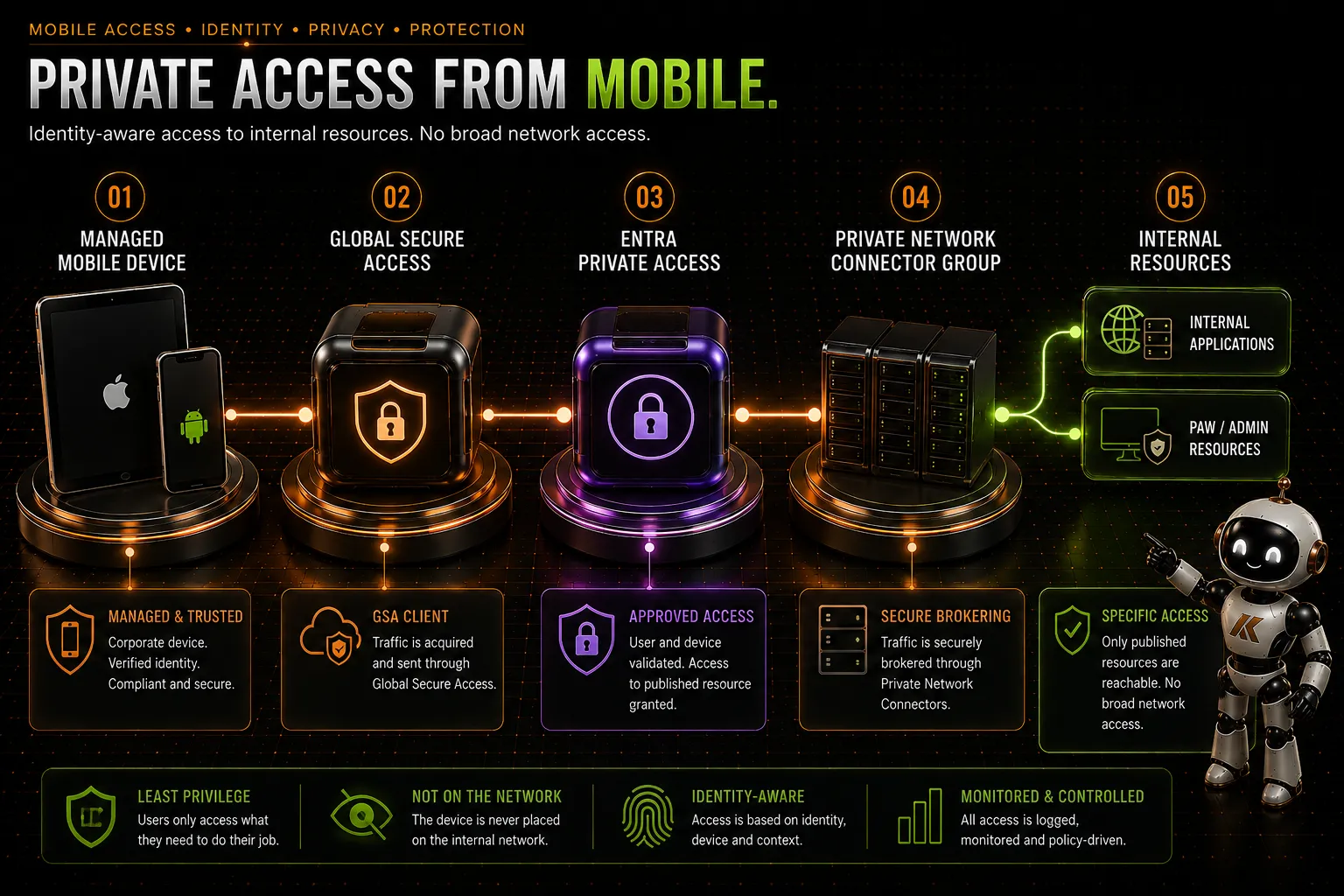
My iPad connects through Global Secure Access.
The resource is published through Entra Private Access.
Traffic is brokered through my Private Network Connector infrastructure.
And I get access to the resource without needing to expose it publicly or give the iPad broad access to the internal network.
Conceptually:
iPad → Global Secure Access → Entra Private Access → Private Network Connector → Internal Resource
I’ve also used this model for accessing my internal PAW environment.
And that’s where I think the architecture becomes much more interesting than simply saying:
“GSA works on an iPad.”
It means a mobile device can become a controlled endpoint for accessing specific internal resources without us falling back to the traditional assumption that remote access requires network-level VPN connectivity.
Quick Access or Per-App Access?
There is another architectural decision here.
Entra Private Access allows us to define private resources using Quick Access or through individual Private Access applications.
Quick Access can be useful where there is a broader set of internal resources that need to be reachable.
But for mobile devices, I think there is a strong argument for being more deliberate.
If a mobile user only needs access to three internal applications, why give the device a broad range of private addresses?
Publish the applications.
Assign the appropriate users.
Apply Conditional Access.
Give the endpoint access to what it actually needs.
That’s a much more Zero Trust approach than simply recreating a traditional VPN address space inside Global Secure Access.
There will absolutely be cases where Quick Access makes sense.
But it shouldn’t become:
“Here’s the entire internal network because that’s what the VPN used to do.”
Conditional Access Changes the Conversation
This is another important part of the architecture.
Private Access applications can be represented through Microsoft Entra and controlled using Conditional Access.
That means access to an internal application can become part of the same identity control plane we already use for cloud applications.
Depending on the scenario and supported controls, that can allow us to consider things such as:
- user identity;
- device state;
- authentication requirements;
- location or network context;
- risk; and
- other Conditional Access conditions.
That is a significant shift from a traditional VPN.
A VPN often answers:
“Can this user connect to this network?”
What I actually want to know is:
“Should this user, from this device, under these conditions, be allowed to access this application?”
Those are not the same question.
What About the User Experience?
On both iOS/iPadOS and Android, Global Secure Access is integrated into the Microsoft Defender mobile experience.
There is some platform-specific implementation underneath this.
On iOS, for example, the client uses a local/self-looping VPN mechanism.
That word VPN can make the architecture sound more traditional than it actually is.
It isn’t a conventional VPN tunnel back into your corporate network.
It’s part of how the operating system allows the Global Secure Access/Defender client to acquire the traffic that needs to be processed.
Android similarly integrates Global Secure Access into the Microsoft Defender application.
For users, the objective should ultimately be fairly boring.
And that’s a good thing.
They use the device.
They access the resource.
The security architecture works in the background.
There Are Some Things to Think About
Mobile support doesn’t mean I’d immediately enable Global Secure Access across every corporate phone and tablet.
This needs the same controlled approach as any other significant endpoint networking change.
There are currently platform-specific considerations and known limitations that need to be understood.
For example, Microsoft currently documents limitations around areas including:
- coexistence with Microsoft Tunnel;
- secure DNS;
- some QUIC traffic on iOS;
- third-party endpoint protection coexistence; and
- shared-device scenarios.
Android also has its own platform and configuration requirements.
These things will evolve, so I wouldn’t build a mobile deployment based purely on assumptions about how the Windows client behaves.
Pilot it.
Test the applications people actually use.
Test Wi-Fi.
Test mobile data.
Test switching between networks.
Test the internet traffic path.
Test private applications.
Test Conditional Access.
And, importantly, test the user experience.
Mobile devices move between networks far more frequently than most laptops do.
Your testing should reflect that.
Mobile Should Be Part of the Architecture
I wouldn’t necessarily make mobile devices part of day one of a Global Secure Access deployment.
If I’m replacing an existing VPN or Secure Web Gateway, there may be much more immediate priorities around Windows endpoints.
But I would absolutely consider mobile when designing the target architecture.
Because once Global Secure Access is established, the question becomes:
Why should the security model stop at the laptop?
If an organisation owns and manages an iPhone, iPad or Android device, that device is part of the endpoint estate.
It accesses organisational data.
It accesses SaaS applications.
And increasingly, it accesses internal applications.
Extending identity-aware internet and private application access to those devices feels like a natural evolution of the architecture.
Different Endpoints. One Access Architecture.
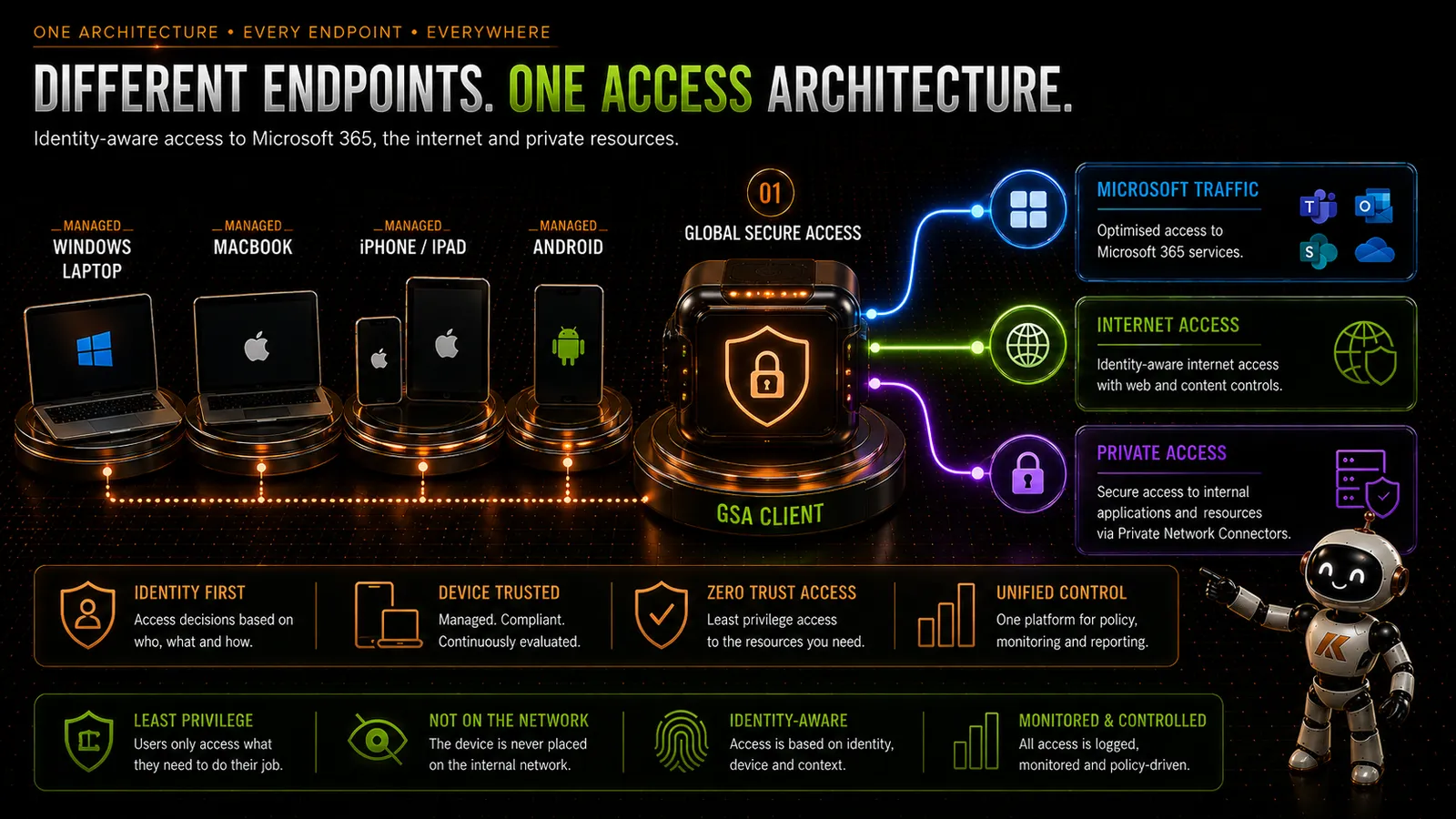
This is ultimately where I think Global Secure Access gets interesting.
Not because it replaces a VPN.
Not because it provides web filtering.
And not because there’s now an app on an iPhone.
It’s because we can start bringing traditionally separate access architectures together.
Windows doesn’t need one remote access model.
macOS another.
Mobile another.
Internal applications another.
Internet security another.
Instead, we can start building around:
Identity.
Device.
Policy.
Application.
Access.
The endpoint still matters.
The network still matters.
But neither needs to be the security boundary it once was.
And for mobile devices — endpoints that are almost permanently outside the traditional corporate network — that makes a lot of sense.
What’s Next?
So far in this series we’ve spent a lot of time looking at Entra Private Access and how Global Secure Access changes access to internal resources across different endpoint platforms.
But Global Secure Access isn’t only about replacing VPNs.
There is another side to the platform.
Entra Internet Access.
And that starts to challenge another piece of traditional enterprise security architecture: the Secure Web Gateway.
In the next part of the series, I’ll look at Entra Internet Access and what happens when web security starts moving towards the identity layer.
References
- Microsoft Learn – What is Global Secure Access?
- Microsoft Learn – Global Secure Access client overview
- Microsoft Learn – Install the Global Secure Access client for iOS and iPadOS
- Microsoft Learn – Install the Global Secure Access client for Android
- Microsoft Learn – Bring Your Own Device (BYOD) with Global Secure Access
- Microsoft Learn – Configure Quick Access to private resources
- Microsoft Learn – Configure per-app access to private resources
Comments
No comments yet — be the first to leave one below.
Published — it will appear for everyone in a couple of minutes once the site updates.