
Your Conditional Access Policy Says Require MFA. What Does That Actually Mean?
You open a Conditional Access policy.
Under Grant:
Require multifactor authentication.
Great.
MFA is enforced.
But what does that actually tell you?
Which authentication method satisfied the requirement?
Was the user prompted for MFA during this sign-in?
Was the authentication phishing-resistant?
Was the credential device-bound?
Do we know anything about the authenticator that created the credential?
Could a synced passkey satisfy the requirement?
Those aren’t all the same question.
And that is where I think we sometimes give those three little words in Conditional Access more meaning than they actually have.
“MFA requirement satisfied” tells us that an MFA requirement was satisfied. It doesn’t tell us everything about the assurance of the authentication that satisfied it.
That distinction becomes increasingly important as we move from passwords and traditional MFA towards passwordless authentication, FIDO2 passkeys, Authentication Strength and authenticator attestation.
Require MFA isn’t the problem
Let’s get one thing out of the way first.
This isn’t an article arguing that Require multifactor authentication is bad.
It isn’t.
For many applications and users, requiring MFA remains an entirely sensible security control.
The problem comes when we interpret:
Require MFA
as:
The user definitely performed the exact strong authentication ceremony I have in my head.
Those aren’t necessarily equivalent.
Conditional Access evaluates whether the authentication requirement has been satisfied.
There are multiple authentication methods and combinations capable of satisfying an MFA requirement.
That is intentional.
But it means that if the security requirement for an application is more specific than simply “the user must satisfy MFA”, we need to express that requirement more precisely.
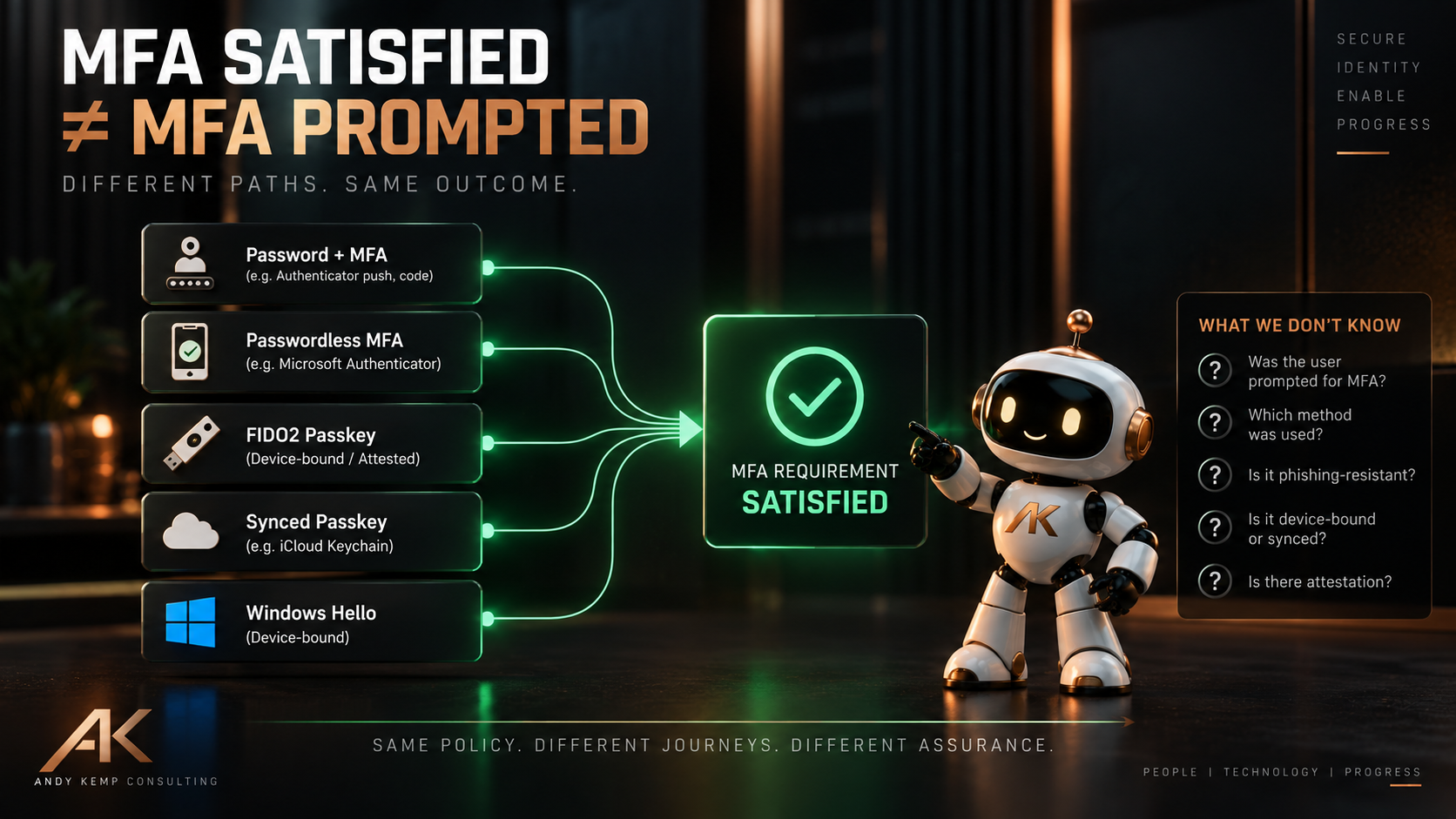
MFA satisfied does not necessarily mean MFA prompted
This is probably the first misconception worth clearing up.
Seeing an MFA requirement satisfied doesn’t necessarily mean the user just received an Authenticator notification, entered a code or performed some other additional authentication step during that exact interaction.
Microsoft Entra can recognise an existing MFA claim.
Some authentication methods also inherently provide multifactor authentication.
Windows Hello for Business, for example, can satisfy the Conditional Access MFA requirement without the familiar:
Password → MFA prompt
experience many of us still picture when somebody says “MFA”.
The same broader principle applies as we move into passwordless authentication.
The authentication can satisfy an MFA requirement without the user necessarily experiencing a separate MFA challenge at that moment.
This distinction matters when looking at sign-in logs as well.
An MFA requirement being satisfied tells us about the authentication requirement.
It doesn’t automatically mean:
The user received an MFA prompt at 09:42.
Those are different statements.
So our first distinction is:
MFA SATISFIED ≠ MFA PROMPTED
But not all MFA gives us the same assurance
Now we get to the more interesting problem.
Imagine two users accessing the same application.
Both sign-ins satisfy the Conditional Access requirement for MFA.
Does that automatically mean we should consider the authentication assurance identical?
Not necessarily.
The authentication methods used could have very different security properties.
One might involve an authentication method susceptible to phishing or social engineering.
Another might use a phishing-resistant FIDO2 credential.
Both might legitimately satisfy an MFA requirement.
But if I am protecting an ordinary productivity application, my authentication requirement might be different from the one I want protecting privileged administration of Microsoft Entra.
That isn’t really a question of:
Do we have MFA?
It is:
What authentication methods are we prepared to trust for this resource?
And that is where Authentication Strength becomes much more interesting.
Require MFA or Require Authentication Strength?
There is an important Conditional Access detail here.
When we configure the Grant controls for a Conditional Access policy, we can require:
Multifactor authentication
or
Authentication strength
These aren’t two authentication controls that we stack together to progressively make MFA stronger.
In fact, Microsoft doesn’t allow Require multifactor authentication and Require authentication strength to be configured together in the same Conditional Access policy.
There is a good reason for that.
Microsoft’s built-in Multifactor authentication strength represents the same authentication method combinations that can satisfy the Require multifactor authentication grant control.
So we are effectively choosing how specifically we want to express the authentication requirement.
Require multifactor authentication
We are asking Entra:
Has the MFA requirement been satisfied?
Require authentication strength
We are asking:
Has the user authenticated using one of the authentication method combinations that I have explicitly decided is acceptable?
Microsoft provides three built-in authentication strengths:
- Multifactor authentication strength
- Passwordless MFA strength
- Phishing-resistant MFA strength
We can also create custom authentication strengths containing the authentication method combinations appropriate to a particular requirement.
So the design decision becomes:
Do I simply need MFA to be satisfied, or do I care how it is satisfied?
If the answer is the latter, Authentication Strength gives us a way to express that requirement.
But I don’t think the conversation should become:
Require MFA = old and bad
Authentication Strength = new and good
That’s too simplistic.
They express different levels of specificity.
If any authentication method capable of satisfying Microsoft Entra MFA is acceptable for the resource, Require multifactor authentication may express the requirement perfectly well.
If only a defined set of authentication methods is acceptable, Require authentication strength lets us say so explicitly.
The important thing isn’t choosing the more sophisticated-looking control. It’s choosing the control that accurately expresses the assurance requirement.
Authentication Strength changes the question
Once we start using Authentication Strength, our question changes.
Instead of simply:
Has MFA happened?
we can start asking:
What authentication methods are acceptable for accessing this resource?
For some resources, Microsoft’s built-in Multifactor authentication strength might be sufficient.
For others, perhaps we want Passwordless MFA.
And for higher-impact access, we might require Phishing-resistant MFA.
We can go further again with a custom Authentication Strength where the built-in strengths don’t accurately represent our requirement.
This isn’t about making every user carry the strongest credential we can possibly issue.
It is about matching authentication assurance to the thing being protected.
Then passkeys made this more interesting
Passkeys are where this becomes particularly interesting.
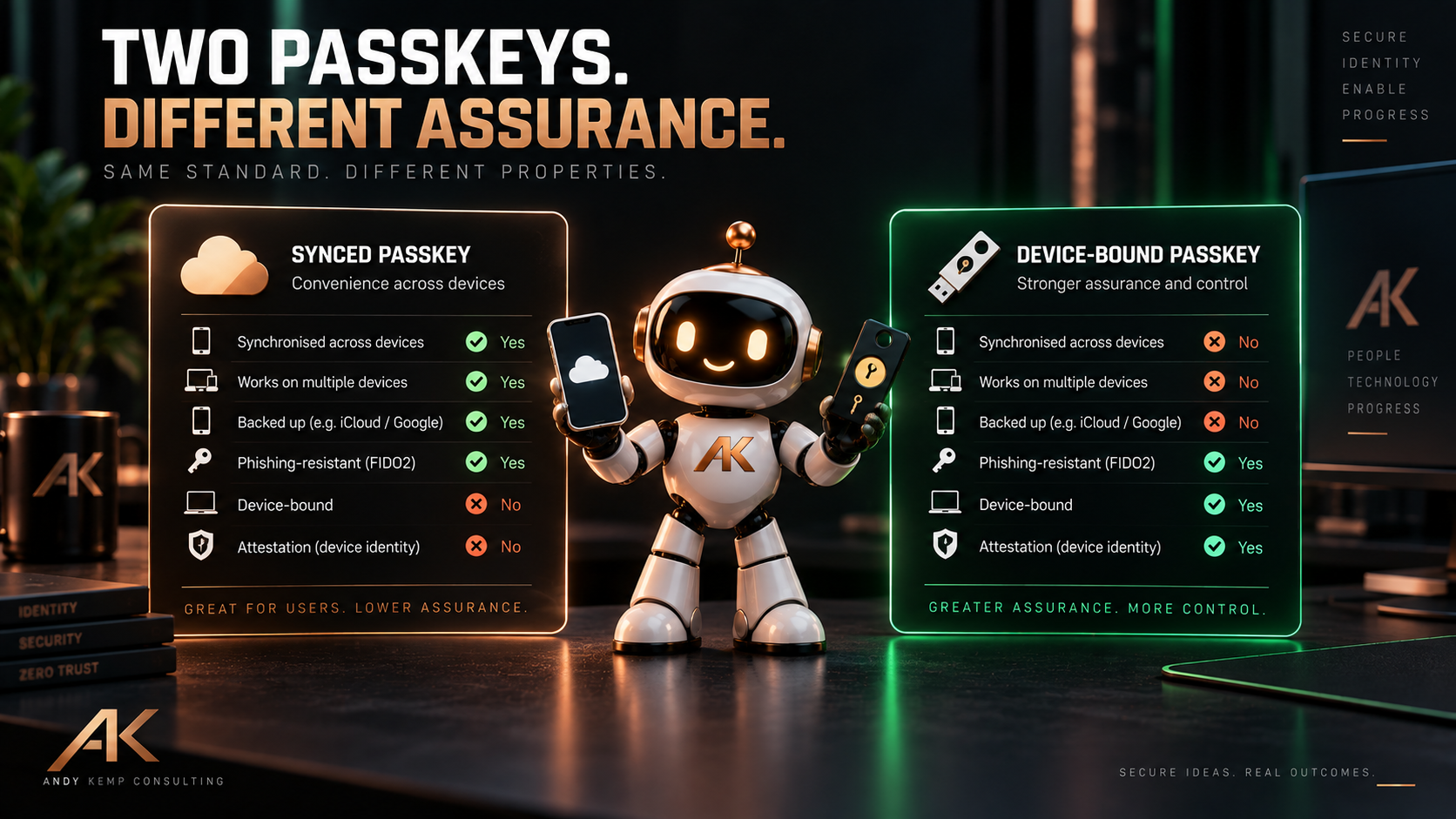
Microsoft Entra supports FIDO2 passkeys, including both device-bound passkeys and synced passkeys.
Both can provide phishing-resistant authentication.
But they don’t necessarily have identical security properties.
A device-bound passkey keeps its private key associated with the authenticator on which it was created.
Examples include FIDO2 security keys and device-bound passkeys in Microsoft Authenticator.
A synced passkey is designed to be available across a user’s trusted devices through a passkey provider’s synchronisation mechanism.
That makes passkeys considerably easier for ordinary users to adopt.
And that is a good thing.
Phishing-resistant authentication becoming easier to use is exactly what we should want.
But it also introduces an important distinction:
Phishing-resistant does not automatically mean device-bound.
A synced passkey can be phishing-resistant while also being synchronised between devices.
For a normal productivity user, that may be exactly the balance of security and usability we want.
For a highly privileged identity, we might make a different decision.
The important bit is that we make that decision deliberately.
FIDO2 doesn’t tell the whole story either
It would be tempting to solve this by saying:
Fine. We’ll require FIDO2.
But even that doesn’t necessarily tell us everything we might want to know.
Consider two passkeys.
Both use FIDO2.
Both provide phishing-resistant authentication.
But one is a synced passkey.
The other is a device-bound credential held on an authenticator whose provenance we have chosen to validate.
Those credentials share important security properties.
They also have differences.
Which brings us to attestation.
What does attestation actually give us?
Attestation gives us information about the authenticator involved in creating a credential.
With supported authenticators, Microsoft Entra can use attestation information to establish information about the authenticator being registered and enforce registration requirements accordingly.
That gives us another set of questions.
Is it MFA?
Is it passwordless?
Is it phishing-resistant?
Is the credential device-bound?
Do we have attestation for the authenticator?
Those questions overlap.
They are not synonyms.
That distinction is important.
Phishing-resistant does not automatically mean device-bound, and device-bound does not automatically mean attested.
Attestation is about what we can establish about the authenticator.
Phishing resistance describes a property of the authentication mechanism.
Device binding describes another property of the credential.
We shouldn’t collapse all of those into a single idea of “strong MFA”.
Attestation starts at registration
There is another important consideration with attestation.
It isn’t something we magically add to an existing credential later.
Attestation is evaluated when the credential is registered.
That matters when changing the authentication architecture of an existing environment.
Imagine an organisation has already allowed users to register passkeys.
Later, it decides that a particular population should only register approved, attested authenticators.
Changing the registration policy doesn’t retrospectively prove that credentials already registered meet the new requirement.
Credential lifecycle matters.
Registration matters.
And knowing what has already been issued matters.
This is another reason authentication assurance can’t begin and end with Conditional Access.
Conditional Access determines whether the authentication presented satisfies the access policy.
The authentication-method configuration and registration process determine what credentials users can actually obtain.
Those two parts of the architecture need to work together.
Synced passkeys deliberately change the model
Synced passkeys deserve particular attention here because I don’t think the right conclusion is:
Synced passkeys = bad.
Far from it.
They can remove passwords from more authentication journeys and provide phishing-resistant authentication with considerably less friction for users.
That is a substantial improvement over relying on phishable credentials.
Microsoft’s own guidance positions synced passkeys as a convenient, lower-cost option for many users, particularly outside highly regulated or sensitive scenarios.
But synced passkeys don’t support attestation.
That’s an important architectural difference.
Again, that doesn’t make one universally “good” and the other “bad”.
It means they can satisfy different assurance requirements.
For a standard user accessing Microsoft 365, I may be perfectly comfortable with a synced phishing-resistant passkey.
For an administrator capable of changing Conditional Access, authentication methods or privileged role assignments across the tenant, I might want something different.
Perhaps my requirement becomes:
Phishing-resistant.
Device-bound.
Attested.
Issued using an approved authenticator.
That’s a different security requirement from simply:
Require MFA.
And it’s also more specific than simply saying:
Use a passkey.
The resource and the potential impact should drive the requirement.
Not simply whether the technology has the word passkey attached to it.
This isn’t a simple security ladder
There is a trap here that I want to avoid.
It would be very easy to draw:
MFA → Passwordless → Phishing-resistant → Device-bound → Attested
and imply that each item is simply a higher rung on one security ladder.
That isn’t quite right.
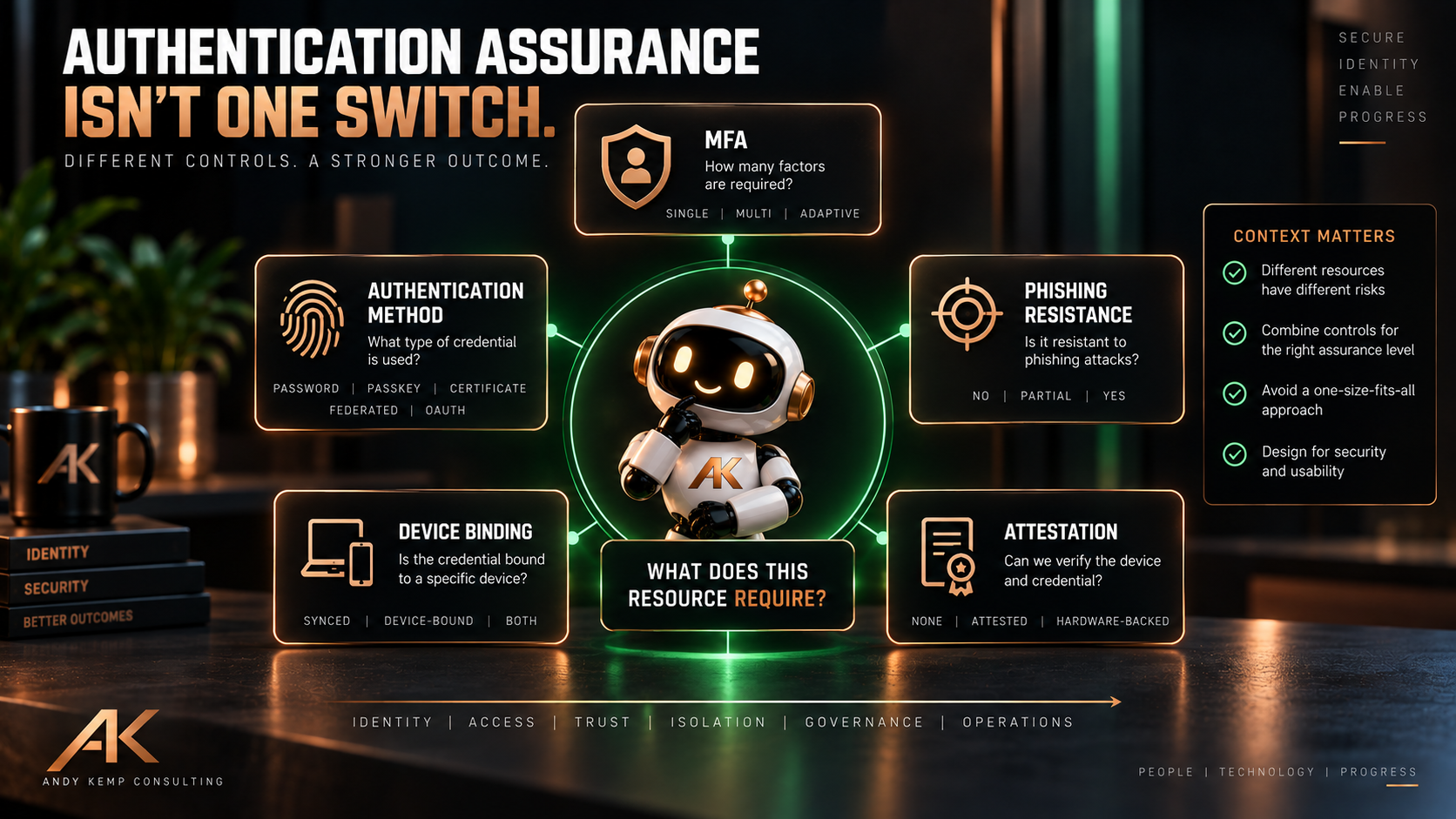
These describe different properties.
A better way of thinking about authentication assurance is as a set of questions.
Did we satisfy MFA?
Did the authentication meet an MFA requirement?
What authentication method did we use?
Password plus another factor?
Windows Hello for Business?
FIDO2?
A passkey?
Is it phishing-resistant?
Does the authentication mechanism provide phishing-resistant properties?
Is the credential device-bound?
Does the private credential remain associated with a particular authenticator or device, or can it synchronise elsewhere?
What do we know about the authenticator?
Was it attested?
Is it an authenticator or provider we deliberately allow?
Those are separate dimensions of assurance.
Conditional Access still needs context
Even strong authentication isn’t the entire access decision.
Suppose I require a phishing-resistant credential for privileged administration.
Good.
But what device is the administrator using?
Is it managed?
Is it compliant?
Is this a normal productivity workstation reading email and browsing the web?
Or is it a dedicated privileged workstation?
What role has the identity activated?
What application are they accessing?
What session controls apply?
Authentication Strength is one part of the access decision.
Conditional Access becomes much more useful when authentication assurance is combined with the other context available to us.
For privileged access in particular, I increasingly think about the decision as something closer to:
Identity + Privilege + Credential + Device + Context + Resource
The authentication method matters enormously.
But it doesn’t magically make the rest of the architecture irrelevant.
So should we stop using Require MFA?
No.
That would be completely the wrong conclusion.
There are plenty of places where:
Require multifactor authentication
is exactly the right Conditional Access requirement.
The point is to understand what it says.
And what it doesn’t.
If our security requirement is:
Users must perform authentication that satisfies Microsoft’s MFA requirement.
Then Require multifactor authentication expresses that.
If our requirement is:
Only the authentication methods included in our chosen Authentication Strength are acceptable.
Then Require authentication strength expresses that instead.
Remember, these aren’t two authentication grant controls we stack in the same policy.
We choose the one that expresses the authentication requirement we actually want.
And if our requirement goes further still:
This privileged population must use an approved, device-bound authenticator whose provenance we can establish.
Then Conditional Access is only part of that architecture.
We also need to think about which authentication methods users can register, passkey configuration, attestation, credential lifecycle and how those credentials are issued in the first place.
The policy should represent the security requirement.
We shouldn’t look at a generic policy afterwards and infer a stronger requirement than the one we actually configured.
Ask a better question
For years, one of the first questions we’ve asked when assessing an environment has been:
Do you have MFA enabled?
It is still an important question.
But I don’t think it is enough anymore.
A better question is:
What authentication assurance do you require for this resource, and which authentication methods are allowed to provide it?
That immediately leads to better conversations.
For a normal user accessing ordinary productivity services, the answer may be very different from an administrator accessing the tenant control plane.
And it should be.
The objective isn’t maximum friction.
It is appropriate assurance.
So the next time you open a Conditional Access policy and see:
Grant access → Require multifactor authentication
don’t assume the policy is wrong.
Instead, ask:
What exactly are we trying to prove?
Because:
MFA is a requirement. Assurance is an architecture.
Microsoft Learn references
Documentation checked on 23 September 2026. Microsoft’s documentation below describes the Conditional Access grant controls, Authentication Strength, MFA behaviour, passkeys and attestation capabilities discussed in this article. The assurance model, privileged-access examples and architectural recommendations are my own interpretation and design guidance.
- Conditional Access: Grant controls
- Conditional Access authentication strengths
- How Conditional Access authentication strengths work
- Microsoft Entra multifactor authentication reporting
- Passkeys (FIDO2) authentication options in Microsoft Entra ID
- Enable passkeys (FIDO2) for your organisation
- Enable synced passkeys in Microsoft Entra ID
- Enable passkeys in Microsoft Authenticator
- Passwordless authentication options for Microsoft Entra ID
- Plan a phishing-resistant passwordless authentication deployment
Comments
No comments yet — be the first to leave one below.