Windows LAPS: Intune or Group Policy for Windows 11?
In Part 1, we designed the local administrator model.
We decided which account Windows LAPS should manage, what should happen to the built-in Administrator, and why managing one password doesn’t automatically mean we’ve controlled the local Administrators group.
Now we need to decide something else.
Who actually configures Windows LAPS?
For a modern Windows 11 estate, the obvious answer might seem to be:
Intune.
For a traditional Active Directory environment:
Group Policy.
But plenty of organisations aren’t entirely one or the other.
They have hybrid-joined Windows devices.
They have years of Group Policy.
They’re moving workloads into Intune.
Some settings have moved.
Others haven’t.
And somewhere in the middle of that transition, somebody creates a Windows LAPS policy in Intune while a LAPS GPO is still linked to the device.
So which one wins?
There is a technical answer to that.
But I think there’s a more important architectural question:
Why are two management planes trying to own the same security control in the first place?
Windows LAPS gives us multiple ways to configure it
Native Windows LAPS supports several policy sources.
For the Windows 11 devices we’re talking about here, the two we’re most interested in are:
Windows LAPS CSP
Typically configured through Microsoft Intune.
and:
Windows LAPS Group Policy
Configured through Active Directory Group Policy.
There is also local configuration and, for migration scenarios, legacy Microsoft LAPS emulation.
We’ll come back to legacy LAPS later.
For now, let’s concentrate on the two management planes most organisations are likely to encounter:
Intune
and:
Group Policy
Both can configure Windows LAPS.
That doesn’t mean both should.
Intune is configuring the LAPS CSP
When we create a Windows LAPS policy in Intune, Intune isn’t implementing a completely different version of LAPS.
Windows itself contains Windows LAPS.
Intune is configuring it through the Windows LAPS Configuration Service Provider, or CSP.
In Intune, we can create the policy under:
Endpoint security → Account protection → Local admin password solution (Windows LAPS)
The resulting policy controls the Windows LAPS settings exposed through the CSP.
That includes things such as:
- where the password is backed up
- password age
- password length
- password complexity
- post-authentication behaviour
- Automatic Account Management settings on supported Windows versions
Intune also gives us the management experience around that policy.
Assignment.
Reporting.
RBAC.
Password retrieval.
Manual password rotation.
For a modern Intune-managed Windows estate, that makes it a very natural place to manage Windows LAPS.
Group Policy is still a first-class option
Group Policy hasn’t disappeared.
Windows includes a native Windows LAPS ADMX template:
LAPS.admx
The settings appear under:
Computer Configuration → Policies → Administrative Templates → System → LAPS
For Active Directory domain-joined Windows devices, Group Policy remains a fully supported way to configure Windows LAPS.
And that distinction matters.
This isn’t:
Modern supported method versus old unsupported method.
Both are valid management mechanisms.
The question is which one makes sense for the device estate and management architecture you’re operating.
If an organisation has traditional AD-joined Windows devices managed primarily through Group Policy, there may be absolutely nothing wrong with managing Windows LAPS through Group Policy.
If the organisation has moved Windows endpoint management into Intune, continuing to maintain a separate GPO purely because “that’s where LAPS has always lived” becomes harder to justify.
The management plane should follow the endpoint-management architecture, not the history of the feature.
So what happens if we configure both?
This is where Windows LAPS behaves in a particularly important way.
There is a defined precedence order.
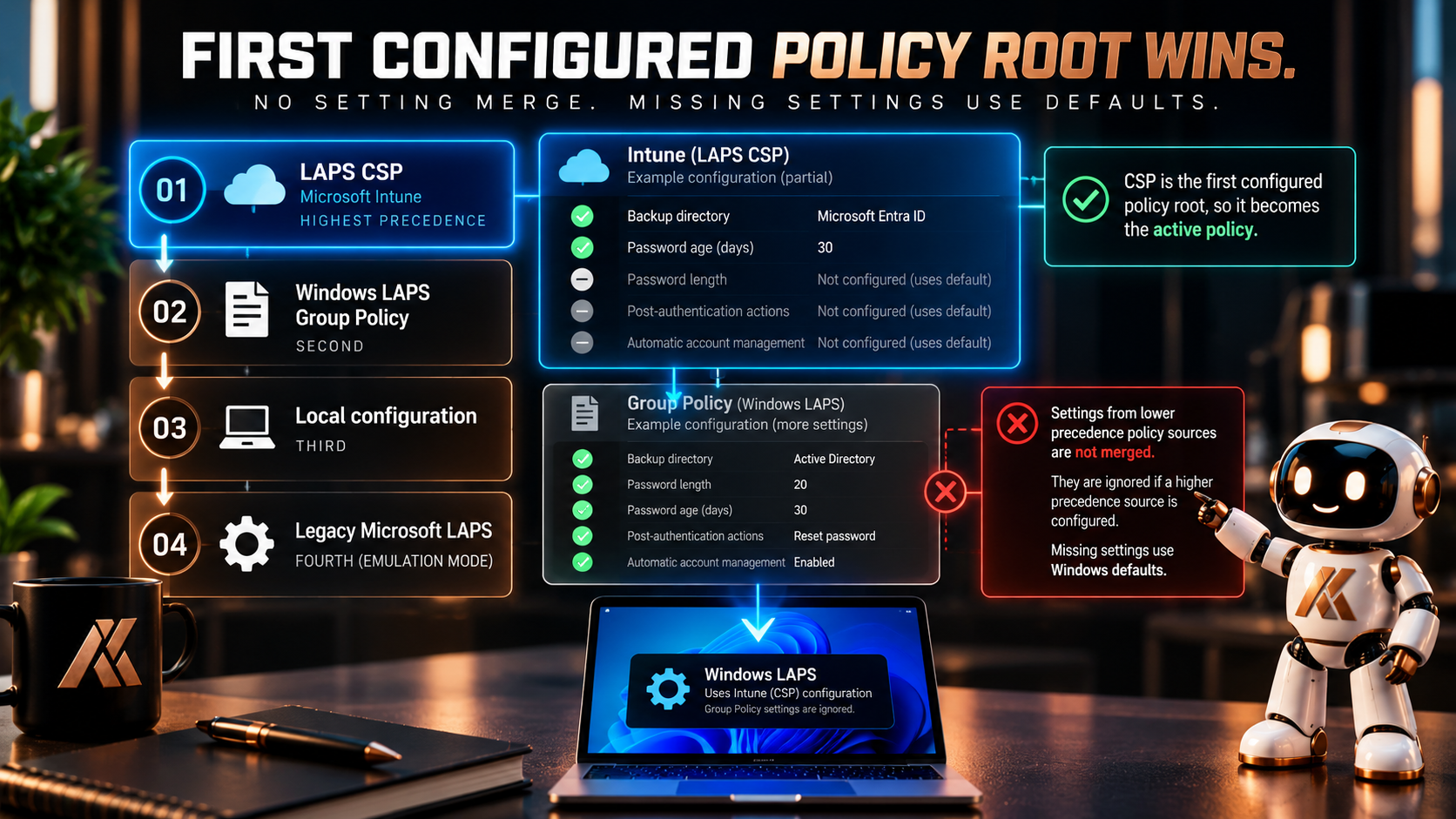
At a high level, Windows LAPS evaluates policy sources in this order:
1. LAPS CSP
2. Windows LAPS Group Policy
3. LAPS local configuration
4. Legacy Microsoft LAPS policy
Windows checks the policy roots in order.
Once it finds a policy source containing at least one explicitly configured Windows LAPS setting, that source becomes the active policy.
And then something particularly important happens:
Windows LAPS does not merge settings between policy sources.
Imagine Intune configures:
BackupDirectory
but your Group Policy configures:
PasswordLength
PasswordAgeDays
and:
PostAuthenticationActions
It would be easy to imagine Windows combining them.
It doesn’t.
If the CSP policy root contains a configured LAPS setting, the CSP becomes the active policy source.
Settings missing from that source take their defaults.
Windows doesn’t drop down to Group Policy and collect the remaining configuration.
That’s more significant than “Intune wins”
I think this is where the phrase:
Intune wins over GPO
can actually hide something important.
Yes, CSP has precedence.
But it isn’t simply overriding individual settings one by one.
We have different policy roots.
Windows LAPS selects an active policy source.
That means an incomplete Intune configuration can have consequences you didn’t expect if you assumed Group Policy would continue supplying the settings you didn’t configure.
Consider this:
Group Policy
Backup directory: Active Directory
Password length: 20
Password age: 30 days
Post-authentication reset: Configured
Then somebody begins migrating LAPS to Intune.
They create an Intune policy containing only:
Backup directory: Microsoft Entra ID
The assumption might be:
Intune changes where the password is stored and the rest still comes from GPO.
That’s the wrong mental model.
Once the CSP becomes the active Windows LAPS policy source, you need to understand the complete effective configuration from that source, including what defaults apply to settings you haven’t explicitly configured.
This is why policy migration should be treated as a migration.
Not as layering.
Hybrid join doesn’t mean hybrid ownership
This becomes especially relevant for hybrid-joined devices.
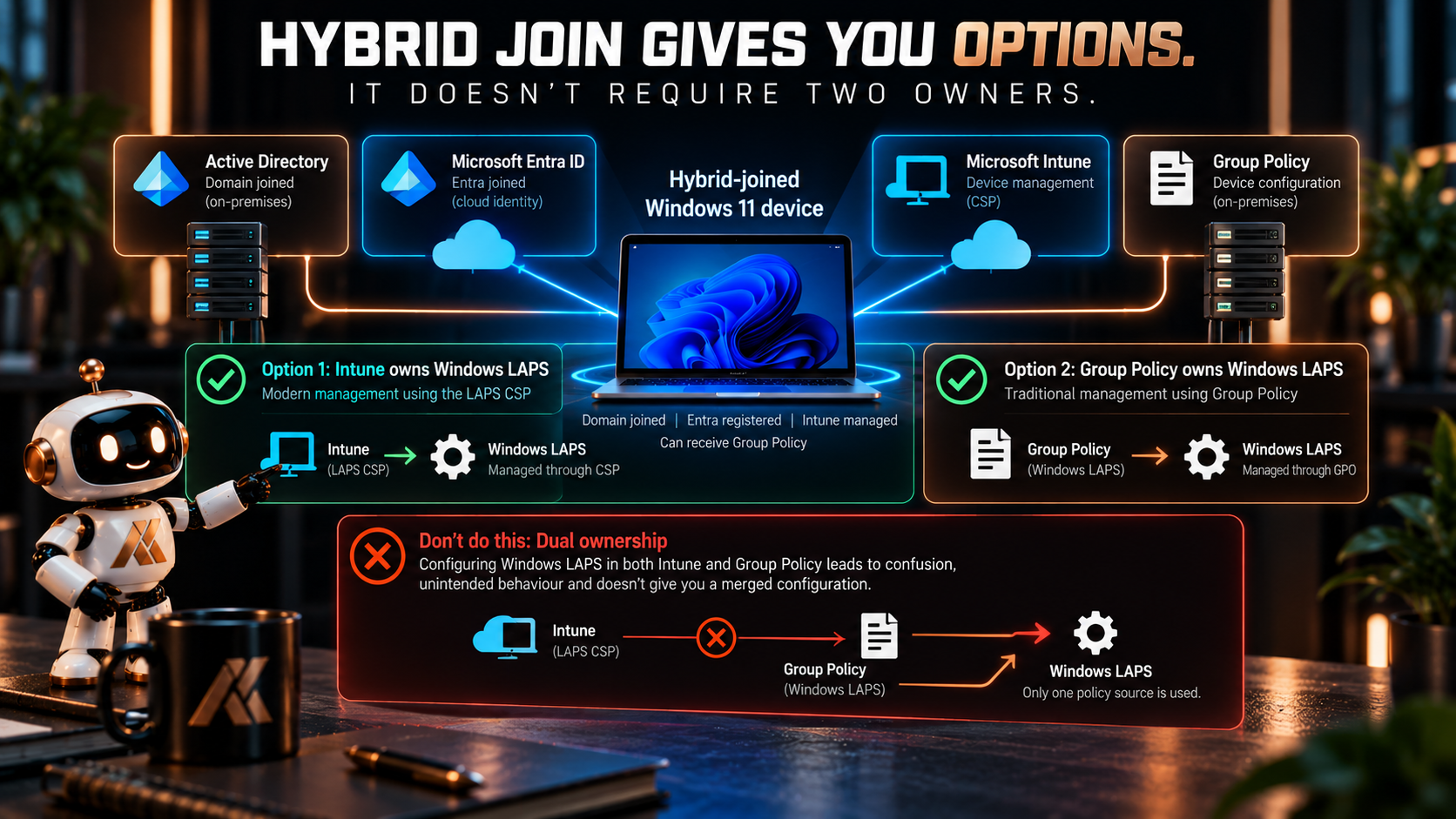
A hybrid-joined Windows 11 device can be:
- joined to Active Directory
- registered with Microsoft Entra ID
- managed through Intune
- receiving Group Policy
That gives us choices.
It doesn’t mean we should exercise all of them simultaneously.
A hybrid-joined device can use Windows LAPS with the password backed up to Microsoft Entra ID.
It can also use Windows LAPS with the password backed up to Windows Server Active Directory.
But Windows LAPS doesn’t back the same password up to both directories.
We need to choose.
And I think the same principle should apply to the policy-management plane.
Hybrid identity doesn’t require hybrid ownership of every configuration.
If Intune owns the endpoint-security configuration, let Intune own Windows LAPS.
If Group Policy still owns that class of configuration, let Group Policy own it until you’re ready to migrate.
The awkward place is:
“Both configure it, but we know which one wins.”
That might technically work.
It isn’t a particularly clean architecture.
Where should the password be backed up?
This decision is related to the management plane, but it isn’t exactly the same decision.
Windows LAPS supports backing the password up to:
Microsoft Entra ID
or:
Windows Server Active Directory
The device join state determines which options are available.
A Microsoft Entra joined device can back up to Microsoft Entra ID.
An Active Directory joined device can back up to Windows Server Active Directory.
A hybrid-joined device can use either.
But not both simultaneously.
That means hybrid environments have a genuine architectural decision to make.
Where should the credential live?
Who needs to retrieve it?
How is access delegated?
Where is retrieval audited?
What happens during an outage?
What does the support operating model look like?
Those questions should drive the directory decision.
Not simply:
We’re hybrid, so I suppose we use AD.
For an organisation moving endpoint management and support operations towards Intune and Microsoft Entra, backing up Windows 11 LAPS credentials to Entra may be the more natural target architecture.
For an organisation whose operational processes and administrative delegation remain centred around Active Directory, AD-backed Windows LAPS may still make sense.
The important thing is that the destination is intentional.
Don’t confuse policy location with credential location
There is a subtle distinction here that’s worth calling out.
Where Windows LAPS is configured
and:
Where the password is backed up
are related, but they aren’t the same architectural question.
For example, a hybrid-joined device can receive Windows LAPS configuration through the CSP while backing the password up to Windows Server Active Directory.
Microsoft explicitly supports deploying Windows LAPS policy through Intune to hybrid-joined devices while using Active Directory as the backup directory.
So don’t reduce the design to:
Intune = Entra backup
GPO = AD backup
That’s too simplistic.
Think about the two decisions independently:
Management plane
Who owns the Windows LAPS configuration?
Credential store
Where should the resulting credential be protected and retrieved?
That distinction makes migration planning considerably clearer.
What about conflicting Intune policies?
There is another source of conflict that doesn’t involve Group Policy at all.
We can create more than one Windows LAPS policy in Intune.
And if two policies assigned to the same device configure conflicting values, Intune doesn’t magically choose whichever one looks more secure.
It reports a conflict.
If a device already has a successfully applied value and later receives a conflicting policy, the existing value can remain while the policies report conflict.
If a device receives conflicting LAPS policies without an existing applicable policy, the conflicting settings aren’t applied until the conflict is resolved.
So even after we’ve decided:
Intune owns Windows LAPS
we still need clean policy architecture inside Intune.
For most organisations, I would favour a small number of clearly scoped LAPS policies rather than creating slightly different versions for every organisational group.
Exceptions should be intentional.
And understandable.
What about legacy Microsoft LAPS?
This is where migrations can become particularly confusing.
Native Windows LAPS can operate in legacy Microsoft LAPS emulation mode.
That allows Windows LAPS to honour existing legacy Microsoft LAPS Group Policy settings while an organisation transitions.
But there are limitations.
Legacy emulation is intended as a transition mechanism.
It doesn’t give us the capabilities of native Windows LAPS such as password encryption in Active Directory or Microsoft Entra ID backup.
And native Windows LAPS policy takes precedence over the legacy policy.
There is also an important distinction around the old legacy Microsoft LAPS client-side extension.
If the legacy LAPS CSE is installed, Windows LAPS doesn’t simply emulate the old policy alongside it.
The legacy CSE remains responsible for legacy LAPS behaviour.
So migrations need to be planned.
This isn’t something I would leave indefinitely in a:
“Some machines are old LAPS, some are new LAPS, and something probably wins”
state.
Know which client implementation is active.
Know which policy source is active.
Know which account is being managed.
Know where the password is being stored.
Then migrate deliberately.
How I would approach a migration from GPO to Intune
I wouldn’t start by creating a new Intune LAPS policy and assigning it to the entire estate.
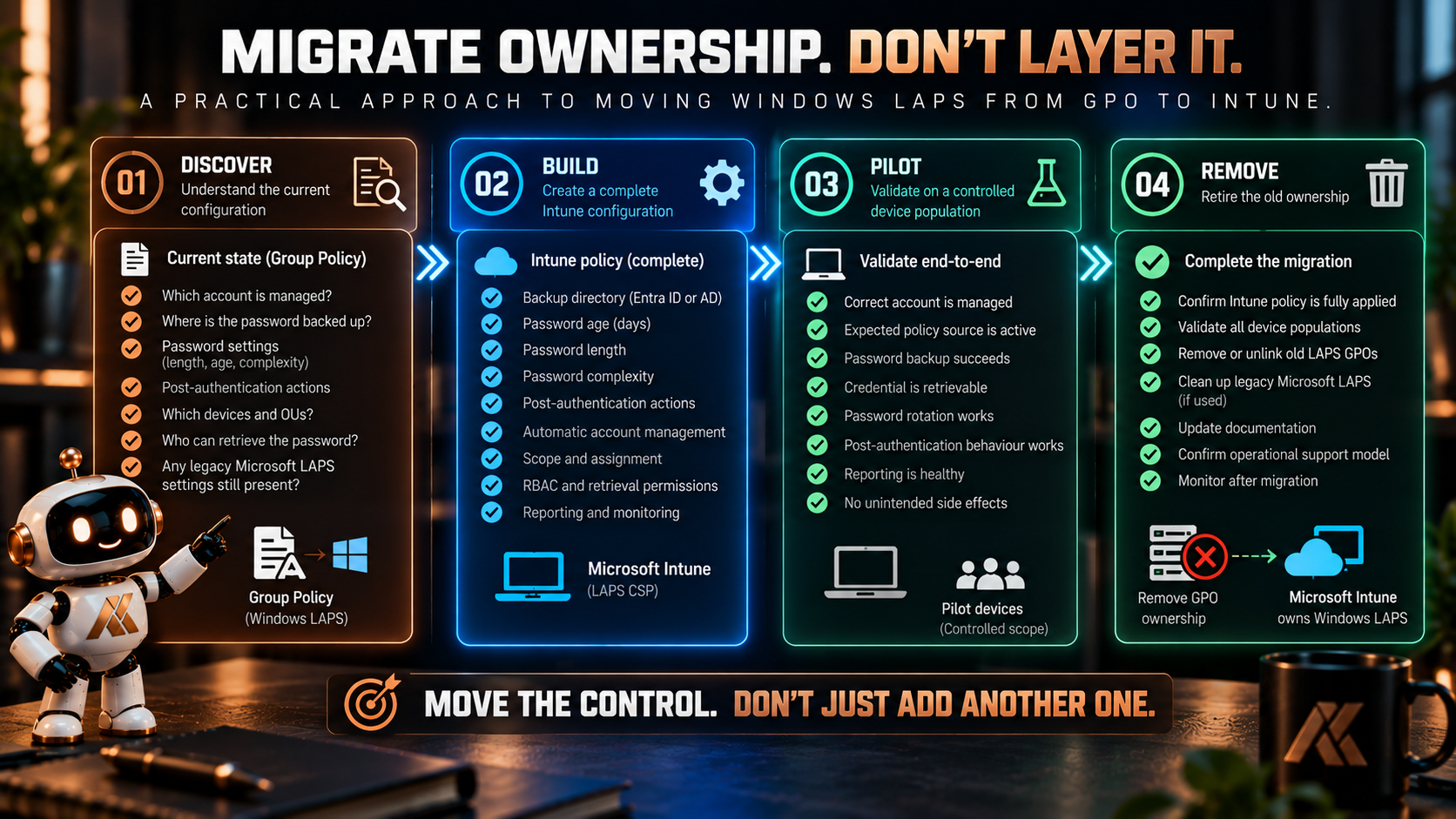
First, document the existing Windows LAPS configuration.
What account is currently being managed?
Where is the password backed up?
What password settings are configured?
What post-authentication actions are configured?
Who can retrieve the credential?
Are there different GPOs for different device populations?
Are legacy Microsoft LAPS settings still present?
Then build the intended Intune policy as a complete configuration.
Don’t rely on Group Policy filling in the blanks.
Pilot it against a controlled device population.
Validate:
- the correct account is managed
- the expected policy source is active
- password backup succeeds
- the credential is retrievable by the intended support roles
- rotation works
- post-authentication behaviour works
- reporting is healthy
- the previous policy no longer needs to apply
Then remove the old ownership.
So, Intune or Group Policy?
For a new Windows 11 environment managed through Intune, I would use Intune.
That gives us a single modern management plane for the endpoint-security configuration and integrates naturally with the wider device-management model.
For an existing Active Directory environment still predominantly managed through Group Policy, native Windows LAPS through GPO remains perfectly valid.
For a hybrid environment, I wouldn’t choose based purely on the word hybrid.
I’d ask:
Which management plane is supposed to own this device configuration going forward?
If that’s Intune, migrate LAPS ownership to Intune deliberately.
If that’s still Group Policy, let Group Policy own it until there is a reason to change.
What I wouldn’t deliberately design is:
Intune configures some LAPS settings.
GPO configures some others.
And precedence sorts it out.
Because it doesn’t work the way that statement implies anyway.
The policies aren’t merged.
And even if Windows can deterministically decide which configuration wins, we’ve still created two places where an administrator might reasonably believe they control the same security feature.
Technical precedence isn’t a substitute for architectural ownership.
One control. One owner.
Windows LAPS gives us flexibility.
That’s useful.
It allows the same underlying Windows capability to work across cloud-native, hybrid and traditional Active Directory environments.
But flexibility shouldn’t become ambiguity.
For each device population, I want to be able to answer:
Who configures Windows LAPS?
Which policy is authoritative?
Which account is managed?
Where is the credential backed up?
Who can retrieve it?
If those answers require checking both Intune and Group Policy to work out which one happens to win, the design probably isn’t finished.
Choose the management plane.
Build the complete policy there.
Remove competing ownership when the migration is complete.
Because:
Policy precedence tells Windows which configuration to use. Architecture tells your administrators which configuration to manage.
In Part 3, we’ll move away from Windows 11 and look at Windows LAPS on Windows Server.
The technology might have the same name, but servers introduce a different set of design decisions around Active Directory, Group Policy, Automatic Account Management, recovery and domain controllers.
Microsoft Learn references
Documentation checked on 4 October 2026. Microsoft’s documentation below describes Windows LAPS policy precedence, CSP and Group Policy behaviour, Intune policy conflicts, directory backup options and legacy Microsoft LAPS emulation. The single-owner management model and migration approach are my own architectural recommendations.
Comments
No comments yet — be the first to leave one below.