
Global Secure Access and Privileged Access: An Architecture I Want to Test
Most of this Global Secure Access series has been grounded in things I have deployed, tested or encountered while working with the platform.
This part is different.
I have not implemented the privileged-access architecture I am about to describe in production.
That matters.
Microsoft documents supported building blocks around Entra Private Access, per-application segmentation, Conditional Access and Privileged Identity Management. Microsoft even documents a scenario combining PIM with Global Secure Access for high-value private applications.
But the architecture I want to explore here goes further than simply proving that those individual features exist.
I want to ask a different question:
What happens if we apply the same isolation principles we use for privileged identities and privileged workstations to the network path itself?
Could Global Secure Access become another control in the privileged-access architecture?
I think it could.
But until I build it, attack it, break it, test failure scenarios and understand the operational consequences, that remains an architectural hypothesis rather than something I am prepared to call a proven design.
So treat this article accordingly.
This is an architecture I want to test, not a reference architecture I am claiming to have proven.
Privileged Access Has a Connectivity Problem Too
When we talk about privileged access, the conversation usually starts with identity.
Separate administrator accounts.
Privileged Identity Management.
Phishing-resistant authentication.
Conditional Access.
Privileged Access Workstations.
Approvals.
Time-bound elevation.
All of those controls matter.
But eventually that administrator has to connect to something.
A domain controller.
A management interface.
A server.
A hypervisor.
An administrative web portal.
A database management endpoint.
A management service buried somewhere inside a private network.
And historically, the answer to that connectivity problem has often been fairly broad:
Admin → PAW or jump host → management network → privileged resources
That can be significantly better than administering everything from the same laptop used for email and web browsing.
But it still raises an interesting question:
Why does the administrator need access to the management network rather than access to the management resource?
That is the question I want to explore with Entra Private Access.
Part 8 Changed the Access Model
In the previous article, I argued that replacing a VPN with Entra Private Access is only the beginning.
If we replace:
VPN → 10.20.0.0/16
with:
Quick Access → 10.20.0.0/16
we have changed the transport mechanism, but we may not have fundamentally changed the access model.
The more interesting architecture is:
User + Device + Context → Authorised Application
Microsoft’s current Private Access guidance explicitly supports this move from broad Quick Access towards per-application segmentation. Individual enterprise applications can have their own assignments and Conditional Access policies.
For ordinary business applications, that gives us a least-privilege connectivity model.
For privileged access, the same capability raises a much more interesting possibility.
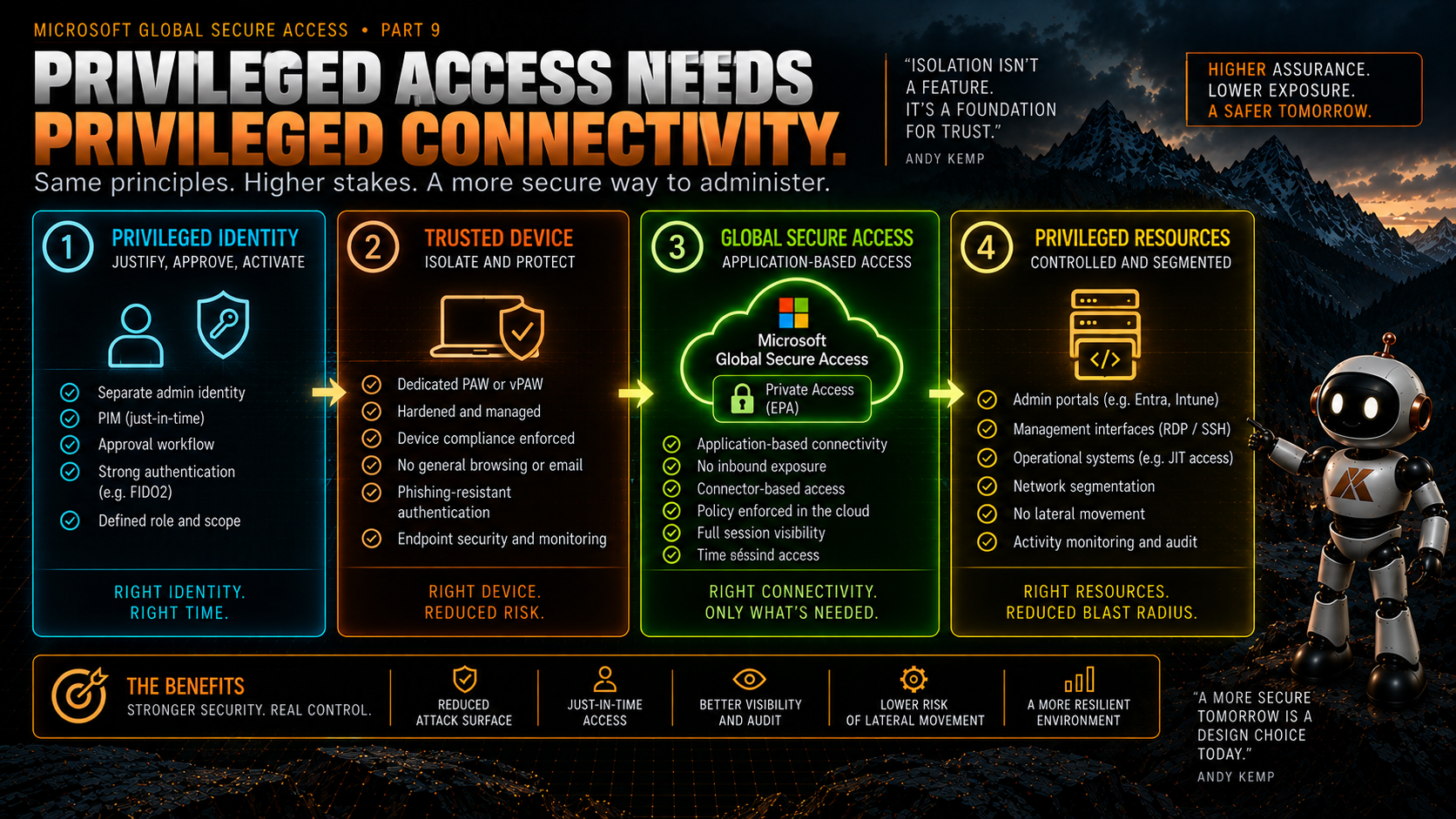
What if the privileged workstation does not get general connectivity to a management network?
What if it gets connectivity to the specific administrative resources that identity is authorised to manage?
That is the architecture I want to test.
Private Access Can Carry Administrative Protocols
This is not purely theoretical at the product-capability level.
Microsoft’s own per-app Private Access documentation uses Remote Desktop Protocol as an example. The Global Secure Access client acquires the RDP traffic, the service evaluates application assignment and Conditional Access, and the connection is brokered through the Private Network Connector to the target server.
Private Access supports TCP and UDP application access rather than being limited to web applications.
So technically, the idea of using Private Access to reach administrative services is supported.
The unanswered question for me is not:
Can I send RDP through Private Access?
Microsoft already documents that.
The more important questions are:
Should this be part of my privileged-access architecture?
and:
What would I need to prove before trusting it?
Those are very different questions.
Reachability Is Not Privilege
There is an important distinction here.
Entra Private Access controlling whether I can establish a network path to a server does not automatically mean I am authorised to administer that server.
If I publish:
server01.contoso.internal : TCP 3389
through Private Access, successfully reaching TCP 3389 is only one part of the control chain.
The target server still has its own authentication and authorisation model.
The administrator still needs the appropriate rights.
The operating system still needs to be secured.
The endpoint still needs to be monitored.
Privileged group membership still matters.
PIM still matters.
Credential hygiene still matters.
The PAW still matters.
Private Access does not replace any of that.
It potentially gives us another boundary:
Can this identity, from this device and under these conditions, establish connectivity to this administrative resource in the first place?
That is useful.
But we should not confuse network access with administrative authority.
What I Would Want the Control Chain to Look Like
Conceptually, I would want a privileged connection to satisfy several independent conditions.
1. The Right Identity
The administrator uses a dedicated privileged identity appropriate to the resource being administered.
Not the account reading email.
Not the everyday productivity identity.
The identity boundary remains fundamental.
2. The Right Privilege
Where the role supports it, privilege is eligible rather than permanently active.
The administrator activates what they need through PIM for the period they need it.
Microsoft now documents combining PIM-managed group membership with Private Access for high-value private applications, giving us a supported pattern for making private application access itself just-in-time.
That is particularly interesting.
Instead of:
Permanent membership → Permanent network reachability
we could potentially move towards:
Eligible membership → Activation → Temporary application assignment/access → Private resource
That deserves testing.
3. The Right Credential
For privileged access, I want phishing-resistant authentication.
Conditional Access authentication strengths allow us to require appropriate authentication methods for access to a resource.
Exactly which credential belongs at each privilege level is a wider privileged-access design question, but the important point here is that Private Access applications can participate in a Conditional Access decision.
Connectivity does not need to be separated from authentication assurance.
4. The Right Device
The device matters.
A privileged identity using a strong credential from an unmanaged everyday endpoint is not the architecture I want.
For higher privilege, I want the workstation to be part of the trust boundary.
That could be a dedicated physical PAW or an appropriately isolated virtual privileged workstation, depending on the assurance level and design.
The important principle is:
The device used to administer the resource should have a trust level appropriate to the privilege being exercised.
Private Access should complement that boundary, not become an excuse to weaken it.
5. The Right Resource
This is where per-app Private Access becomes interesting.
Instead of giving the PAW broad reachability to:
10.50.0.0/16
we define the actual management resource.
Perhaps:
dc-admin-01.contoso.internal : TCP 3389
or a set of management interfaces and ports representing a particular administrative service.
The exact segmentation will depend on the application.
But the goal is deliberate:
Publish the administrative requirement, not the management network.
6. The Right Time
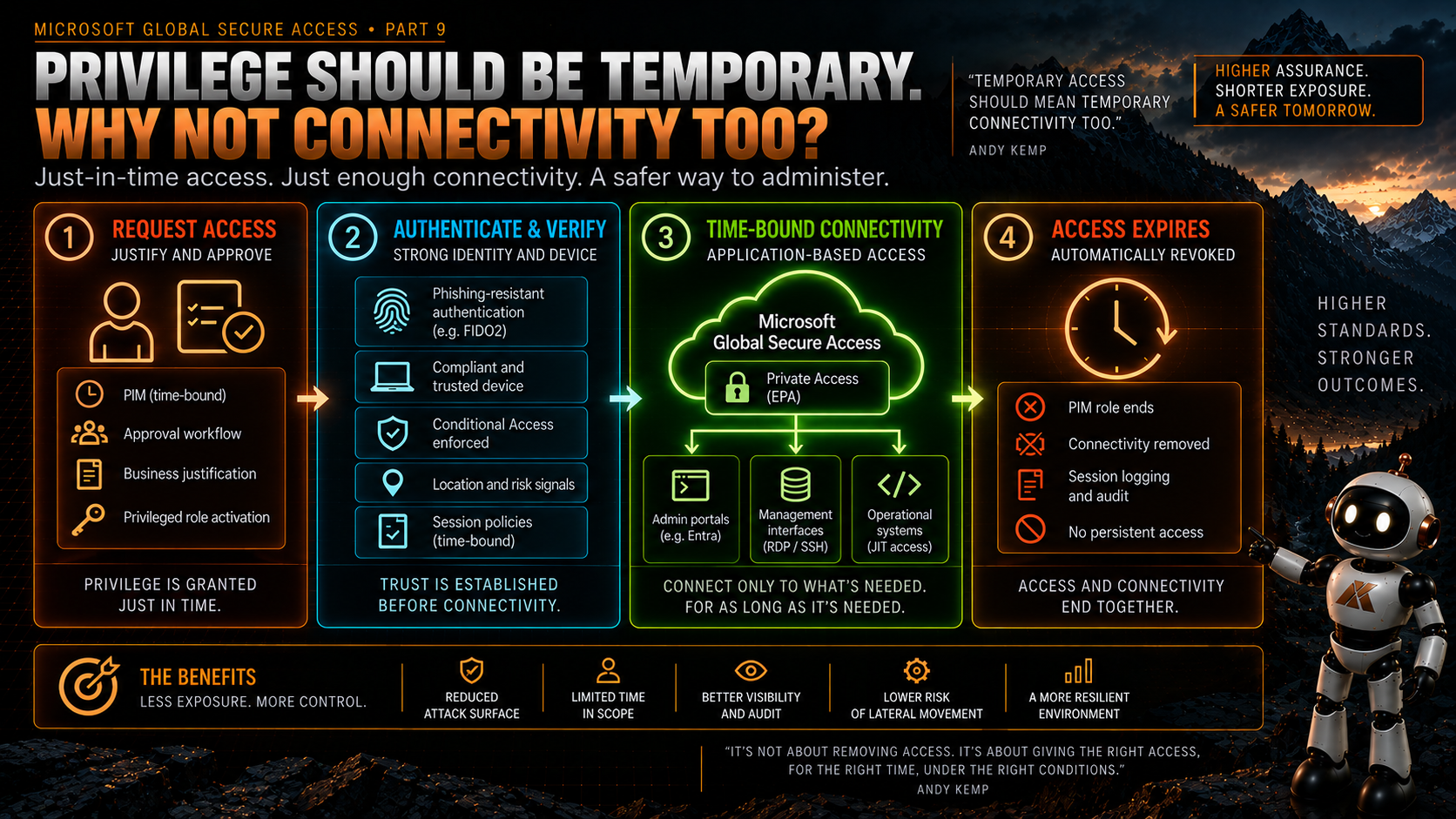
If application access itself is linked to PIM-managed group activation, the path to the resource can potentially become temporary as well.
That is an important change.
We already think about time-bound privilege.
Why should privileged connectivity always be permanent?
PIM Plus Private Access Is Particularly Interesting
Microsoft has published specific guidance for securing high-value private applications by combining Entra Private Access with Privileged Identity Management.
The pattern uses a security group that is managed through PIM. Users can be made eligible for membership and activate that access when required. That group is then used in the access model for the private application.
That gives us a supported building block for just-in-time access to private resources.
For me, this is one of the most interesting parts of the design.
Consider the difference.
Traditional model:
Administrator is permanently allowed onto management network
↓
Administrator activates privileged role
↓
Administrator manages resource
Potential model:
Administrator has no normal path to privileged resource
↓
Administrator activates required access
↓
PIM-managed membership becomes active
↓
Conditional Access requirements are satisfied
↓
Private Access permits connectivity to defined administrative resource
↓
Target system performs its own authentication/authorisation
↓
Access expires
Now we have multiple boundaries working together.
That does not automatically make it secure.
But it gives us something worth testing.
Conditional Access Becomes Part of the Network Decision
This is one of the things I find most compelling about the architecture.
Traditionally, the network and identity teams could end up solving different parts of the same problem.
The network decides whether a source can reach a destination.
The identity platform decides whether the user can authenticate.
The endpoint platform decides whether the device is healthy.
The privileged-access system decides whether the role is active.
Private Access gives us an opportunity to bring more of those signals together before the connection reaches the resource.
For a privileged application, I might want to test requirements such as:
- The user must be in the appropriate privileged-access group.
- The access must be active through PIM where applicable.
- The device must meet the required compliance/trust conditions.
- The user must satisfy a phishing-resistant authentication strength.
- The user must be explicitly assigned to the Private Access enterprise application.
- Only the required destinations, ports and protocols should be reachable.
The exact Conditional Access design would need testing.
And importantly, Microsoft’s current known-limitations documentation makes a distinction here: Conditional Access is applied to the Private Access application, rather than directly to the Private Access traffic profile itself.
That is another reason I would want to validate the real behaviour rather than simply drawing the architecture and assuming the policy works exactly as imagined.
Does This Reduce Lateral Movement?
Potentially.
Microsoft describes per-app segmentation as a way to reduce lateral movement by limiting access scope.
If an administrator only has a route to a defined management resource rather than an entire management subnet, the reachable attack surface from that endpoint should be smaller.
But I would be cautious about making a stronger claim until I have tested it.
There are several things I would want to prove.
What happens if the PAW is compromised?
What other Private Access applications can that identity reach?
What local network connectivity still exists from the PAW?
Can the user bypass the intended Private Access path because they are physically on the corporate network?
What DNS services are reachable?
What Active Directory dependencies are required?
What happens with Kerberos?
Does the application require access to domain controllers or other infrastructure that expands the effective network scope?
Does an administrative protocol open secondary connections we did not account for?
What happens when the Global Secure Access client is paused, unhealthy or unavailable?
The theoretical blast radius and the actual blast radius are not necessarily the same thing.
That is why this needs a lab.
A PAW Is Still a PAW
I would not use GSA as an argument for turning an ordinary productivity device into a privileged workstation.
That misses the point.
If the endpoint can browse arbitrary websites, read email, run everyday productivity applications and then use the same session to administer the most sensitive parts of the environment, adding Private Access does not magically create isolation.
The workstation remains part of the privileged-access boundary.
For the highest levels of privilege, I still want strong separation between productivity activity and privileged administration.
GSA could potentially improve how that privileged workstation reaches its management resources.
It does not make the workstation itself trusted.
That trust has to come from the endpoint architecture.
Where This Fits With My Trust Levels
I have been using a Trust Level model elsewhere in my privileged-access work.
Very broadly:
- TL4 --- normal users and productivity access.
- TL3 --- operational/helpdesk-style administration.
- TL2 --- higher privilege with stronger separation and dedicated administrative environments.
- TL1 --- the highest-impact administrative identities and resources, where compromise could affect the entire control plane.
I am deliberately not going to declare that Entra Private Access is automatically suitable for every one of those levels.
That is exactly what I want to test.
For TL3, application-level access to support and management services feels like a very natural use case to investigate.
For TL2, the combination of a dedicated device or vPAW, strong authentication, Conditional Access, PIM and per-app Private Access becomes particularly interesting.
For TL1, my bar is much higher.
Before I allowed Global Secure Access to become part of a TL1 administrative path, I would want to understand the dependencies, failure modes, client behaviour, recovery model and emergency-access implications in considerably more depth.
The highest privilege level is not where I want to discover an architectural assumption was wrong.
Break-Glass Changes the Conversation
Every privileged-access architecture looks great when everything is healthy.
The real test is what happens when something is broken.
Imagine:
Entra is degraded.
Conditional Access is misconfigured.
PIM activation fails.
The GSA client is unhealthy.
The connector group cannot reach the target.
DNS is broken.
The administrator needs to recover the environment that provides one of those dependencies.
Now what?
This is where a privileged-access architecture needs a recovery path that is intentionally different from normal operations.
That does not mean creating a permanently open backdoor “just in case.”
It means designing emergency access deliberately.
I would want to test:
- Which failures prevent Private Access from functioning?
- Which privileged resources need an independent recovery path?
- How are emergency identities protected?
- Can emergency access operate without the normal GSA dependency?
- How is that path monitored?
- How do we prevent the recovery mechanism becoming the everyday workaround?
- How do we test it without weakening normal operations?
If the only way to recover Global Secure Access is through Global Secure Access, we have designed a circular dependency.
The Clean-Source Principle Still Applies
There is another principle I would not compromise.
A privileged environment should not depend on a lower-trust system for its security.
If the PAW, connector infrastructure, DNS, management application or authentication path ultimately depends on something administered from a less-trusted tier, we need to understand that dependency.
Private Network Connectors are particularly interesting here.
They become part of the path to the privileged resource.
Who administers them?
From where?
What identities can modify the Private Access application?
Who can change the connector group?
Who can alter Conditional Access?
Who can change group membership or PIM settings?
The architecture diagram may show:
PAW → GSA → Management Resource
but the control plane behind that arrow is much larger.
That needs to be part of the threat model.
Control-Plane Privilege Matters
Global Secure Access itself introduces administrative roles and configuration surfaces.
Microsoft separates responsibilities across roles such as Global Secure Access Administrator, Application Administrator and Conditional Access Administrator. Private Access configuration, Conditional Access configuration and GSA-wide configuration do not all sit behind one identical role.
That is useful separation.
It also means the privileged-access design needs to include the people who can change the access architecture itself.
If somebody can redefine the application segment, change assignments or weaken the Conditional Access policy protecting an administrative resource, that capability is privileged.
The GSA control plane therefore belongs in the privileged-access conversation too.
This is another reason I do not want to treat GSA as merely a clever network tunnel.
What I Want to Build in the Lab
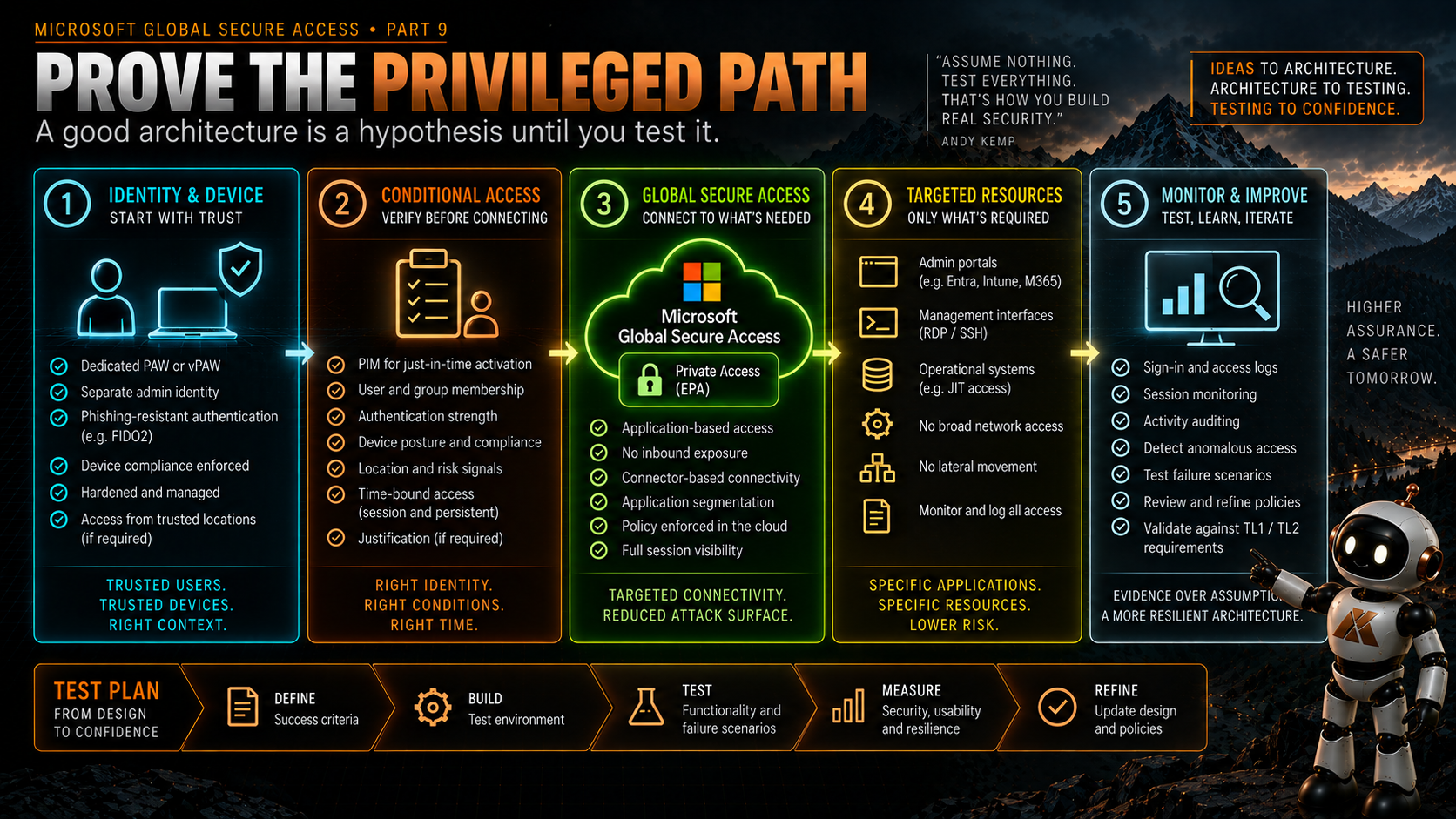
Rather than ending this article with a theoretical diagram and declaring victory, I want a test plan.
The first lab I would build is deliberately small.
A dedicated privileged identity.
A dedicated test PAW or vPAW.
A private Windows server.
A Private Access enterprise application publishing only the required RDP destination and port.
A dedicated connector group.
Explicit application assignment.
A Conditional Access policy requiring the intended device state and phishing-resistant authentication.
A PIM-managed group controlling temporary access to the private application.
Then I want to prove both the positive and negative cases.
The expected path
Eligible admin
↓
PIM activation
↓
Privileged device
↓
Phishing-resistant authentication
↓
Conditional Access satisfied
↓
Private Access application available
↓
RDP reaches only the intended server
↓
Target server authentication/authorisation
Then try to break it
Can the same identity connect from a normal productivity device?
Can the PAW reach another server in the same subnet?
Can an unassigned privileged identity reach the RDP endpoint?
What happens before PIM activation?
What happens after PIM expires?
What happens if the application segment overlaps Quick Access?
What happens if the GSA client is stopped or paused?
What happens when one connector fails?
What happens when all connectors fail?
What do the sign-in, PIM and Global Secure Access logs actually show?
Can I correlate the privileged activation with the network access?
What does the experience look like when access is denied?
And crucially:
Can the administrator still recover the environment when one of the dependencies is unavailable?
That is the point at which the diagram starts becoming evidence.
What Would Make Me Comfortable With It?
Before I described this as a production privileged-access pattern, I would want evidence in five areas.
Isolation
I need to prove that application segmentation meaningfully constrains what the privileged endpoint can reach.
Not what the configuration says it should reach.
What it can actually reach.
Assurance
I need to prove the identity, authentication and device requirements are enforced consistently for the administrative application.
Time
If PIM is part of the connectivity model, I need to prove access appears and disappears as expected around activation and expiry.
Resilience
I need to understand connector failure, service failure, client failure and DNS failure.
A privileged-access design that is secure but impossible to operate during an incident is not finished.
Recovery
I need a tested emergency path that does not depend entirely on the system I might be trying to recover.
That is probably the hardest part.
And it is exactly the part that tends to disappear from architecture diagrams.
This Could Be Powerful. It Could Also Be Over-Engineered.
There is another possibility we should acknowledge.
We could build all of this and discover that, for some privilege levels or resources, the additional complexity does not justify the benefit.
That is a valid outcome.
Zero Trust does not mean inserting every available control into every connection.
A security architecture needs to be understandable and operable.
If the combination of PAW isolation, existing management-network segmentation, strong authentication, PIM and target-system controls already produces the required assurance, adding another dependency needs to earn its place.
On the other hand, if Private Access lets us remove broad management-network reachability and make privileged connectivity identity-aware, application-specific and potentially just-in-time, that is a meaningful architectural improvement.
The lab needs to tell us which one is true.
The Architecture I Want to Test
So the model I want to explore is:
Dedicated privileged identity
Appropriate privileged workstation
Phishing-resistant authentication
Just-in-time privilege
Conditional Access
Per-application Private Access
Explicit administrative resource
Independent target authentication and authorisation
That is not a replacement for privileged-access architecture.
It is privileged connectivity becoming part of it.
And that is the distinction I think matters.
Don’t just protect the privileged identity. Protect the path between the identity and the thing it can control.
For now, that is a design.
Once I have built it and tried to break it, I will know whether it deserves to become more than that.
What’s Next?
That brings us to the final article in this Global Secure Access series.
Over the series I have looked at fixed egress, replacing VPN access, macOS, mobile devices, Internet Access, migrating from a traditional Secure Web Gateway, running GSA alongside the rest of the security stack and designing Private Access around applications rather than networks.
The final part will step away from individual features.
What I Learned Deploying Global Secure Access for Real
Not another product overview.
The things that worked.
The things that were harder than the diagrams suggested.
The assumptions that changed once I started testing.
What I would do differently.
And what I would tell someone starting their own Global Secure Access deployment tomorrow.
Microsoft Learn references
Documentation checked on 21 September 2026. Microsoft documents the product capabilities and supported scenarios referenced below, including Private Access application segmentation, Conditional Access, RDP connectivity and PIM integration. The privileged-access architecture, Trust Level mapping, PAW design, failure-model analysis and proposed lab validation in this article are my architectural hypotheses and recommendations; I have not yet validated this complete design in production.
- What is Global Secure Access?
- Microsoft Entra Private Access
- Configure per-app access using Global Secure Access applications
- Private Access per-application segmentation
- Secure private application access with Privileged Identity Management and Global Secure Access
- How Conditional Access authentication strengths work
- Plan a phishing-resistant passwordless authentication deployment
- Known limitations for Global Secure Access
- Global Secure Access built-in roles
Comments
No comments yet — be the first to leave one below.